Learn Databricks SQL - Part 1 - Why, and the data we'll use
 Stefan Koch
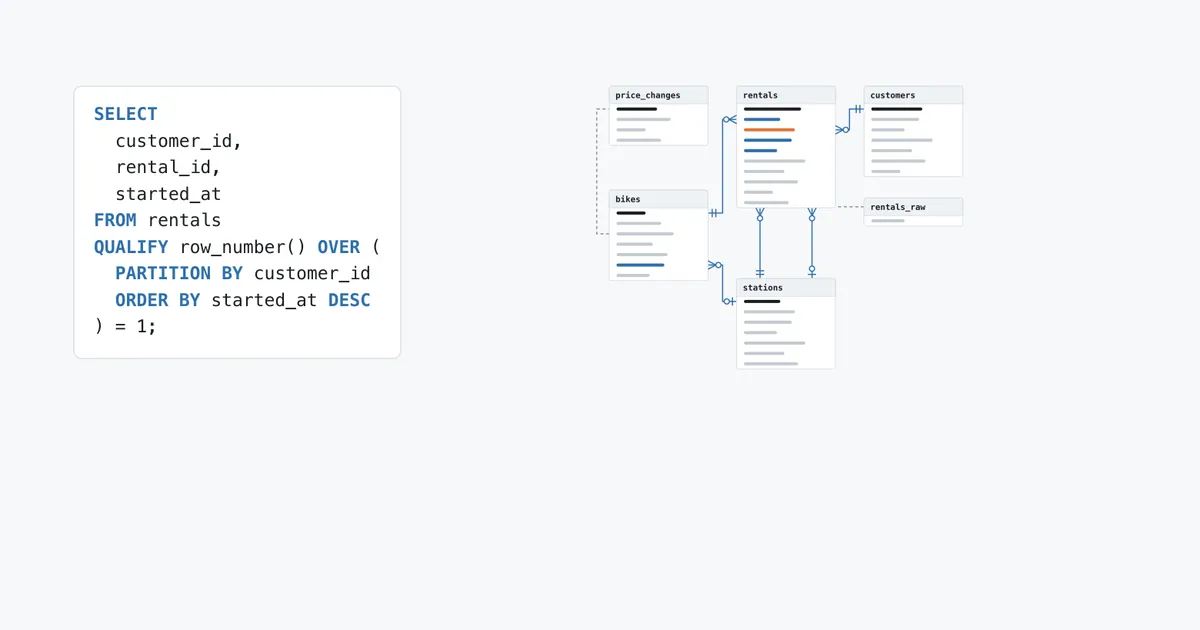
A small bike rental in Lucerne has a table with 30 rentals. What was the most recent rental of every customer?
SELECT
  customer_id,
  rental_id,
  started_at,
  price_chf
FROM rentals
QUALIFY row_number() OVER (PARTITION BY customer_id ORDER BY started_at DESC) = 1
ORDER BY customer_id| customer_idint | rental_idint | started_attimestamp | price_chfdecimal |
|---|---|---|---|
| 1 | 26 | 2026-03-30 05:42:00 | 3.00 |
| 2 | 25 | 2026-03-30 06:03:00 | 5.50 |
| 3 | 30 | 2026-03-31 17:55:00 | NULL |
| 4 | 18 | 2026-03-27 23:40:00 | 4.00 |
| 5 | 27 | 2026-03-30 12:30:00 | 3.00 |
| 6 | 23 | 2026-03-29 00:50:00 | 3.00 |
| 7 | 29 | 2026-03-31 16:40:00 | 9.00 |
| 8 | 28 | 2026-03-31 06:15:00 | 5.50 |
| 9 | 24 | 2026-03-29 13:05:00 | 5.00 |
| 99 | 16 | 2026-03-26 14:00:00 | 2.50 |
One statement, and no subquery. QUALIFY filters on a window function the way WHERE filters on a column. Without it, the window function moves into a subquery and the filter outside:
SELECT
  customer_id,
  rental_id,
  started_at,
  price_chf
FROM (
  SELECT
    customer_id,
    rental_id,
    started_at,
    price_chf,
    row_number() OVER (PARTITION BY customer_id ORDER BY started_at DESC) AS rn
  FROM rentals
) AS ranked
WHERE rn = 1
ORDER BY customer_id
I ran both. They return the same ten rows.
Two rows of the result are odd. The last rental of customer 3 has no price. And customer 99 has a rental, but the bike rental has no customer 99. Both are on purpose, and this part explains why.
This series goes through the SQL of Databricks like this: statement by statement, every one run on the same small tables, every one with what came back.
Why this series
Databricks documents its SQL in the SQL language reference. On 11 November 2026, its index linked to about 200 pages of statements and clauses, and the built-in functions are a long list of their own.
I write SQL on Databricks all the time. And most of the time, I write the same few statements, the same way, again and again. They work, so I never look further. Most of those 200 pages I have never opened.
This series is my reason to open them. I want to work through the reference properly, try the statements I never use, and find out what the ones I use every day can do that I don’t know about. It’s practice for me, first of all.
Writing it down forces me to be exact: an example in an article has to run, and I have to understand why it returns what it returns. And if I write it down anyway, someone else can use it too.
The reference itself doesn’t make that easy. It’s complete, and it’s a reference: syntax, parameters, and examples on tables that change from page to page. It tells me what a statement accepts. I want to see what it does – with every clause and every option, on data I know, including the cases where it fails.
So the rules of the series are:
- One topic per part. A part covers one statement or one clause, with every variation the reference describes.
- Everything is run. Every statement in an article ran on a SQL warehouse. The result tables are generated from what the warehouse returned. I don’t type results.
- Errors are examples too. If something doesn’t work, the article shows the statement and the error message.
- The same data everywhere. Six small tables. After a few parts you know every row.
- What I don’t know, I say. If I couldn’t test something, the part says so.
What “Databricks SQL” means here
The reference calls itself “a SQL command reference for Databricks SQL and Databricks Runtime”. Databricks SQL is the part of the platform with the SQL warehouses and the SQL editor. Databricks Runtime is what runs on clusters.
In this series, Databricks SQL means: SQL sent to a SQL warehouse. That’s where I ran every example. Most of the language is the same on both sides, and the pages of the reference say where a statement applies and from which version. The page of the QUALIFY clause from above, for example, says Databricks SQL and Databricks Runtime 10.4 LTS and above. Every part has a section “Where it runs” with these notes.
What you need
A Databricks workspace with a SQL warehouse. Databricks Free Edition is enough: it costs nothing and comes with one SQL warehouse, limited to the size 2X-Small. It has a quota. If you exceed it, the compute is shut down for the rest of the day, and the data stays (Free Edition limitations).
I run the series on a Free Edition workspace. I don’t know whether every statement runs there. Where one doesn’t, the part says so.
The data
The data is a fictional bike rental in Lucerne, in a schema called velo in the catalog sql_playground. Six tables, the largest with 30 rows:
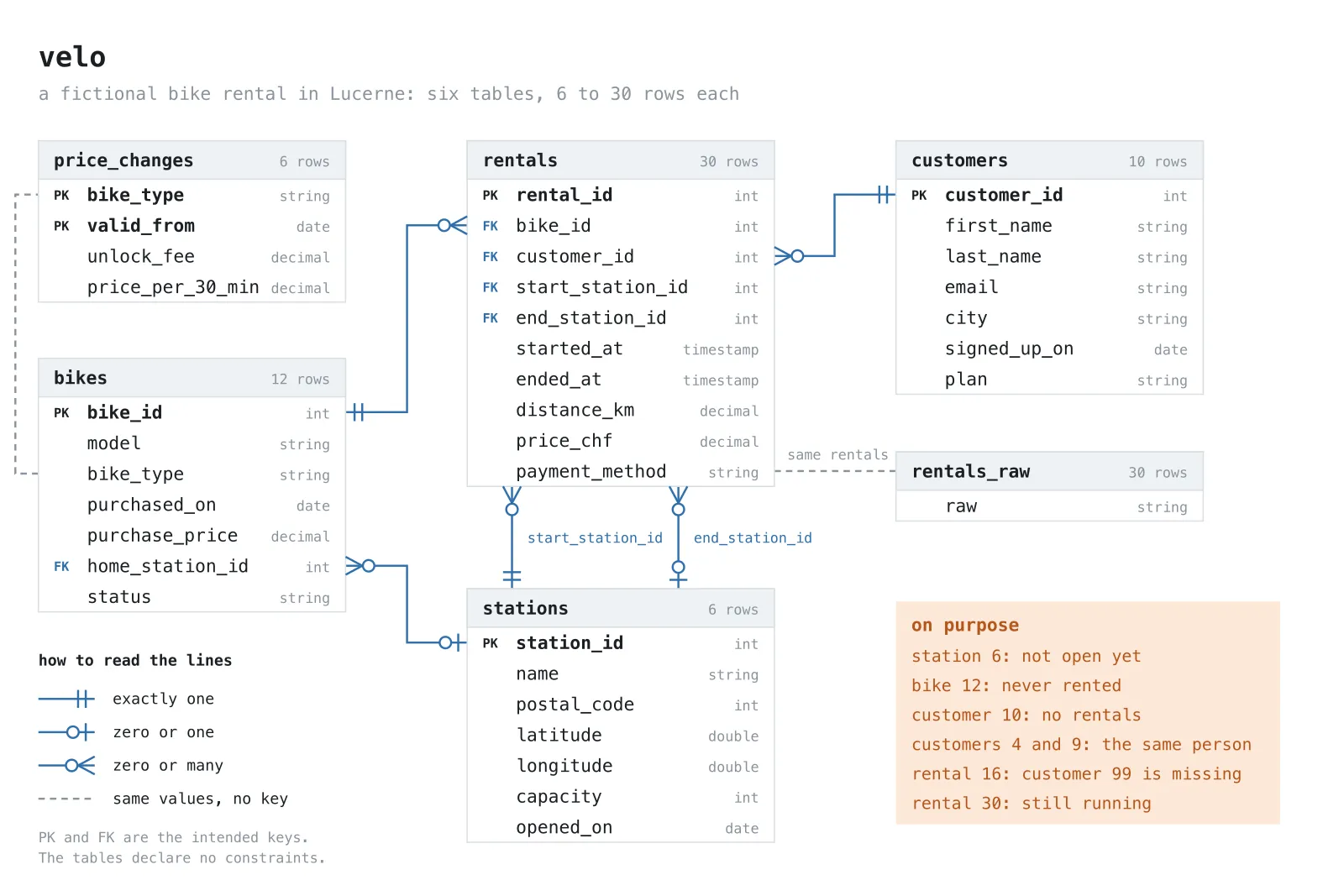
Read a line from one end to the other: a bike has zero or many rentals, a rental has exactly one bike. A rental has exactly one start station, but zero or one end station, because a rental that is still running has none. price_changes has only a dashed line: a bike finds its prices by its type and the date, and bike_type alone is not a key there.
The keys are the intended ones. The tables declare no primary or foreign keys, so nothing stops a rental from pointing to a customer that doesn’t exist. One does.
The tables are small so that every row fits on the screen. When a join drops a row or a filter loses a NULL, you can see which one.
And some rows are wrong, missing or odd on purpose. Real data has such rows, and they are where SQL gets interesting. Here are all six tables, with the rows to remember.
stations
SELECT *
FROM stations
ORDER BY station_id| station_idint | namestring | postal_codeint | latitudedouble | longitudedouble | capacityint | opened_ondate |
|---|---|---|---|---|---|---|
| 1 | Bahnhof | 6003 | 47.0502 | 8.3102 | 24 | 2022-05-01 |
| 2 | Schwanenplatz | 6004 | 47.0533 | 8.3089 | 16 | 2022-05-01 |
| 3 | Verkehrshaus | 6006 | 47.0539 | 8.3373 | 20 | 2023-04-01 |
| 4 | Allmend | 6005 | 47.0351 | 8.3032 | 12 | 2023-04-01 |
| 5 | Kantonsspital | 6004 | 47.0578 | 8.298 | 10 | 2024-06-15 |
| 6 | Littau | 6014 | 47.0531 | 8.2571 | NULL | 2026-04-15 |
- The rental is fictional, the places are real. Every station has the coordinates of the public transport stop of the same name in Lucerne, from the stop search of transport.opendata.ch, and the postal code at that point, from the official index of localities of swisstopo.
- Station 6, Littau, opens on 15 April 2026, after the week of the rentals. It has no capacity yet, no bikes and no rentals.
bikes
SELECT *
FROM bikes
ORDER BY bike_id| bike_idint | modelstring | bike_typestring | purchased_ondate | purchase_pricedecimal | home_station_idint | statusstring |
|---|---|---|---|---|---|---|
| 1 | Tour 3 | city | 2023-04-12 | 890.00 | 1 | active |
| 2 | Tour 3 | city | 2023-04-12 | 890.00 | 2 | active |
| 3 | Tour 3 | city | 2024-03-01 | 940.00 | 1 | active |
| 4 | Urban S | city | 2024-03-01 | 1120.00 | 4 | active |
| 5 | Urban S | city | 2025-02-17 | 1150.00 | 2 | active |
| 6 | Volt E1 | e-bike | 2024-05-20 | 3400.00 | 3 | active |
| 7 | Volt E1 | e-bike | 2022-06-03 | 3250.00 | 1 | retired |
| 8 | Volt E2 | e-bike | 2025-02-17 | 3890.00 | 3 | active |
| 9 | Volt E2 | e-bike | 2025-02-17 | 3890.00 | 5 | active |
| 10 | Cargo L | cargo | 2024-09-09 | 5600.00 | 4 | active |
| 11 | Cargo L | cargo | 2024-09-09 | 5600.00 | NULL | maintenance |
| 12 | Volt E2 | e-bike | 2026-03-30 | 3990.00 | 3 | active |
- Bike 11 is in maintenance and has no home station.
- Bike 12 was bought on 30 March 2026 and has never been rented.
- Bike 7 is retired.
customers
SELECT *
FROM customers
ORDER BY customer_id| customer_idint | first_namestring | last_namestring | emailstring | citystring | signed_up_ondate | planstring |
|---|---|---|---|---|---|---|
| 1 | Luca | Keller | [email protected] | Luzern | 2024-05-02 | plus |
| 2 | Mia | Schmid | [email protected] | Luzern | 2024-08-19 | plus |
| 3 | Noah | Weber | [email protected] | Kriens | 2025-01-11 | basic |
| 4 | Anna | Meier | [email protected] | luzern | 2025-03-07 | basic |
| 5 | Elena | Fischer | NULL | Luzern | 2025-06-23 | basic |
| 6 | Jonas | Müller | [email protected] | LUZERN | 2025-09-01 | plus |
| 7 | Sofia | Brunner | [email protected] | Emmen | 2025-11-15 | NULL |
| 8 | NULL | Stadtkurier GmbH | [email protected] | Luzern | 2024-02-01 | business |
| 9 | ANNA | MEIER | [email protected] | Luzern | 2026-01-20 | plus |
| 10 | Tim | Baumann | [email protected] | Küssnacht | 2026-03-15 | basic |
- Customers 4 and 9 are the same person, signed up twice. The name is in a different case, the email too, and the second email has a space before and after it.
- Customer 5 has no email, customer 7 no plan.
- Customer 8 is a company and has no first name.
- The city Luzern is spelled three ways:
Luzern,luzernandLUZERN. - Customer 10 signed up and never rented a bike.
price_changes
SELECT *
FROM price_changes
ORDER BY valid_from, bike_type| bike_typestring | valid_fromdate | unlock_feedecimal | price_per_30_mindecimal |
|---|---|---|---|
| cargo | 2026-01-01 | 2.00 | 4.00 |
| city | 2026-01-01 | 1.00 | 1.50 |
| e-bike | 2026-01-01 | 1.50 | 3.00 |
| cargo | 2026-03-28 | 2.00 | 4.50 |
| city | 2026-03-28 | 1.00 | 2.00 |
| e-bike | 2026-03-28 | 2.00 | 3.50 |
A rental costs the unlock fee plus the price for every started 30 minutes. The prices went up on 28 March 2026, in the middle of the week of the rentals. Which price a rental gets depends on the day it started.
rentals
SELECT *
FROM rentals
ORDER BY rental_id| rental_idint | bike_idint | customer_idint | start_station_idint | end_station_idint | started_attimestamp | ended_attimestamp | distance_kmdecimal | price_chfdecimal | payment_methodstring |
|---|---|---|---|---|---|---|---|---|---|
| 1 | 1 | 1 | 1 | 2 | 2026-03-23 06:42:00 | 2026-03-23 07:00:00 | 3.2 | 2.50 | card |
| 2 | 6 | 2 | 3 | 1 | 2026-03-23 07:05:00 | 2026-03-23 07:29:00 | 6.1 | 4.50 | twint |
| 3 | 2 | 3 | 2 | 5 | 2026-03-23 11:30:00 | 2026-03-23 12:11:00 | 5.4 | 4.00 | card |
| 4 | 10 | 5 | 4 | 4 | 2026-03-23 13:15:00 | 2026-03-23 14:50:00 | 7.8 | 18.00 | twint |
| 5 | 7 | 4 | 1 | 3 | 2026-03-24 06:50:00 | 2026-03-24 07:17:00 | 6.4 | 4.50 | card |
| 6 | 3 | 1 | 1 | 2 | 2026-03-24 06:44:00 | 2026-03-24 07:00:00 | 3.1 | 2.50 | card |
| 7 | 8 | 6 | 5 | 1 | 2026-03-24 16:20:00 | 2026-03-24 16:42:00 | 4.0 | 4.50 | twint |
| 8 | 1 | 7 | 2 | 2 | 2026-03-24 18:05:00 | 2026-03-24 19:08:00 | 9.5 | 5.50 | card |
| 9 | 6 | 2 | 3 | 1 | 2026-03-25 07:02:00 | 2026-03-25 07:27:00 | 6.0 | 4.50 | twint |
| 10 | 4 | 8 | 4 | 1 | 2026-03-25 07:30:00 | 2026-03-25 08:03:00 | 7.2 | 4.00 | invoice |
| 11 | 11 | 5 | 4 | 5 | 2026-03-25 09:10:00 | 2026-03-25 11:10:00 | 11.3 | 18.00 | twint |
| 12 | 2 | 9 | 1 | 3 | 2026-03-25 17:45:00 | 2026-03-25 18:14:00 | 6.6 | 2.50 | card |
| 13 | 9 | 3 | 5 | 2 | 2026-03-26 12:10:00 | 2026-03-26 12:24:00 | 2.2 | 4.50 | card |
| 14 | 3 | 1 | 1 | 2 | 2026-03-26 06:41:00 | 2026-03-26 06:58:00 | 3.2 | 2.50 | card |
| 15 | 7 | 6 | 1 | 5 | 2026-03-26 21:15:00 | 2026-03-26 21:34:00 | 3.5 | 4.50 | twint |
| 16 | 5 | 99 | 2 | 1 | 2026-03-26 14:00:00 | 2026-03-26 14:12:00 | 1.9 | 2.50 | card |
| 17 | 8 | 2 | 3 | 1 | 2026-03-27 07:04:00 | 2026-03-27 07:30:00 | 6.1 | 4.50 | twint |
| 18 | 1 | 4 | 1 | 4 | 2026-03-27 23:40:00 | 2026-03-28 00:25:00 | 8.0 | 4.00 | card |
| 19 | 10 | 7 | 2 | 3 | 2026-03-28 10:00:00 | 2026-03-28 12:30:00 | 14.2 | 24.50 | card |
| 20 | 6 | 8 | 4 | 1 | 2026-03-28 08:15:00 | 2026-03-28 08:46:00 | 7.0 | 9.00 | invoice |
| 21 | 2 | 1 | 1 | 2 | 2026-03-28 09:30:00 | 2026-03-28 09:45:00 | 3.0 | 0.00 | NULL |
| 22 | 9 | 3 | 5 | 5 | 2026-03-28 15:20:00 | 2026-03-28 16:48:00 | 12.4 | 12.50 | card |
| 23 | 4 | 6 | 1 | 5 | 2026-03-29 00:50:00 | 2026-03-29 01:20:00 | 4.1 | 3.00 | twint |
| 24 | 3 | 9 | 3 | 2 | 2026-03-29 13:05:00 | 2026-03-29 13:57:00 | 8.8 | 5.00 | card |
| 25 | 8 | 2 | 3 | 1 | 2026-03-30 06:03:00 | 2026-03-30 06:28:00 | 6.0 | 5.50 | twint |
| 26 | 1 | 1 | 1 | 2 | 2026-03-30 05:42:00 | 2026-03-30 05:59:00 | 3.1 | 3.00 | card |
| 27 | 5 | 5 | 4 | 4 | 2026-03-30 12:30:00 | 2026-03-30 12:50:00 | 2.7 | 3.00 | twint |
| 28 | 6 | 8 | 4 | 1 | 2026-03-31 06:15:00 | 2026-03-31 06:45:00 | 7.1 | 5.50 | invoice |
| 29 | 9 | 7 | 2 | 1 | 2026-03-31 16:40:00 | 2026-03-31 17:16:00 | 5.9 | 9.00 | card |
| 30 | 2 | 3 | 5 | NULL | 2026-03-31 17:55:00 | NULL | NULL | NULL | NULL |
One week, 23 to 31 March 2026.
- Rental 16 belongs to customer 99. There is no customer 99.
- Rental 18 starts before midnight and ends after it.
- Rental 21 was free: a promotion. The price is 0, and the payment method is
NULL. 0 andNULLare not the same thing, and this row has both. - Rental 23 crosses the switch to summer time. More about it below.
- Rental 28 took exactly 30 minutes: one started half hour, or two?
- Rental 30 is still running. It has no end, no distance and no price.
rentals_raw
SELECT *
FROM rentals_raw
ORDER BY raw:rental_id::int| rawstring |
|---|
| {"rental_id":1,"bike":{"id":1,"type":"city"},"customer_id":1,"start":{"station_id":1,"ts":"2026-03-23T06:42:00Z"},"end":{"station_id":2,"ts":"2026-03-23T07:00:00Z"},"distance_km":3.2,"price_chf":2.5,"payment":"card","tags":["commute"],"app":{"os":"iOS","version":"2.4.1"}} |
| {"rental_id":2,"bike":{"id":6,"type":"e-bike"},"customer_id":2,"start":{"station_id":3,"ts":"2026-03-23T07:05:00Z"},"end":{"station_id":1,"ts":"2026-03-23T07:29:00Z"},"distance_km":6.1,"price_chf":4.5,"payment":"twint","tags":["commute"],"app":{"os":"Android","version":"2.4.1"}} |
| {"rental_id":3,"bike":{"id":2,"type":"city"},"customer_id":3,"start":{"station_id":2,"ts":"2026-03-23T11:30:00Z"},"end":{"station_id":5,"ts":"2026-03-23T12:11:00Z"},"distance_km":5.4,"price_chf":4.0,"payment":"card","tags":["leisure"],"app":{"os":"iOS","version":"2.3.0"}} |
The same 30 rentals as the app would send them: one JSON document per rental, in a single string column. The documents are nested, and they have two things the table doesn’t: a list of tags, sometimes empty, and details about the app.
Time
All timestamps in the tables are UTC. How a timestamp is displayed depends on the time zone of the session. On my warehouse, that’s UTC too:
SELECT current_timezone() AS session_time_zone| session_time_zonestring |
|---|
| Etc/UTC |
Lucerne is not in UTC. Its time zone is Europe/Zurich: Central European Time (CET), one hour ahead of UTC, in winter, and Central European Summer Time (CEST), two hours ahead, in summer. That makes two rentals interesting. Here they are in UTC and in local time:
SELECT
  rental_id,
  started_at,
  ended_at,
  from_utc_timestamp(started_at, 'Europe/Zurich') AS started_local,
  from_utc_timestamp(ended_at, 'Europe/Zurich') AS ended_local
FROM rentals
WHERE rental_id IN (18, 23)
ORDER BY rental_id| rental_idint | started_attimestamp | ended_attimestamp | started_localtimestamp | ended_localtimestamp |
|---|---|---|---|---|
| 18 | 2026-03-27 23:40:00 | 2026-03-28 00:25:00 | 2026-03-28 00:40:00 | 2026-03-28 01:25:00 |
| 23 | 2026-03-29 00:50:00 | 2026-03-29 01:20:00 | 2026-03-29 01:50:00 | 2026-03-29 03:20:00 |
Rental 18 starts on 27 March in UTC and on 28 March in Lucerne. 28 March is the day the prices went up. Which day counts is a decision, and the data has to make it somewhere. I calculated the prices with the UTC date.
Rental 23 started at 01:50 local time, in CET, and ended at 03:20, in CEST. It took 30 minutes. In that night, the clocks in Switzerland went from 02:00 to 03:00.
Get the data
Everything is in a public repository: github.com/stefanko-ch/learn-databricks-sql. One script, setup/00_velo.sql, creates a catalog of its own, sql_playground, the schema velo in it, and the six tables with CREATE OR REPLACE TABLE and INSERT ... VALUES. So the data is in the same place for everyone: sql_playground.velo. The rows are written out in the script. Nothing is random, so you get exactly the rows above. And because of CREATE OR REPLACE, running it again resets the data.
This is how I ran it, in a Free Edition workspace with nothing in it.
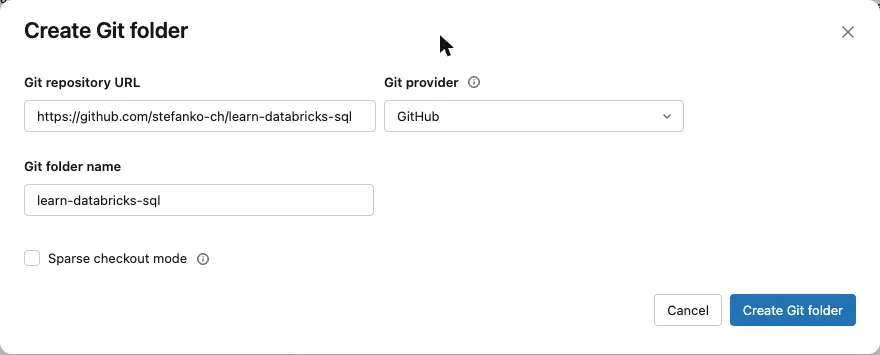
1. Get the repository into the workspace. In the sidebar, open Workspace, then Create > Git folder. Paste the URL of the repository. Databricks fills in the provider and the folder name.
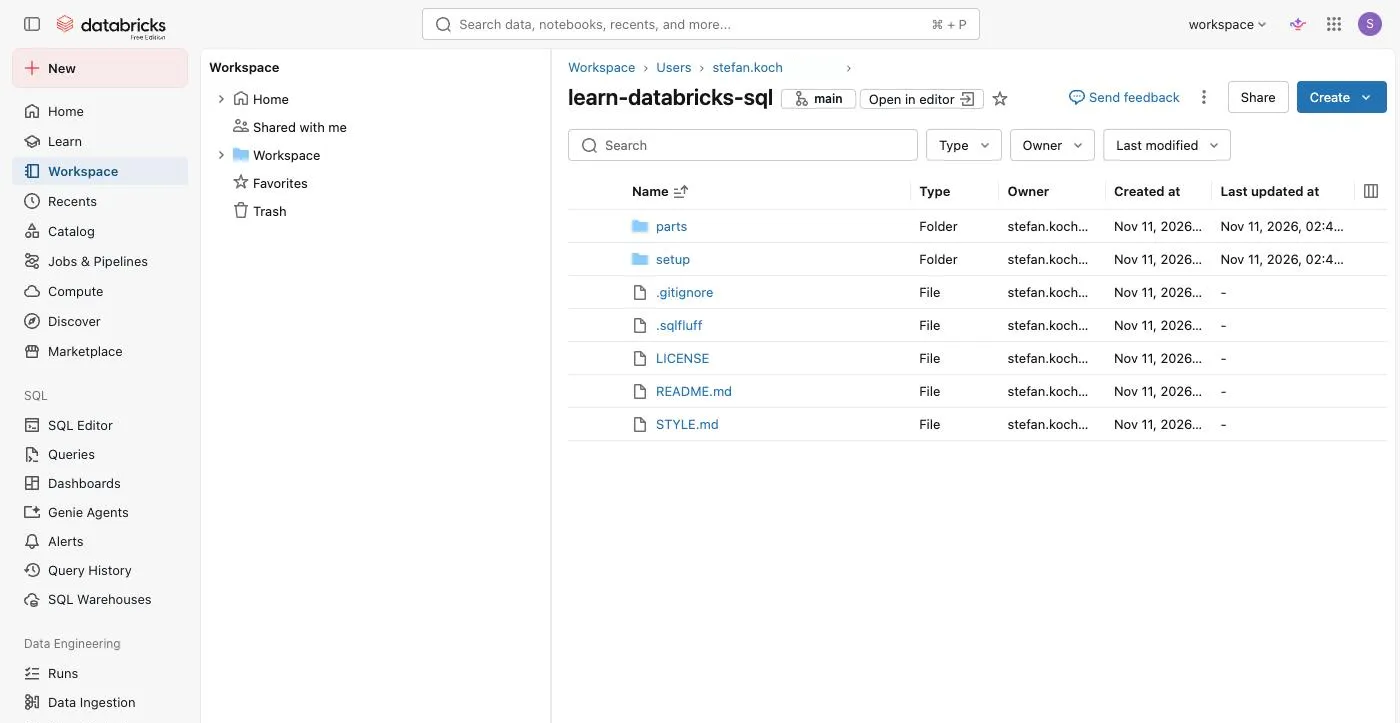
A few seconds later the repository is a folder in your workspace. The repository is public: I had no Git credentials set up in the workspace, and it didn’t ask for any.
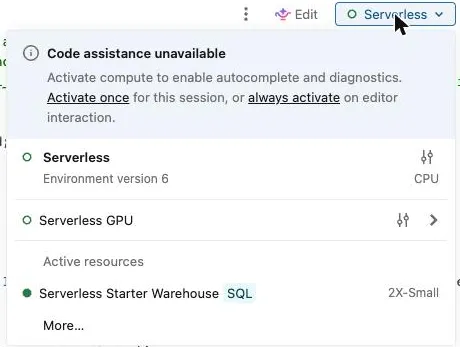
2. Open the script and choose the SQL warehouse. Open setup, then 00_velo.sql. The file opens in the SQL editor. Look at the compute selector at the top right before you run it: for me, the file was attached to “Serverless”, not to a SQL warehouse. Open the selector and choose your warehouse. On Free Edition there is one, the Serverless Starter Warehouse.
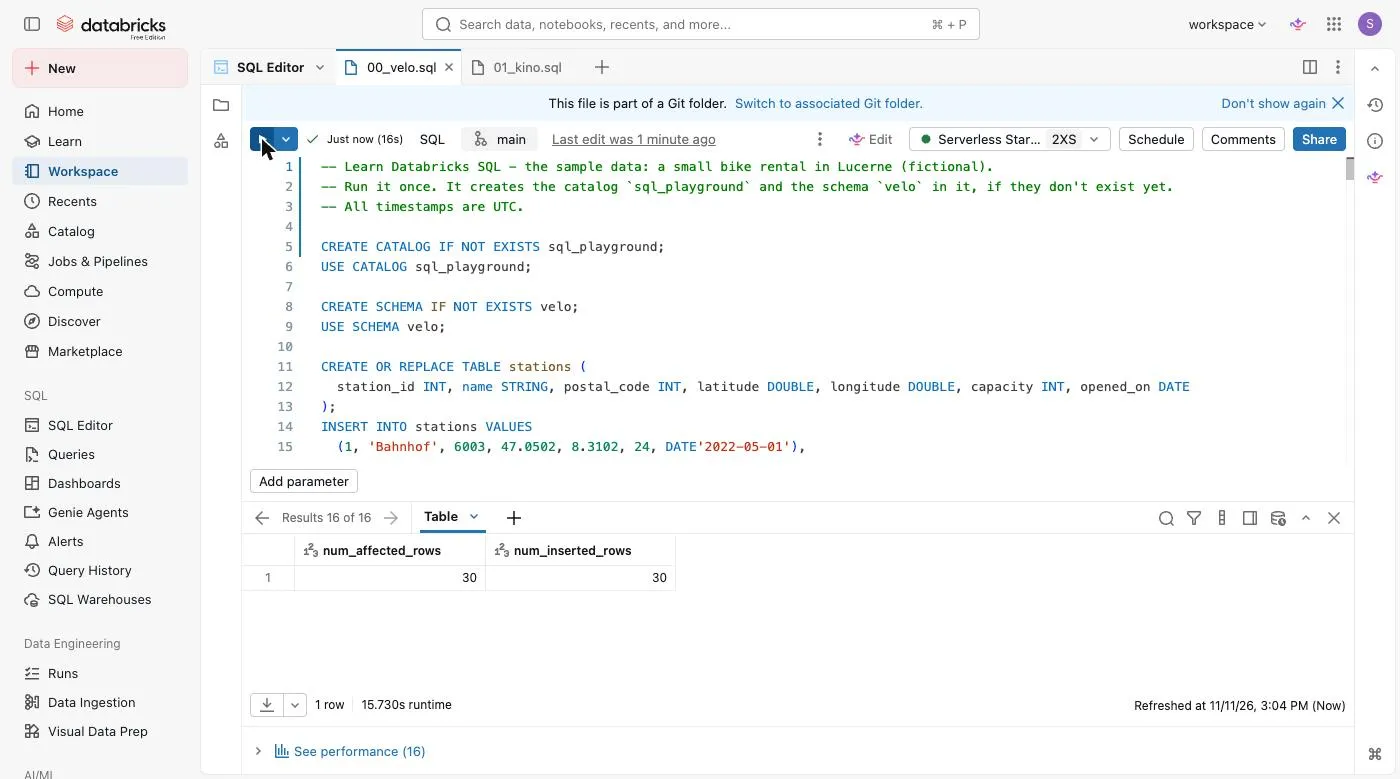
3. Run it. Click the Run button, or press Cmd/Ctrl + Enter. “Run all statements” was already ticked in the menu next to the button. The script has 16 statements. The first time they took 22 seconds; the screenshot is from a second run, with 16. The last result is the 30 rows inserted into rentals_raw:
4. Look at it. In the sidebar, open Catalog. There is a new catalog sql_playground with the schema velo and its six tables.
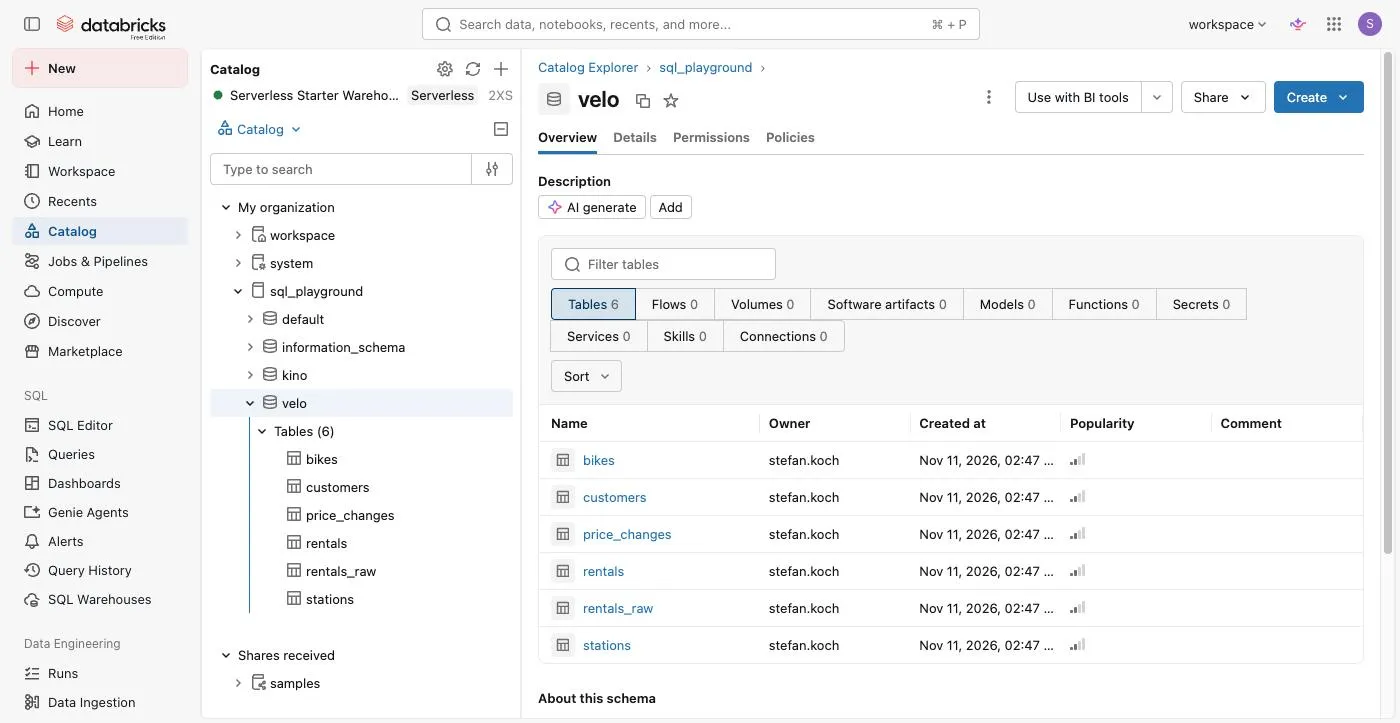
The screenshot already shows a second schema, kino. It comes from a second script, for the exercises at the end of this part.
Every example in the series starts in sql_playground.velo. In a new session, one statement gets you there:
USE sql_playground.velo;Then check that you have what I have:
SELECT 'bikes' AS table_name, count(*) AS row_count FROM bikes
UNION ALL
SELECT 'customers', count(*) FROM customers
UNION ALL
SELECT 'price_changes', count(*) FROM price_changes
UNION ALL
SELECT 'rentals', count(*) FROM rentals
UNION ALL
SELECT 'rentals_raw', count(*) FROM rentals_raw
UNION ALL
SELECT 'stations', count(*) FROM stations
ORDER BY table_name| table_namestring | row_countbigint |
|---|---|
| bikes | 12 |
| customers | 10 |
| price_changes | 6 |
| rentals | 30 |
| rentals_raw | 30 |
| stations | 6 |
How the parts are built
Every part has the same sections:
- A question to the bike rental, and a figure: the table before, the result after.
- The short version: the syntax in a few lines, with a link to the page in the reference.
- Examples, from simple to surprising. One sentence, the SQL, the result.
- Traps: what goes wrong, with the example that shows it.
- Where it runs: the date and the version I tested on, and the minimum versions the reference gives.
- Covered in this part: which pages of the reference the part covers, and what it leaves for other parts.
The SQL is formatted the same way everywhere: keywords in upper case, every clause on its own line.
What this series is not
- Not a replacement for the reference. Every part links to the pages it covers. The grammar is there.
- Not a performance course. It’s about what statements do, not about tuning a warehouse.
- Not about PySpark. Only SQL.
Exercises
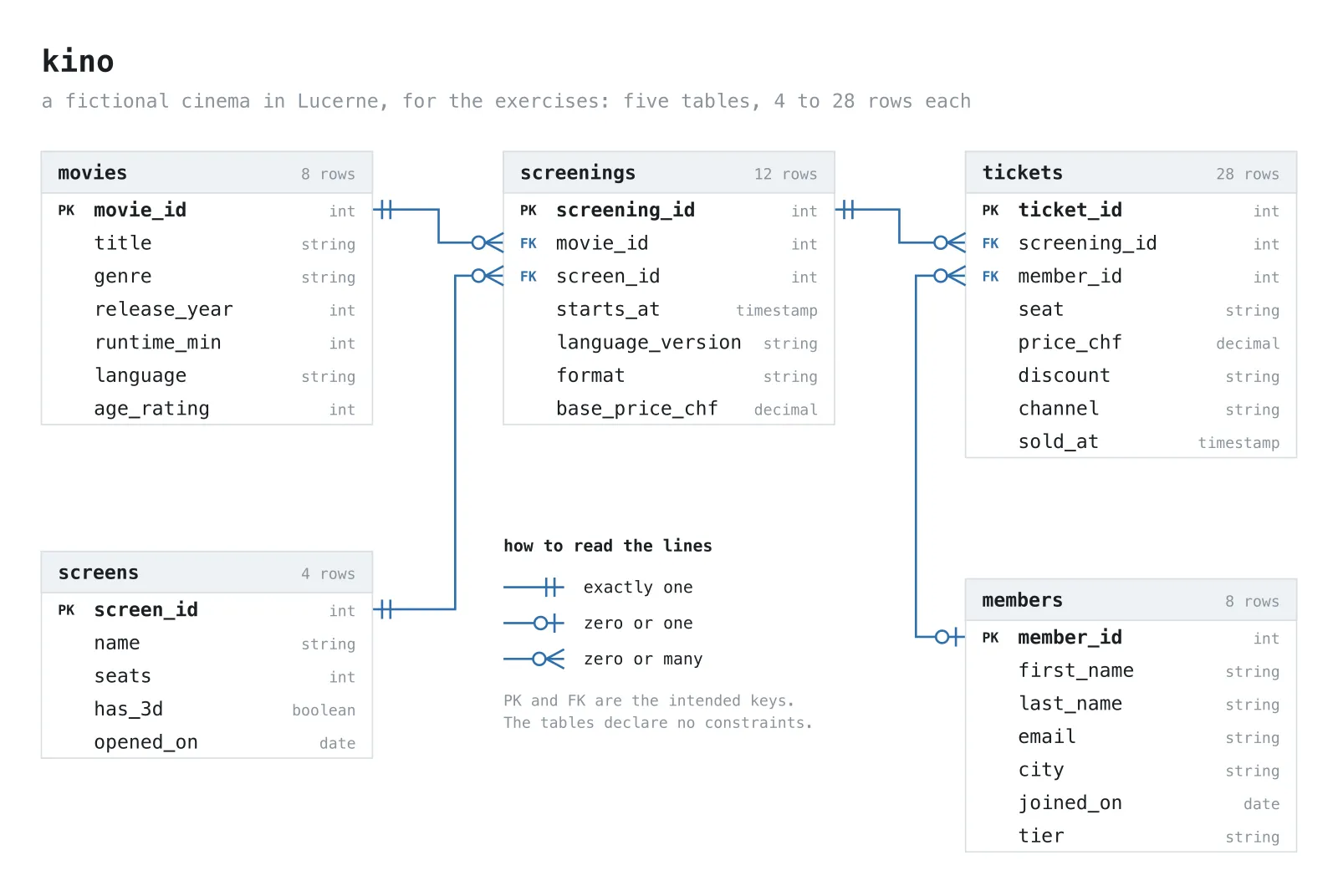
Every part of this series ends with a few exercises. They don’t use the bike rental: you have seen those answers in the article. They use a second small dataset, a cinema in Lucerne with five tables: movies, screens, screenings, tickets and members, in the schema sql_playground.kino. It’s as made up as the bike rental, and it has its own odd rows.
A second script creates it: setup/01_kino.sql. Run it the same way as the first one. It has 14 statements, and for me it took 17 seconds.
I don’t publish solutions. Every exercise shows what should come out, so you can check yourself.
1.1 Run the script, then count the rows of the five tables. You should get:
| table_namestring | row_countbigint |
|---|---|
| members | 8 |
| movies | 8 |
| screenings | 12 |
| screens | 4 |
| tickets | 28 |
1.2 Look at every table with SELECT *. The cinema has rows that are missing something, wrong or odd, like the bike rental. I put in more than ten. How many do you find? The movies table, to start with:
| movie_idint | titlestring | genrestring | release_yearint | runtime_minint | languagestring | age_ratingint |
|---|---|---|---|---|---|---|
| 1 | The Last Tram | drama | 2024 | 112 | de | 12 |
| 2 | Nordlicht | drama | 2025 | 98 | de | 12 |
| 3 | Paper Planets | animation | 2025 | 91 | en | 6 |
| 4 | Zero Kelvin Kiss | comedy | 2023 | 104 | en | 12 |
| 5 | Les Heures Bleues | drama | 2025 | 127 | fr | 16 |
| 6 | Alpine Static | thriller | 2026 | NULL | de | 16 |
| 7 | paper planets 2 | animation | 2026 | 88 | en | 6 |
| 8 | The Quiet Orchard | Drama | 2022 | 119 | en | 12 |
1.3 The diagram says: a ticket has exactly one screening. That’s the intention, and nothing in the tables enforces it. Is it true for every ticket? Look at tickets and screenings. You should find one ticket that breaks it.
1.4 Take the query from the top of this part and change it: the most recent ticket of every member. If two tickets were sold at the same time, take the one with the higher ticket_id. You should get eight rows, and the first one is not a member:
| member_idint | ticket_idint | sold_attimestamp | price_chfdecimal |
|---|---|---|---|
| NULL | 24 | 2026-03-06 15:00:00 | NULL |
| 1 | 18 | 2026-03-04 21:00:00 | 0.00 |
| 2 | 20 | 2026-03-05 13:00:00 | 14.00 |
| 3 | 26 | 2026-03-06 19:00:00 | 9.00 |
| 4 | 27 | 2026-03-07 20:00:00 | 16.00 |
| 5 | 23 | 2026-03-05 22:10:00 | 20.00 |
| 6 | 21 | 2026-03-06 09:30:00 | 18.00 |
| 8 | 28 | 2026-03-06 10:00:00 | 16.00 |
Where it runs
I ran everything in this part on the Serverless Starter Warehouse of a Databricks Free Edition workspace on 11 November 2026; current_version() reported DBSQL version 2026.44.
The code
The setup script and all statements of this part, with the results as they came back, are in the repository: learn-databricks-sql.
Related Articles

How To: Copying all schemas and tables from one catalog to another catalog in Databricks
In this quick guide, I will show you how to automatically copy all schemas and tables from one catalog to another in Databricks.
From SharePoint to Databricks – and Back: Seamless Bidirectional Integration
In modern data workflows, it’s essential to collect data where it originates and deliver it to where it’s needed. In this blog post, I’ll show how to connect **SharePoint directly with Databricks** –
From Snapshots to CDC: How to load Snapshot-Data with Databricks Delta Live Tables
In this article I describe how to load data from recurring full snapshots with Delta Live Tables relatively easily and elegantly into a bronze table without the amount of data exploding.
Comments
Comments are powered by giscus. You need a GitHub account to comment.