Learn Databricks SQL - Part 2 - Where and how to run it
 Stefan Koch
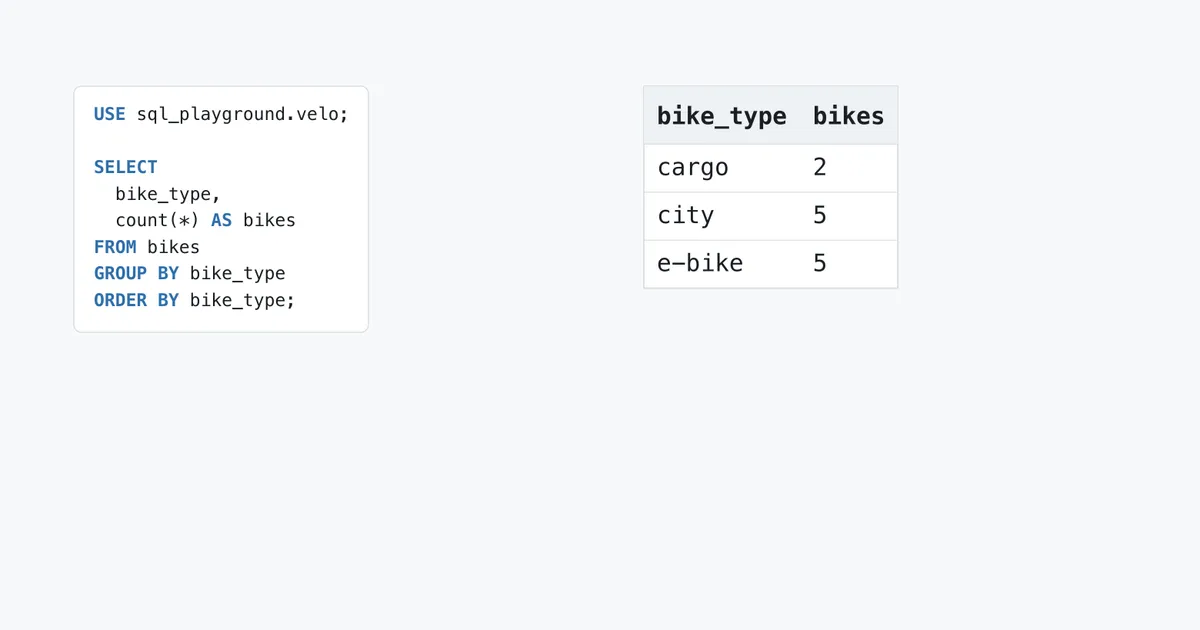
Two statements, nothing special: a USE that says where the tables are, and a SELECT that counts the bikes of the rental from part 1 by type:
-- The script every way of running SQL gets in this part: two statements, the second depends on the first.
USE sql_playground.velo;

SELECT
  bike_type,
  count(*) AS bikes
FROM bikes
GROUP BY bike_type
ORDER BY bike_type;
In the SQL editor, they return three rows:
| bike_typestring | bikesbigint |
|---|---|
| cargo | 2 |
| city | 5 |
| e-bike | 5 |
The script is fine. What changes is the way it travels to the warehouse, and there are seven of them in this part. It sends the same script along every way I could test and asks two questions each time:
- Does it take a script? Some ways run several statements separated by semicolons, others exactly one.
- Does it remember? A
USE, a variable or a temporary view only helps the next statement if both run in the same session.
The short version
| Way | Several statements at once | Session between statements |
|---|---|---|
| SQL editor | yes | yes, per query or file |
| Notebook on a SQL warehouse | yes, also in one cell | yes |
| Job with a SQL file | yes | yes |
Databricks CLI, query | no | no |
| Statement Execution API | no | no |
| Python, SQL connector | no | yes, within one connection |
| Python, SDK | no | no |
The script
USE sql_playground.velo sets the current catalog and schema. After it, bikes means sql_playground.velo.bikes. Without it, the SELECT has to say where the table is, or it looks in the wrong place.
The SQL editor
The SQL editor is where most people start. If you made the Git folder of part 1, open parts/02_where_to_run/01_script.sql in it: a .sql file opens in the SQL editor. Choose your SQL warehouse at the top right and click Run.
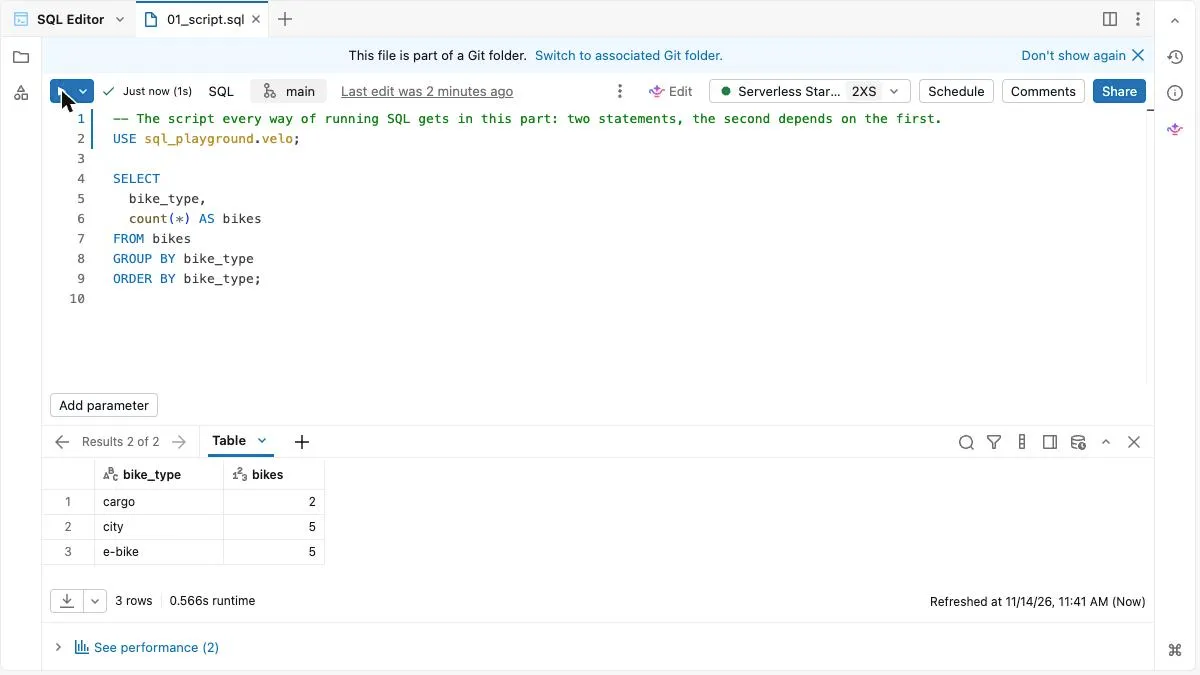
Both statements ran. The result pane says “Results 2 of 2”: the first result is the USE, the second the table. That’s because “Run all statements” is ticked in the menu next to the Run button:
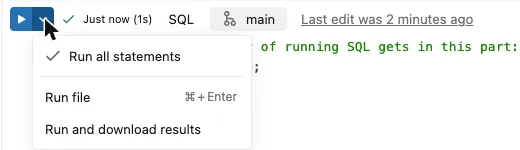
If I clear it, the button says “Run statement” and runs only the statement the cursor is in. I put the cursor into the SELECT and ran it alone:
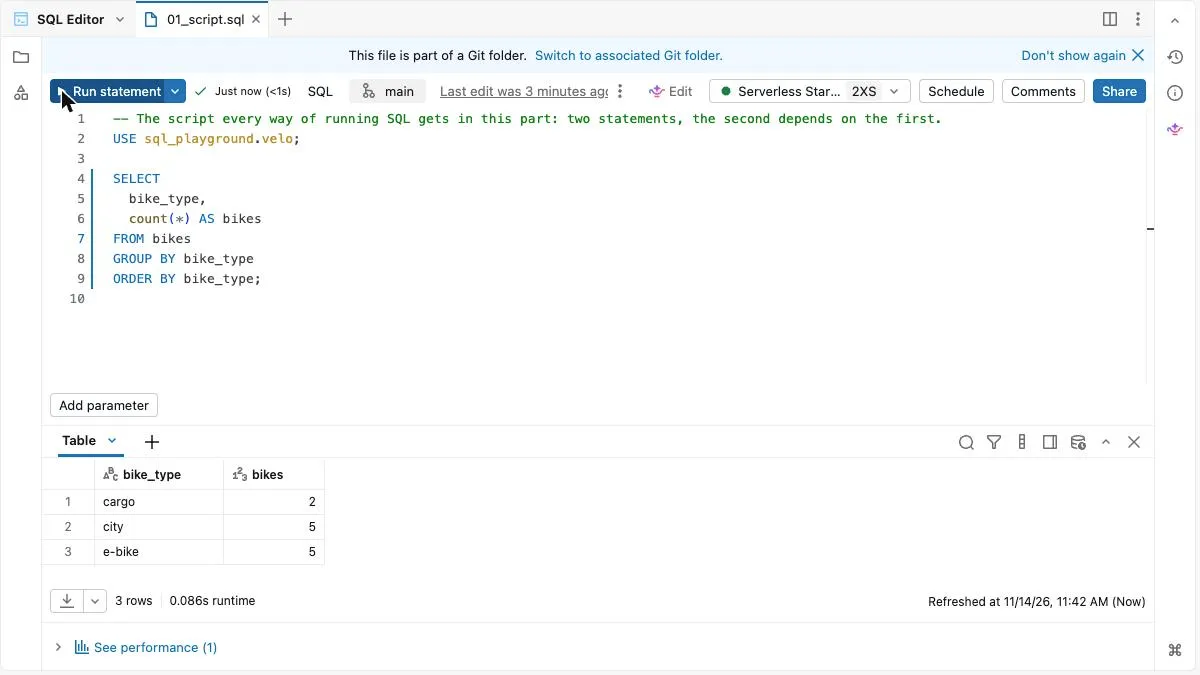
It still found bikes. The USE from the first run was still in effect: the file has a session on the warehouse, and it lasts across runs. The docs say a session ends after eight hours without a command, and that it belongs to the query or file and the warehouse it’s attached to – everyone who shares the file shares its session (SQL warehouse sessions).
A new query is a new session. I opened one with the + next to the tabs and asked where it is:
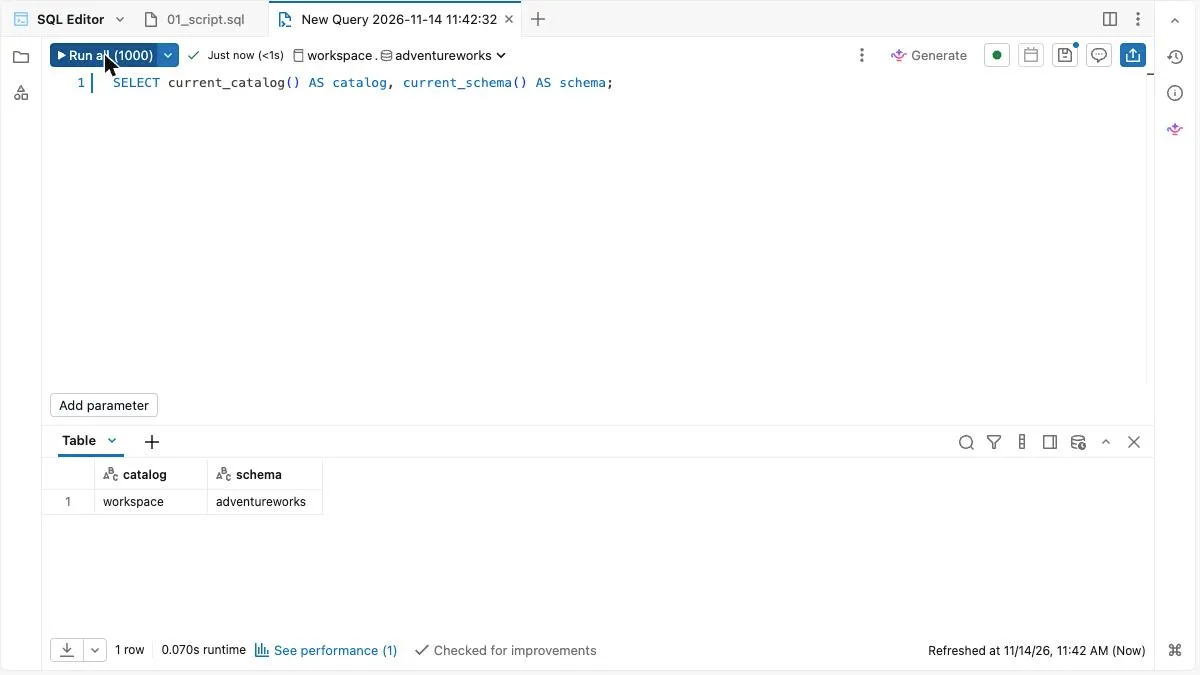
Not in velo. A query has a selector for the catalog and the schema above the editor, and a new query starts in what it shows; in my workspace that was workspace.adventureworks, a schema that has nothing to do with this series. The .sql file didn’t have that selector.
One more difference: the Run button of the query says “Run all (1000)”. By default the editor adds a limit of 1,000 rows to a query; the docs explain how to switch it off (Run and share queries). The Run button of the file showed no such number.
A notebook
A notebook can be attached to a SQL warehouse instead of a cluster. Then it runs SQL and Markdown cells and nothing else: a cell in another language throws an error (Notebook compute).
I put the script into a notebook with one statement per cell. As a file, a SQL notebook is a .sql file with a first line that marks it as a notebook, and a comment line between the cells:
-- Databricks notebook source
-- MAGIC %md
-- MAGIC The script of this part as a notebook: one statement per cell.

-- COMMAND ----------

USE sql_playground.velo;

-- COMMAND ----------

SELECT
  bike_type,
  count(*) AS bikes
FROM bikes
GROUP BY bike_type
ORDER BY bike_type;
In the Git folder, it shows up as the notebook 02_notebook. It was already attached to the SQL warehouse when I opened it. Run all:
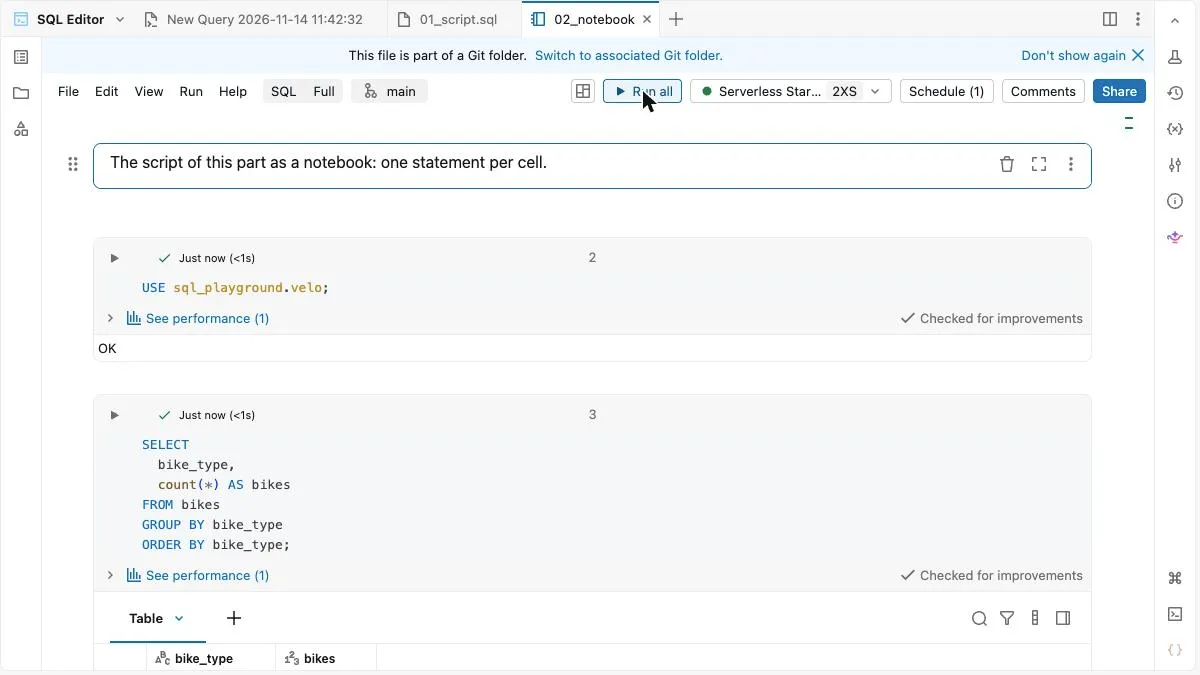
The second cell reads bikes without a catalog or schema, so it used what the first cell set: the cells of a notebook share a session.
Two more cases, which I ran as notebooks on the warehouse:
- Both statements in one cell. The run succeeded. A cell can hold a script.
- The cells swapped, the
SELECTfirst. It failed withTABLE_OR_VIEW_NOT_FOUND, and the error listed where it had looked:workspace.default. A session only knows what came before.
I also ran the notebook as a job on the warehouse:
{
  "name": "learn-databricks-sql: run a SQL notebook",
  "tasks": [
    {
      "task_key": "run_notebook",
      "notebook_task": {
        "notebook_path": "/Workspace/Users/<you>/learn-databricks-sql/parts/02_where_to_run/02_notebook",
        "warehouse_id": "<warehouse-id>"
      }
    }
  ]
}
A job with a SQL file
A job can run a .sql file from the workspace or from a Git repository on a SQL warehouse. The docs say the file can contain several statements separated by semicolons (SQL task for jobs). If you made the Git folder of part 1, the script of this part is already in your workspace. This job runs it:
{
  "name": "learn-databricks-sql: run a SQL file",
  "tasks": [
    {
      "task_key": "run_script",
      "sql_task": {
        "warehouse_id": "<warehouse-id>",
        "file": {
          "path": "/Workspace/Users/<you>/learn-databricks-sql/parts/02_where_to_run/01_script.sql",
          "source": "WORKSPACE"
        }
      }
    }
  ]
}
It ran, and the output of the task has the three rows:
{
  "sql_output": {
    "file_output": {
      "query_result": {
        "columns": [
          {
            "name": "bike_type"
          },
          {
            "name": "bikes"
          }
        ],
        "rows": [
          {
            "values": [
              {
                "string_value": "cargo"
              },
              {
                "string_value": "2"
              }
            ]
          },
          {
            "values": [
              {
                "string_value": "city"
              },
              {
                "string_value": "5"
              }
            ]
...
Both statements ran in the same session. And the numbers came back as strings: "2", not 2. That will come up again.
The Databricks CLI
The Databricks CLI has a command that sends SQL to a warehouse. It’s in the group experimental, so it may change:
databricks experimental aitools tools query "SELECT bike_type, count(*) AS bikes FROM sql_playground.velo.bikes GROUP BY bike_type ORDER BY bike_type" --profile <profile>[
{
"bike_type": "cargo",
"bikes": "2"
},
{
"bike_type": "city",
"bikes": "5"
},
{
"bike_type": "e-bike",
"bikes": "5"
}
]With --output csv:
bike_type,bikes
cargo,2
city,5
e-bike,5
The command also takes a file. With the script of this part:
databricks experimental aitools tools query 01_script.sql --profile <profile>Error: query failed: BAD_REQUEST
[PARSE_SYNTAX_ERROR] Syntax error at or near 'SELECT': extra input 'SELECT'. SQLSTATE: 42601 (line 2, pos 0)
== SQL ==
USE sql_playground.velo;
SELECT
^^^
bike_type,
count(*) AS bikes
FROM bikes
GROUP BY bike_type
ORDER BY bike_type;One statement per call. The file is sent as one statement, and the parser stops at the second one.
So I sent the two statements in two calls: first USE sql_playground.velo, then a query that asks where it is.
databricks experimental aitools tools query "USE sql_playground.velo" --profile <profile>
databricks experimental aitools tools query "SELECT current_catalog() AS catalog, current_schema() AS schema" --profile <profile>
[
{
"catalog": "workspace",
"schema": "default"
}
]The USE is gone. Every call is a session of its own, and the second one starts in the default catalog and schema of the workspace. With the CLI, a query has to name its tables in full: sql_playground.velo.bikes.
I used Databricks CLI v1.24.0.
The Statement Execution API
Databricks also has a REST API for this: the Statement Execution API. A request names the warehouse and the statement:
{
  "warehouse_id": "<warehouse-id>",
  "catalog": "sql_playground",
  "schema": "velo",
  "statement": "SELECT bike_type, count(*) AS bikes FROM bikes GROUP BY bike_type ORDER BY bike_type",
  "wait_timeout": "30s"
}
catalog and schema do here what USE does in a script. I sent the request with the CLI, which takes care of the login:
databricks api post /api/2.0/sql/statements --json @api_request.json --profile <profile>{
"statement_id": "01f1e017-989b-1c9c-923c-3c8e3bc23402",
"status": {
"state": "SUCCEEDED"
},
"manifest": {
"format": "JSON_ARRAY",
"schema": {
"column_count": 2,
"columns": [
{
"name": "bike_type",
"type_text": "STRING",
"type_name": "STRING",
"position": 0
},
{
"name": "bikes",
"type_text": "BIGINT",
"type_name": "LONG",
"position": 1
}
]
},
"total_chunk_count": 1,
"chunks": [
{
"chunk_index": 0,
"row_offset": 0,
"row_count": 3
}
],
"total_row_count": 3,
"truncated": false
},
"result": {
"chunk_index": 0,
"row_offset": 0,
"row_count": 3,
"data_array": [
...The answer has a state, the columns with their types, and the rows. The values are strings again: the type is in the schema, not in the data.
The script as one statement fails here too:
{
  "statement_id": "01f1e017-9944-126a-8faf-271ac6d33323",
  "status": {
    "state": "FAILED",
    "error": {
      "error_code": "BAD_REQUEST",
      "message": "\n[PARSE_SYNTAX_ERROR] Syntax error at or near 'SELECT': extra input 'SELECT'. SQLSTATE: 42601 (line 1, pos 25)\n\n== SQL ==\nUSE sql_playground.velo; SELECT count(*) AS bikes FROM bikes\n-------------------------^^^\n"
    },
    "sql_state": "42601"
  }
}
Python
Two libraries, and they answer the session question differently.
The Databricks SQL Connector for Python opens a connection, and a connection is a session:
# /// script
# requires-python = ">=3.11"
# dependencies = ["databricks-sql-connector", "databricks-sdk"]
# ///
"""Run SQL from Python with the Databricks SQL Connector: one connection is one session.

    uv run connector.py <cli-profile> <warehouse-id>
"""
import sys

from databricks import sql
from databricks.sdk import WorkspaceClient

profile, warehouse_id = sys.argv[1], sys.argv[2]
w = WorkspaceClient(profile=profile)  # reads host and login from the CLI profile

with sql.connect(
    server_hostname=w.config.host.removeprefix("https://"),
    http_path=f"/sql/1.0/warehouses/{warehouse_id}",
    credentials_provider=lambda: w.config.authenticate,
    catalog="sql_playground",
) as connection:
    with connection.cursor() as cursor:
        cursor.execute("USE SCHEMA velo")
        cursor.execute("SELECT bike_type, count(*) AS bikes FROM bikes GROUP BY bike_type ORDER BY bike_type")
        print([column[0] for column in cursor.description])
        for row in cursor.fetchall():
            print(row)

        try:
            cursor.execute("USE SCHEMA velo; SELECT count(*) AS bikes FROM bikes")
        except Exception as error:
            print(type(error).__name__, str(error).strip().splitlines()[0])
['bike_type', 'bikes']
Row(bike_type='cargo', bikes=2)
Row(bike_type='city', bikes=5)
Row(bike_type='e-bike', bikes=5)
ServerOperationError [PARSE_SYNTAX_ERROR] Syntax error at or near 'SELECT': extra input 'SELECT'. SQLSTATE: 42601 (line 1, pos 17)The USE in the first execute still holds in the second. The values arrive as Python types: bikes=2, an integer. And one execute takes one statement. The last line is the error for two.
The Databricks SDK for Python calls the Statement Execution API:
# /// script
# requires-python = ">=3.11"
# dependencies = ["databricks-sdk"]
# ///
"""Run SQL from Python with the Databricks SDK: a wrapper around the Statement Execution API.

    uv run sdk.py <cli-profile> <warehouse-id>
"""
import sys

from databricks.sdk import WorkspaceClient

profile, warehouse_id = sys.argv[1], sys.argv[2]
w = WorkspaceClient(profile=profile)

response = w.statement_execution.execute_statement(
    warehouse_id=warehouse_id,
    catalog="sql_playground",
    schema="velo",
    statement="SELECT bike_type, count(*) AS bikes FROM bikes GROUP BY bike_type ORDER BY bike_type",
    wait_timeout="30s",
)
print(response.status.state)
print([column.name for column in response.manifest.schema.columns])
for row in response.result.data_array:
    print(row)
StatementState.SUCCEEDED
['bike_type', 'bikes']
['cargo', '2']
['city', '5']
['e-bike', '5']Same as the API: one statement, no session, strings.
What I didn’t run
The docs describe more ways to send SQL to a warehouse. I haven’t tried them for this part:
- the ODBC and JDBC drivers, for BI tools and other clients;
- the Databricks Driver for SQLTools, to run queries from Visual Studio Code – in Public Preview;
- the Databricks SQL CLI, a separate command line tool. Its page says it is not in active development.
How this series runs its SQL
The examples of this series are .sql files with several statements each. I run them from my laptop with a small Python script around the SQL connector: it splits a file into statements and sends them one by one, all through one connection. So a USE or a temporary view holds until the end of the file, as it would in the editor. What comes back is stored next to each file in the repository, and the result tables in the articles are built from that. The script itself is not in the repository; you don’t need it to run the examples.
Every file assumes that the session starts here:
USE sql_playground.velo;If you run the examples yourself, start with that statement.
Traps
- A script is not a statement. The CLI command, the API and
cursor.executetake one statement. A file with two fails withPARSE_SYNTAX_ERRORat the start of the second. - No session, no USE. With the CLI and the API, every call starts in the default catalog and schema. Name the tables in full, or pass
catalogandschemawith the request. - Numbers as strings. The API, the CLI and the output of a job return
"2". The SQL connector returns2. - A new query starts somewhere else. Its catalog and schema come from the selector above the editor, not from the query or file you ran before.
- The limit of 1,000 rows is on by default for a query in the SQL editor.
- A shared query is a shared session, according to the docs: a temporary view someone else created in the same query is there for you too.
Where it runs
I ran everything on the Serverless Starter Warehouse of a Databricks Free Edition workspace, with Databricks CLI v1.24.0. Creating a job with a SQL file task and one with a notebook task on the warehouse both worked on Free Edition.
Exercises
The exercises don’t use the bike rental. They use a second small dataset, a cinema: sql_playground.kino, from part 1. Start with USE sql_playground.kino;. There are no solutions here. Every exercise shows what should come out, so you can check yourself.
2.1 Write a script of two statements: the USE from above, and a query that counts the tickets per channel. Run it in the SQL editor with “Run all statements”. You should get:
| channelstring | ticketsbigint |
|---|---|
| app | 11 |
| box office | 3 |
| phone | 1 |
| web | 13 |
2.2 Run only the second statement in a fresh session: a new query in the SQL editor, one call of the CLI, or a request to the API. Which error do you get, and where did the statement look for the table? With the CLI, I got TABLE_OR_VIEW_NOT_FOUND.
2.3 Change the query so that it works in a fresh session, without USE. The result is the same as in 2.1.
2.4 Put the two statements into a notebook with two cells, attach it to your SQL warehouse and run it. Then swap the cells and run it again in a new notebook. What changes?
The code
The script, the notebook, the job definitions, the Python files and every output shown here are in the repository: learn-databricks-sql / parts / 02_where_to_run.
Related Articles
Learn Databricks SQL - Part 1 - Why, and the data we'll use
The start of a series that goes through the SQL of Databricks statement by statement, every one run on the same small tables. This part: why, what you need, and the sample data – a fictional bike rental in Lucerne with six tables and a few rows that are wrong on purpose.

How To: Copying all schemas and tables from one catalog to another catalog in Databricks
In this quick guide, I will show you how to automatically copy all schemas and tables from one catalog to another in Databricks.
From SharePoint to Databricks – and Back: Seamless Bidirectional Integration
In modern data workflows, it’s essential to collect data where it originates and deliver it to where it’s needed. In this blog post, I’ll show how to connect **SharePoint directly with Databricks** –
Comments
Comments are powered by giscus. You need a GitHub account to comment.