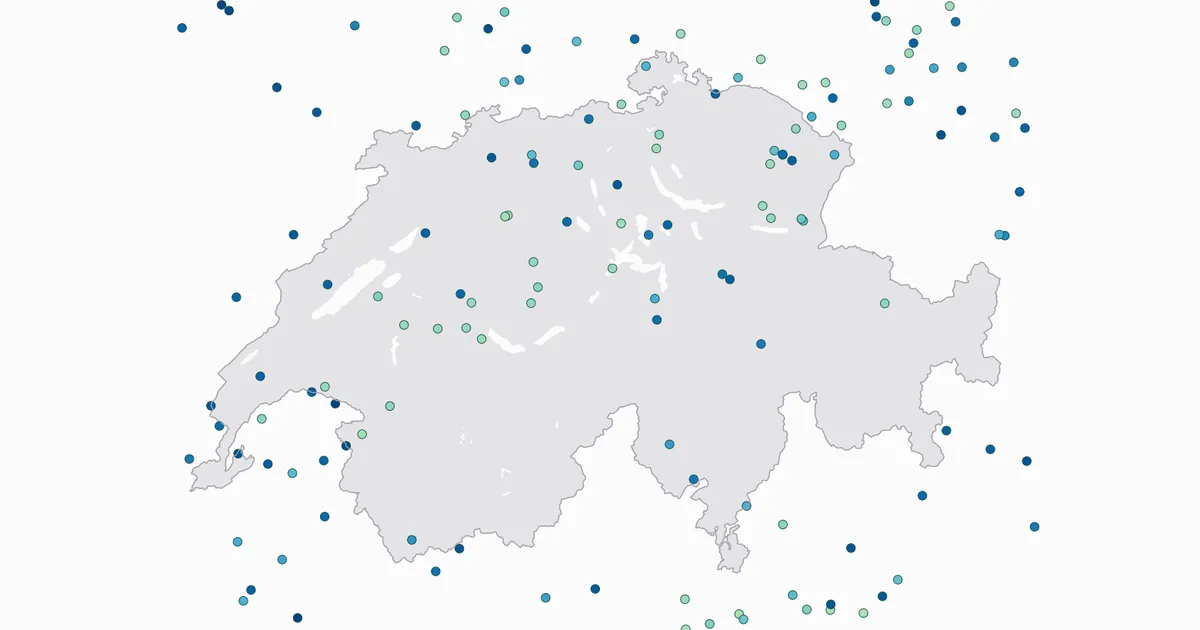
Live Flight Data Step by Step - Part 1 - OpenSky Network and the first API call
 Stefan Koch
 On Tuesday, 20 October 2026, something odd happened over Switzerland. Shortly after two in the afternoon, departures from Zurich dropped from about ten per quarter of an hour to two or three. An hour later they were back. The news caught up later the same day: Skyguide, the Swiss air navigation service provider, had a problem with a system that produces the controllers’ radar picture, and 20 Minuten reported that capacity in Swiss airspace was cut in half for a while.
I didn’t learn about it from the news, though. I saw it in a chart, because a small pipeline on my laptop had been recording every aircraft over Switzerland every 35 seconds.
This series is about building that pipeline from scratch: one API call first, then a database, then a collector that runs all night, and finally analyses that answer questions like how far do aircraft really fly compared with the great circle? or which runway is Zurich using right now, and why? Everything runs locally with Python, DuckDB and marimo notebooks – no cloud account needed.
I originally built this for a data engineering course I teach at the Lucerne University of Applied Sciences and Arts. I’ll publish the complete code at the end of the series.
How aircraft tell the world where they are
Most of what you see on flight-tracking websites comes from ADS-B, short for Automatic Dependent Surveillance – Broadcast. The EU regulation that made it mandatory defines it rather dryly as “a surveillance technique in which aircraft automatically provide, via a data link, data derived from on-board navigation and position-fixing systems” (Regulation (EU) No 1207/2011, Art. 3).
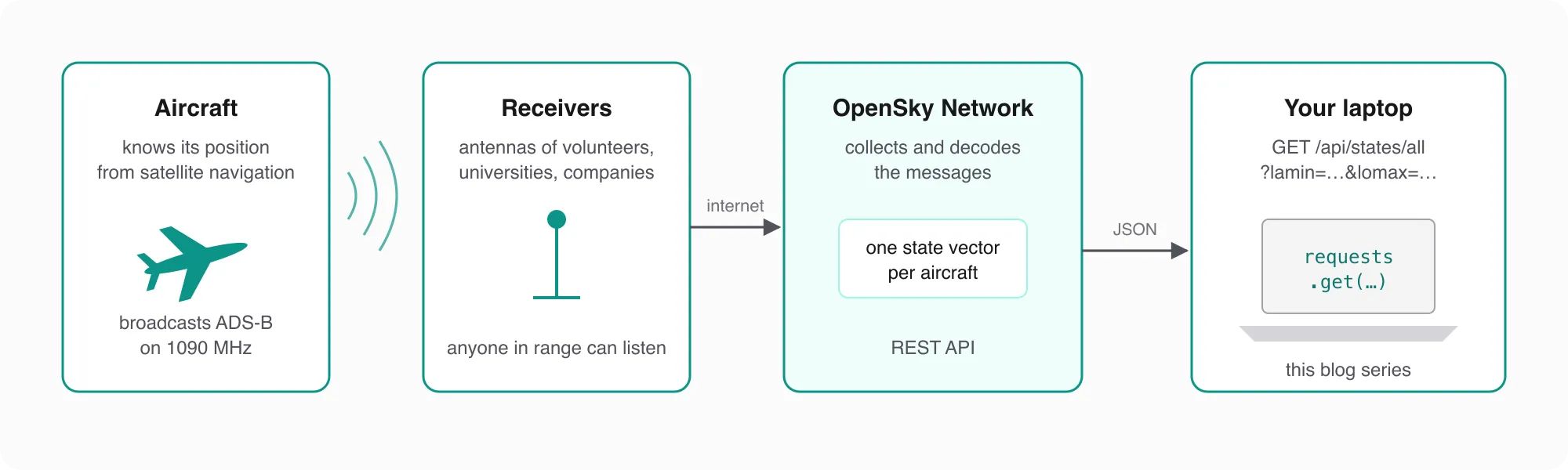
In plain words: the aircraft works out its own position from satellite navigation and broadcasts it, along with its identity, altitude and velocity. Nobody has to ask for it. The messages go out on 1090 MHz as Mode S Extended Squitter frames of 112 bits (The 1090 Megahertz Riddle, the free book by Junzi Sun at TU Delft). Airborne position and velocity are each sent twice per second, the identification about once every five seconds.
Every frame carries the aircraft’s ICAO 24-bit address, usually written as six hex characters. It belongs to the transponder and normally stays with the aircraft for its whole life – that’s the icao24 we’ll meet in every table of this series.
Two properties make ADS-B so useful for hobbyists and researchers, and a bit uncomfortable for security people: the messages are neither encrypted nor authenticated. Anyone with an antenna in range can listen, and as Strohmeier, Lenders and Martinovic put it, “there is no hurdle at all for an attacker to build a transmitter that is able to produce correctly modulated and formatted ADS-B messages”. Keep that second point in mind whenever a position looks too strange to be true.
ADS-B is not optional for larger aircraft anymore. In the US, 14 CFR § 91.225 has required it since 1 January 2020 in Class A, B and C airspace and, over the contiguous states, at and above 10,000 feet. In Europe, the deadline was first set for 7 June 2020 and then, because of COVID, postponed to 7 December 2020. It applies to instrument flights of aircraft with a maximum take-off mass above 5,700 kg or a cruising speed above 250 knots (463 km/h).
The OpenSky Network
One antenna on your balcony sees what flies within its range. To see a whole country, you need many antennas – and that’s what the OpenSky Network is.
It started in 2012 as a research project of armasuisse (Switzerland), the University of Kaiserslautern (Germany) and the University of Oxford (UK). In 2015 it became an independent association, legally a Swiss non-profit based in Burgdorf. The mission is “to openly support global air traffic research on a non-profit basis”. The receivers are run by private people, companies and universities, which is also why coverage is uneven: by their own account, OpenSky has the best coverage in Europe and the US, and low-flying aircraft only show up if a receiver happens to be nearby.
OpenSky offers live data through a REST API, which is what this series uses. University researchers and authorities can also query the full history through Trino. One thing OpenSky does not have, and the FAQ says so with an exclamation mark: schedules, delays, flight numbers or passenger counts. It knows where aircraft are, not where they are supposed to be.
A word on the terms, before we start downloading. The data is licensed for non-profit research and education, and any publication that uses it – this blog included – must cite the OpenSky paper (see the end of this post) and anonymise aircraft identifiers. That’s why you won’t see real callsigns or transponder addresses in this series.
The REST API in five facts
Everything we need is in the REST API documentation:
-
One endpoint does it all for live data:
GET https://opensky-network.org/api/states/all. Without parameters, you get every aircraft in the world. -
A bounding box keeps it small:
lamin,lamax,lomin,lomaxin decimal degrees. All four or none. -
Every call costs credits, depending on the area of the box:
Box area (latitude range × longitude range) Credits per call up to 25 square degrees 1 25 – 100 2 100 – 400 3 more than 400, or the whole world 4 My box for Switzerland – 45.6° to 48.0° north, 5.8° to 10.7° east – covers 2.4 × 4.9 ≈ 12 square degrees: one credit.
-
The budget is per day: 400 credits anonymously, counted per IP address; 4,000 with a free account; 8,000 if a receiver of yours feeds OpenSky for at least 30% of the month. When they’re gone, the API answers
429 Too Many Requests. The headerX-Rate-Limit-Remainingtells you how many are left after each call. -
The data is only so fresh: the time resolution is 10 seconds anonymously and 5 seconds with an account. Asking more often gives you the same snapshot again.
That last pair matters more than it looks. At one call every 35 seconds you need about 2,470 credits a day – fine with an account, impossible without one. And if a whole classroom sits behind one public IP address, they share those 400 anonymous credits. I learned that one the hard way.
The first call
Ten lines of Python with requests:
import requests

URL = "https://opensky-network.org/api/states/all"
box = {"lamin": 45.6, "lamax": 48.0, "lomin": 5.8, "lomax": 10.7}   # Switzerland and a bit around it

response = requests.get(URL, params=box, timeout=20)
response.raise_for_status()
data = response.json()

print("snapshot time:", data["time"])
print("aircraft:     ", len(data["states"]))
print("credits left: ", response.headers.get("X-Rate-Limit-Remaining"))
When I ran it while writing this post, the answer was:
snapshot time: 1792586430
aircraft:      137
credits left:  5
137 aircraft over and around Switzerland. And yes, five credits left: a day of testing does that. The time is a Unix timestamp – seconds since 1 January 1970, UTC – and it’s the moment of the snapshot on OpenSky’s side, not the moment of your request. We’ll lean on that heavily in the next post.
What’s inside one state vector
data["states"] is a list with one entry per aircraft. Each entry is itself a list, not a dictionary – the meaning of a value comes only from its position. Here is one, taken from a snapshot on 20 October 2026 at 12:02:42 UTC, with the identifiers replaced:
["<icao24>", "<callsign>", "Switzerland", 1792497762, 1792497762,
 8.1285, 47.3703, 3253.74, false, 167.59, 259.21, 4.88, null, 3345.18, "<squawk>", false, 0, 0]
The important positions, according to the field list:
| Index | Field | In this example | Unit |
|---|---|---|---|
| 0 | icao24 | transponder address (hex) | – |
| 1 | callsign | 8 characters, padded with spaces | – |
| 2 | origin_country | Switzerland – derived from the ICAO address | – |
| 3 | time_position | time of the last position update | Unix seconds |
| 5 / 6 | longitude / latitude | 8.1285 / 47.3703 | degrees, WGS-84 |
| 7 | baro_altitude | 3,253.74 | metres |
| 8 | on_ground | false | – |
| 9 | velocity | 167.59 | m/s over ground |
| 10 | true_track | 259.21 – heading west-southwest | degrees from north |
| 11 | vertical_rate | 4.88 – climbing | m/s |
| 13 | geo_altitude | 3,345.18 | metres |
| 16 | position_source | 0 = ADS-B (others: ASTERIX, MLAT, FLARM) | – |
| 17 | category | 0 = no information; only with extended=1 | – |
A few things to notice. origin_country is the country that assigned the transponder address – the aircraft’s country of registration, not the airline’s home or the route. Values can be null. And time_position can be older than the snapshot: OpenSky keeps reporting the last known position for a while.
Units for humans
Aviation speaks feet and knots, OpenSky speaks metres and metres per second. Two lines fix that:
altitude_ft = round(3253.74 * 3.28084)   # 10,675 ft
speed_kmh = round(167.59 * 3.6)          # 603 km/h
So this aircraft was climbing through about 10,700 feet at roughly 600 km/h, heading west-southwest. Put all 176 aircraft of that snapshot on a map, colour them by altitude, and you get this:
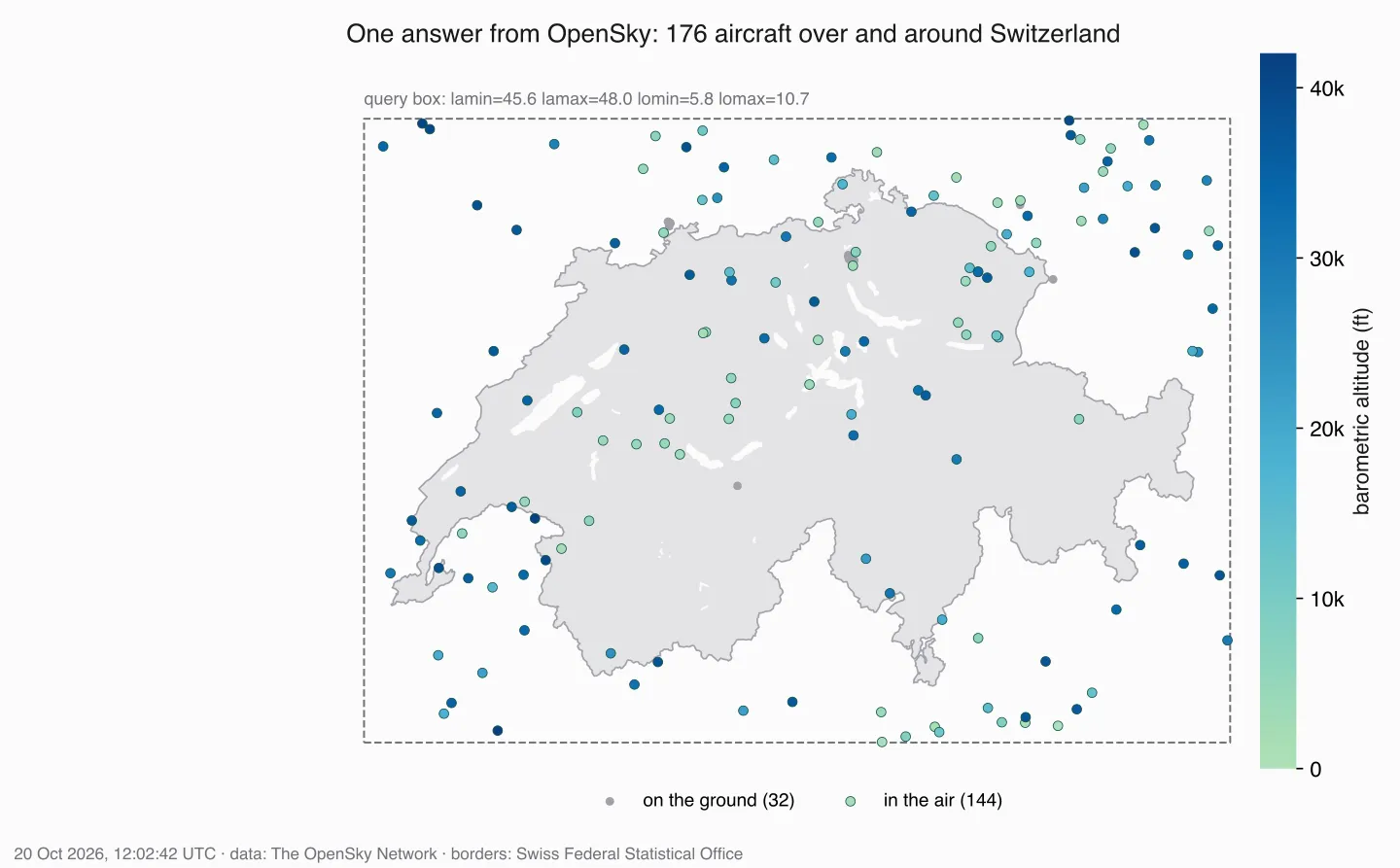
The dashed rectangle is the query box. Everything inside it comes back – including the aircraft over southern Germany, France and northern Italy. The light dots are low – mostly aircraft climbing out of or descending into Zurich and Geneva – and the dark ones are at cruise altitude, crossing the country.
With an account
Anonymous access is fine for trying things out. For anything that runs longer, create a free account and an API client on your OpenSky account page. Since 18 March 2026, OpenSky only accepts the OAuth2 client credentials flow – username and password no longer work:
TOKEN_URL = "https://auth.opensky-network.org/auth/realms/opensky-network/protocol/openid-connect/token"

token = requests.post(TOKEN_URL, timeout=15, data={
    "grant_type": "client_credentials",
    "client_id": CLIENT_ID,          # ends in "-api-client"
    "client_secret": CLIENT_SECRET,
}).json()["access_token"]

response = requests.get(URL, params=box, timeout=20,
                        headers={"Authorization": f"Bearer {token}"})
Tokens expire after 30 minutes; a 401 Unauthorized means it’s time for a new one. Keep the client ID and secret in an .env file, never in the notebook.
What we have now – and what’s missing
One API call gives us a photo: 137 aircraft at one moment. To see movement – a climb, an approach, a holding pattern, or departures that suddenly stop – we need many photos in a row, stored somewhere we can query them.
That’s the next post: storing every answer in a DuckDB database, exactly as it arrived, without ever storing the same snapshot twice.
Data source
Flight data in this series comes from the OpenSky Network. As OpenSky asks, here is the paper to cite:
Matthias Schäfer, Martin Strohmeier, Vincent Lenders, Ivan Martinovic and Matthias Wilhelm. “Bringing Up OpenSky: A Large-scale ADS-B Sensor Network for Research”. In Proceedings of the 13th IEEE/ACM International Symposium on Information Processing in Sensor Networks (IPSN), pages 83–94, April 2014. doi:10.1109/IPSN.2014.6846743
Useful Links
OpenSky Network
- OpenSky Network – the crowdsourced receiver network behind this series
- OpenSky REST API documentation – endpoints, state vector fields, credits
- OpenSky FAQ – coverage, data sources, what OpenSky doesn’t know
- OpenSky terms of use – licence, attribution, anonymisation
- opensky-api on GitHub – official client and authentication notes
ADS-B
- The 1090 Megahertz Riddle – free book on decoding Mode S and ADS-B
- On the Security of the ADS-B Protocol – why ADS-B can be read and spoofed
- Regulation (EU) 2020/587 – the European ADS-B mandate and its postponement
- 14 CFR § 91.225 – the US ADS-B Out requirement
Tools and code
- requests – HTTP for Python
- DuckDB – the database we’ll use from the next post on
- marimo – reactive Python notebooks
News
- 20 Minuten: Technische Störung bei Skyguide – the outage from the introduction (German)
Related Articles
Live Flight Data Step by Step - Part 2 - Storing raw answers in a DuckDB bronze layer
Every OpenSky answer goes into DuckDB exactly as it arrived – once, no matter how often you store it. Two tables, one primary key, and what a full day of raw data looks like.
Secure Hetzner Docker Deployment via Cloudflare Zero Trust Tunnel
Self-hosting is awesome – you have full control over your data, no subscription fees, and you learn a lot about system administration along the way. But it comes with real challenges: security concern
Building a Live Data Simulator for Data Engineering Practice
If you've ever tried to learn Change Data Capture (CDC), streaming pipelines, or incremental data loading, you've probably hit the same frustrating wall I did: **static sample databases don't teach yo
Comments
Comments are powered by giscus. You need a GitHub account to comment.