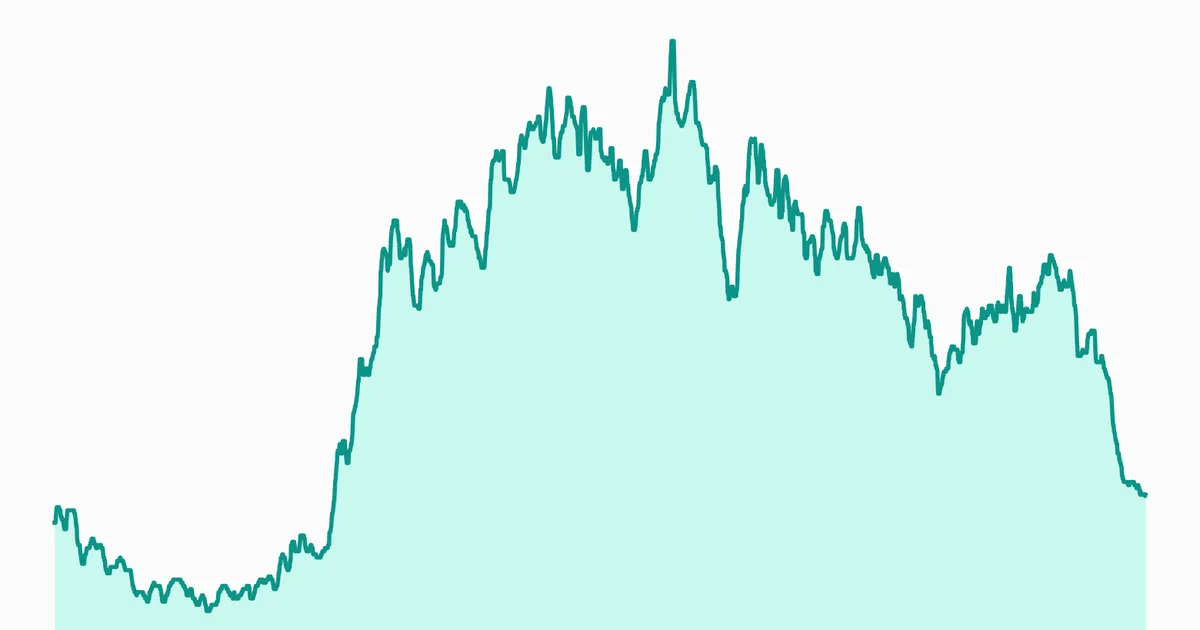
Live Flight Data Step by Step - Part 2 - Storing raw answers in a DuckDB bronze layer
 Stefan Koch
 In part 1 we asked the OpenSky Network for every aircraft over Switzerland and got 137 of them back. That answer is a photo. The interesting questions – when do departures stop, which runway is in use, how long does an approach take – need thousands of photos in a row. So before we fetch anything regularly, we need a place to put the answers.
This post builds that place: the bronze layer, a DuckDB database that stores every answer exactly as it arrived.
Why raw first?
The pipeline in this series follows the medallion pattern you’ll know from lakehouse platforms:
- bronze – the raw data, as it came in, nothing removed
- silver – cleaned and typed: feet instead of metres, empty callsigns removed, one row per aircraft and moment
- gold – what you actually look at: current positions, approaches per airport, traffic per hour
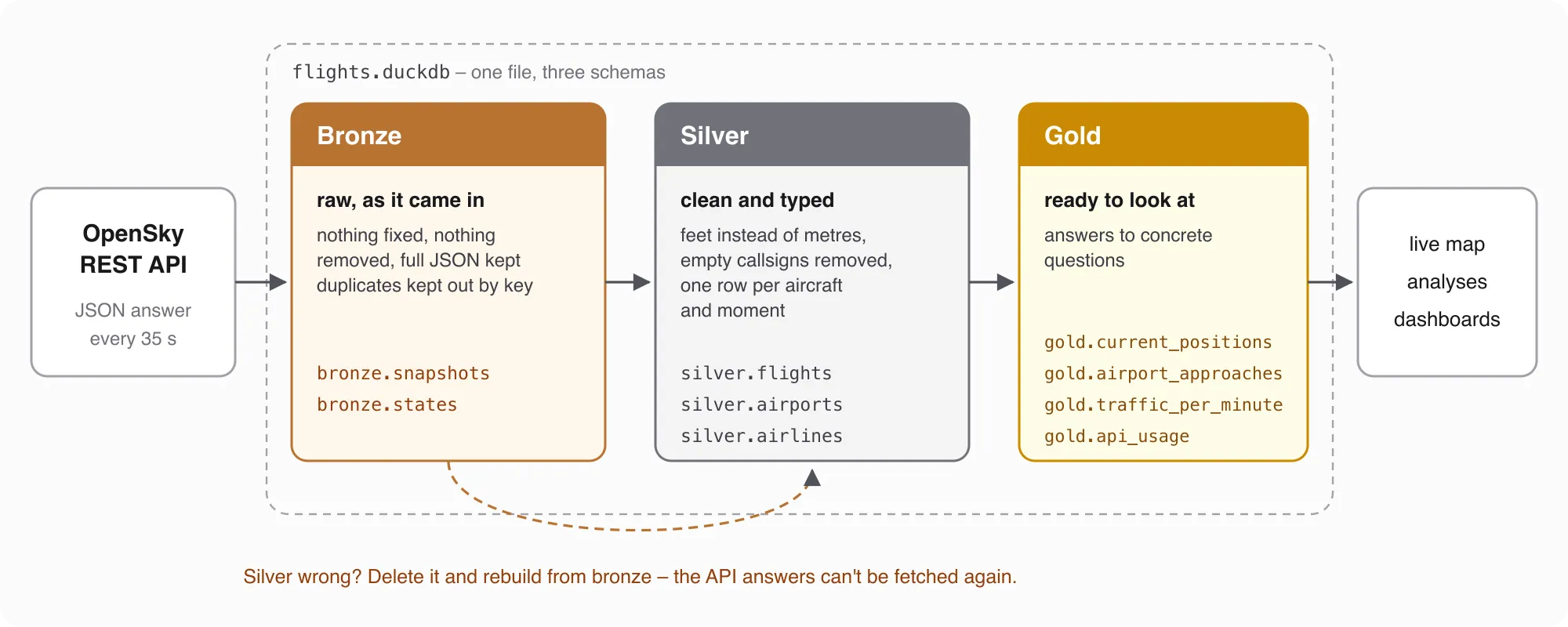
Bronze is boring on purpose. It doesn’t fix units or drop strange rows. If silver turns out to be wrong next month, I can rebuild it from bronze – but only if bronze kept everything. An API answer from last Tuesday can’t be downloaded again.
So why not keep it really simple and write every response to its own JSON file? 2026-10-20T12-02-42.json, next one, next one. It’s tempting, and as a pure archive it even works. For analysis, it doesn’t.
A collector that asks every 35 seconds produces about 2,500 files a day and roughly 900,000 a year. Every question you ask – how many aircraft at noon, which airline flies most over Zurich – means opening all of those files and parsing the same JSON again, each time. Most of the time goes into finding, opening and parsing files, not into the actual counting. Data platforms know this as the small files problem, and it doesn’t go away just because the files sit on your laptop instead of in the cloud.
The files also don’t know anything about each other. Nothing stops the same snapshot from landing in two files, there’s no schema that tells you state[7] is the altitude, and nothing guarantees that a file was written completely before the laptop went to sleep. You end up rebuilding these checks in every script that reads the folder.
A database table solves all three at once: the data is parsed once on the way in, a primary key keeps out duplicates, and a query only reads the columns it needs. That’s why bronze in this series is a table, not a folder – but a table that still keeps the complete raw answer.
Why DuckDB?
DuckDB is a database that runs inside your Python process: no server, no service to install, one file on disk. It speaks SQL – the same SQL you’d write in Databricks or Snowflake – and it’s built for analytical queries, which is exactly what we’ll throw at it later. One file flights.duckdb with three schemas, bronze, silver and gold, is all the infrastructure this series needs.
There are other options, of course. SQLite is just as easy to embed, but it’s built for many small reads and writes, not for scanning millions of rows. PostgreSQL can do both, but it needs a running server. And a folder of Parquet files with Polars would work too – minus the primary key that keeps duplicates out. For a single laptop and analytical SQL, DuckDB is the shortest path.
Two tables
One API answer becomes rows in two tables:
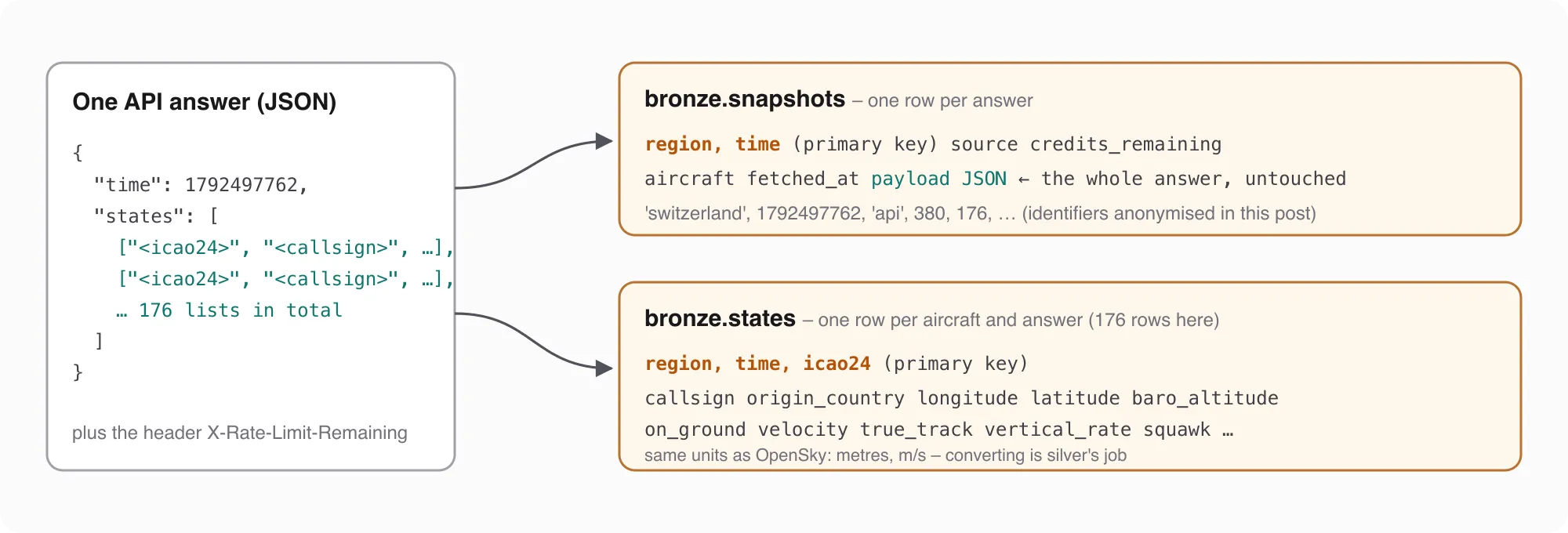
bronze.snapshotsholds one row per answer: when it was taken, where we asked, how many aircraft came back, how many credits were left – and the complete JSON in apayloadcolumn. That’s the insurance policy.bronze.statesholds one row per aircraft and answer, with the fields of the state vector as columns. It’s the same data as the payload, just easier to query.
The interesting part is the primary key. For bronze.snapshots it’s (region, time) – the box we asked for and OpenSky’s snapshot time. Not the time of our request (fetched_at), and not an auto-increment ID.
Why? Remember from part 1 that OpenSky’s data has a time resolution of 10 seconds anonymously. If you ask twice within that window, you get the same snapshot back, with the same time. With (region, time) as the key, the database recognises it as the same answer. With fetched_at as the key, you’d store the same photo twice and count every aircraft double.
The code
Here is the whole bronze layer:
import json
from datetime import datetime, timezone

import duckdb
import pandas as pd

con = duckdb.connect("flights.duckdb")
con.execute("CREATE SCHEMA IF NOT EXISTS bronze")
con.execute("""
    CREATE TABLE IF NOT EXISTS bronze.snapshots (
        region            VARCHAR NOT NULL,
        time              BIGINT  NOT NULL,   -- OpenSky's snapshot time, unix seconds
        fetched_at        TIMESTAMP,
        source            VARCHAR,
        credits_remaining INTEGER,
        aircraft          INTEGER,
        payload           JSON,               -- the whole answer, untouched
        PRIMARY KEY (region, time))""")

FIELDS = ["icao24", "callsign", "origin_country", "time_position", "last_contact", "longitude", "latitude",
          "baro_altitude", "on_ground", "velocity", "true_track", "vertical_rate", "sensors", "geo_altitude",
          "squawk", "spi", "position_source", "category"]
KEEP = [f for f in FIELDS if f not in ("sensors", "spi", "position_source")]

con.execute("""
    CREATE TABLE IF NOT EXISTS bronze.states (
        region VARCHAR NOT NULL, time BIGINT NOT NULL, icao24 VARCHAR NOT NULL,
        callsign VARCHAR, origin_country VARCHAR, time_position BIGINT, last_contact BIGINT,
        longitude DOUBLE, latitude DOUBLE, baro_altitude DOUBLE, on_ground BOOLEAN, velocity DOUBLE,
        true_track DOUBLE, vertical_rate DOUBLE, geo_altitude DOUBLE, squawk VARCHAR, category INTEGER,
        PRIMARY KEY (region, time, icao24))""")


def store_snapshot(data, region, source="api", credits=None):
    """Store one API answer. Returns True if it was new, False if we had it already."""
    new = con.execute(
        "INSERT INTO bronze.snapshots VALUES (?, ?, ?, ?, ?, ?, ?) ON CONFLICT DO NOTHING RETURNING time",
        [region, data["time"], datetime.now(timezone.utc).replace(tzinfo=None), source, credits,
         len(data["states"] or []), json.dumps(data)]).fetchall()
    if not new:
        return False
    rows = [dict(zip(FIELDS, v)) for v in data["states"] or []]
    df = pd.DataFrame(rows).reindex(columns=KEEP)
    df["callsign"] = df["callsign"].str.strip()
    df.insert(0, "time", data["time"])
    df.insert(0, "region", region)
    con.execute("INSERT INTO bronze.states SELECT * FROM df ON CONFLICT DO NOTHING")
    return True
Three details carry the weight:
ON CONFLICT DO NOTHINGmakes the insert idempotent: if a row with the same key exists, nothing happens – no error, no duplicate (INSERT documentation).RETURNING timetells us whether the row was actually inserted. Inserted means a list with one row, skipped means an empty list. That’s howstore_snapshotknows whether to write the states at all.SELECT * FROM df– DuckDB can read a pandas DataFrame straight from a Python variable (SQL on pandas). One statement inserts all aircraft of the answer.
The callsign is the only thing I clean in bronze: OpenSky pads it to eight characters with spaces, and the payload still has the original if I ever need it.
Storing the same answer twice
Let’s feed it the snapshot from part 1’s map – 20 October 2026, 12:02:42 UTC – twice:
data = json.load(open("snapshot_1792497762.json"))
print(store_snapshot(data, "switzerland", credits=380))   # first time
print(store_snapshot(data, "switzerland", credits=380))   # the same answer again
print(con.sql("SELECT COUNT(*) AS snapshots, (SELECT COUNT(*) FROM bronze.states) AS states FROM bronze.snapshots"))
True
False
┌───────────┬────────┐
│ snapshots │ states │
│ int64 │ int64 │
├───────────┼────────┤
│ 1 │ 176 │
└───────────┴────────┘Stored once, skipped once, 176 aircraft in bronze.states. This sounds trivial, but it’s the property everything else in the series depends on. A collector that crashes and restarts, a backfill that overlaps with live data, me pressing Run twice – none of it may count an aircraft twice.
And because the payload is real JSON, DuckDB can query it directly:
con.sql("SELECT payload->>'$.time' AS time, json_array_length(payload->'$.states') AS aircraft FROM bronze.snapshots")┌────────────┬──────────┐
│ time │ aircraft │
│ varchar │ uint64 │
├────────────┼──────────┤
│ 1792497762 │ 176 │
└────────────┴──────────┘A day in bronze
One snapshot is a photo. Here is what a whole day looks like – Tuesday, 20 October 2026, Swiss local time, one answer every 35 seconds:
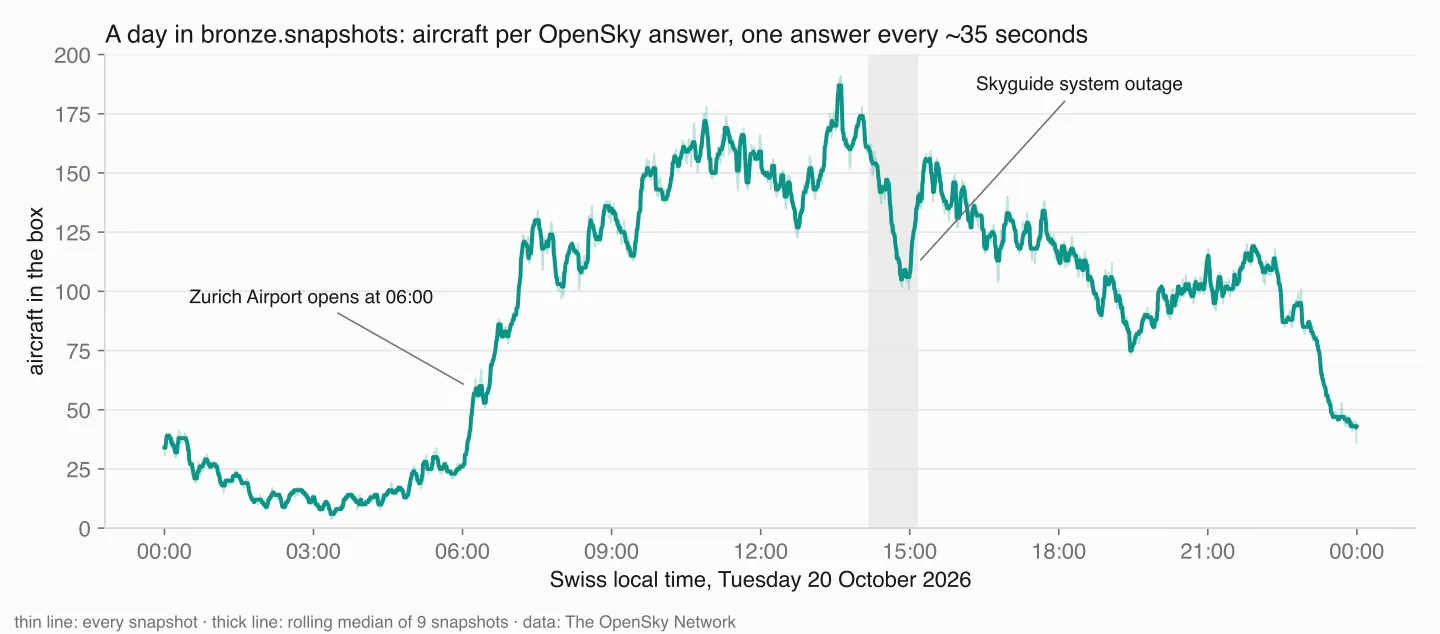
You can read the day straight off the line. Between one and five in the morning there are rarely more than twenty aircraft in the box. Around 06:00 the curve jumps – Zurich Airport’s operating hours start at six. Up to 191 at 13:36. And at a quarter past two, the dip from the introduction of part 1: the Skyguide outage.
In numbers, that day left this in bronze:
| snapshots | 2,990 |
rows in bronze.states | 290,245 |
different aircraft (icao24) | 2,795 |
2,990 snapshots is more than one every 35 seconds would give (about 2,470). That’s not a bug: in the afternoon two collectors were writing into the same table – my live collector and a producer that fills a shared bucket for my students. Both asked OpenSky every 35 seconds, mostly at different moments, so most of their snapshots have different times and both are kept. Where they caught the same snapshot, the key (region, time) stored it once. I’ll come back to merging two sources properly in a later part of the series.
Asking questions in marimo
Every query in this post runs just as well in the DuckDB command line or a plain Python script. I use marimo notebooks for it, and since they’ll show up in every part of this series, here’s a short introduction.
marimo is an open-source notebook for Python, like Jupyter, with two differences that matter here. First, it’s reactive: when you run a cell, marimo automatically reruns every cell that uses a variable defined in it. No more “did I run that cell already?”, and no hidden state from cells you ran in some other order (reactivity). Second, a notebook is a plain .py file – readable in a git diff, runnable as a script, and deployable as an app.
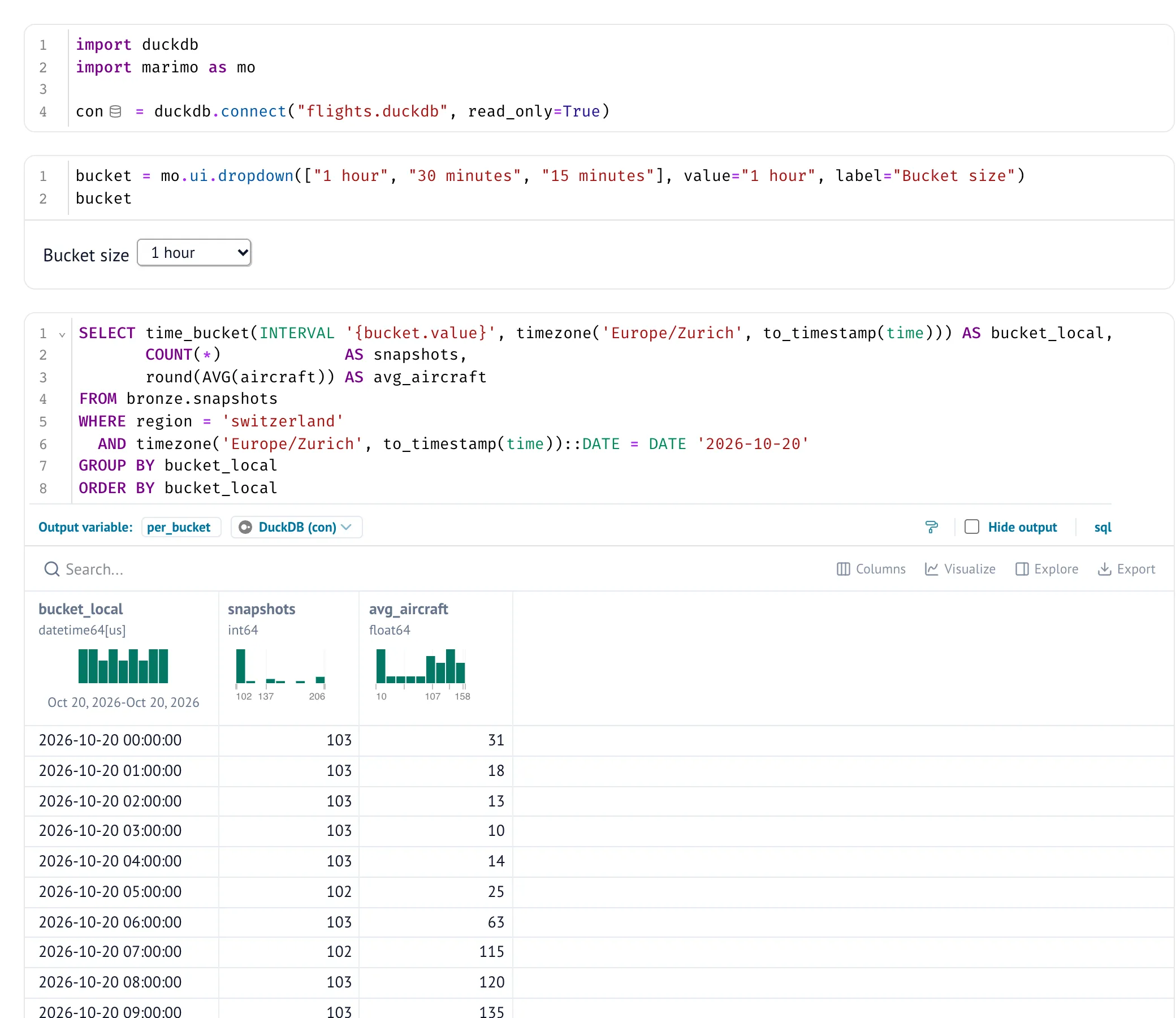
For SQL there’s mo.sql. Give it a query and the DuckDB connection, and you get the result as an interactive table in the notebook and as a DataFrame in Python (SQL in marimo):
bucket = mo.ui.dropdown(["1 hour", "30 minutes", "15 minutes"], value="1 hour", label="Bucket size")

per_bucket = mo.sql(
    f"""
    SELECT time_bucket(INTERVAL '{bucket.value}', timezone('Europe/Zurich', to_timestamp(time))) AS bucket_local,
           COUNT(*)             AS snapshots,
           round(AVG(aircraft)) AS avg_aircraft
    FROM bronze.snapshots
    WHERE region = 'switzerland'
      AND timezone('Europe/Zurich', to_timestamp(time))::DATE = DATE '2026-10-20'
    GROUP BY bucket_local
    ORDER BY bucket_local
    """,
    engine=con,
)
The query is an f-string, so it can use Python values – here the value of a dropdown. Switch it from one hour to 15 minutes, and marimo reruns the query on its own. You don’t have to type the mo.sql(...) call yourself: the SQL button in the editor creates such a cell.
A few SQL questions
With the data in DuckDB, questions become SQL. The first one is the query from the screenshot, without the dropdown – snapshots and average aircraft per hour:
SELECT time_bucket(INTERVAL 1 HOUR, timezone('Europe/Zurich', to_timestamp(time))) AS hour_local,
       COUNT(*)            AS snapshots,
       round(AVG(aircraft)) AS avg_aircraft
FROM bronze.snapshots
GROUP BY hour_local
ORDER BY hour_local
A complete hour at one call every 35 seconds has about 103 snapshots, and that’s exactly what most hours show. Fewer would mean a gap – the laptop slept, the network was down, the credits ran out. It’s the first query I run after a night of collecting.
Where are the aircraft registered?
SELECT origin_country, COUNT(DISTINCT icao24) AS aircraft
FROM bronze.states
GROUP BY origin_country
ORDER BY aircraft DESC
LIMIT 5
Switzerland 374
Germany 312
United Kingdom 303
Ireland 239
Malta 236Malta in fifth place over Switzerland isn’t a sudden boom in Maltese aviation. Ryanair’s subsidiary Malta Air puts its aircraft on the Maltese register – and origin_country is the country of registration, derived from the transponder address, not the airline or the route.
Bronze is messy, and that’s fine
The last query counts what’s wrong with the raw data:
SELECT COUNT(*)                                                 AS total,
       COUNT(*) FILTER (WHERE baro_altitude IS NULL)            AS no_altitude,
       COUNT(*) FILTER (WHERE on_ground)                        AS on_ground,
       COUNT(*) FILTER (WHERE callsign IS NULL OR callsign = '') AS no_callsign,
       COUNT(*) FILTER (WHERE time - time_position > 60)        AS old_position
FROM bronze.states
For the same day:
| total | no altitude | on the ground | no callsign | position older than 60 s |
|---|---|---|---|---|
| 290,245 | 70,174 | 69,576 | 3,303 | 29,290 |
Almost every row without a barometric altitude belongs to an aircraft on the ground. About one row in ten carries a position that’s more than a minute older than the snapshot – OpenSky keeps reporting the last known position for a while. A few thousand rows have no callsign at all.
None of this gets deleted in bronze. Deciding what’s an error, what’s an aircraft on the ground and what’s simply old is silver’s job, and I’ll get to it in a later part.
Two things that cost me time
DuckDB allows only one writing process per file. A second process that opens flights.duckdb gets IO Error: Could not set lock on file – even if it only wants to read while another process writes (concurrency). Within one process you can use several connections from con.cursor(). For notebooks that analyse while a collector writes, I work on a copy of the file.
Time zones sneak in through the cursor. to_timestamp(time) returns a timestamp with time zone, and casting it to a plain TIMESTAMP uses the session’s time zone setting. I set SET TimeZone = 'UTC' on my connection – and later lost an evening because cursors created with con.cursor() didn’t inherit that setting and quietly used my laptop’s zone instead. Two hours of offset in summer. If you need UTC no matter what, make_timestamp(time * 1000000) doesn’t care about any setting.
What’s next
We can now store an answer safely, as often as we like. What we can’t do yet is fetch one every 35 seconds for hours without burning through the credits or falling over at the first 429. That’s what a later part is about: a collector with a credit budget, exponential backoff and a rhythm that doesn’t drift.
Data source
Flight data: The OpenSky Network – Matthias Schäfer, Martin Strohmeier, Vincent Lenders, Ivan Martinovic and Matthias Wilhelm. “Bringing Up OpenSky: A Large-scale ADS-B Sensor Network for Research”. In Proceedings of the 13th IEEE/ACM International Symposium on Information Processing in Sensor Networks (IPSN), pages 83–94, April 2014. doi:10.1109/IPSN.2014.6846743
Useful Links
DuckDB
- Why DuckDB – in-process, analytical, one file
- INSERT and ON CONFLICT – idempotent inserts with RETURNING
- SQL on pandas – querying DataFrames by variable name
- JSON functions – querying the payload column
- Date functions and time_bucket – grouping timestamps
- Concurrency – why only one process may write
marimo
- marimo – reactive Python notebooks, stored as
.pyfiles - Reactivity – how marimo decides which cells to rerun
- SQL in marimo – SQL cells with
mo.sql
Data
- OpenSky REST API – state vector fields and time resolution
- Zurich Airport operating hours – why the curve jumps at 06:00 (German)
Alternatives
- SQLite – embedded database for transactional workloads
- PostgreSQL – the classic open-source database server
- Polars – fast DataFrames, reads Parquet directly
Related Articles
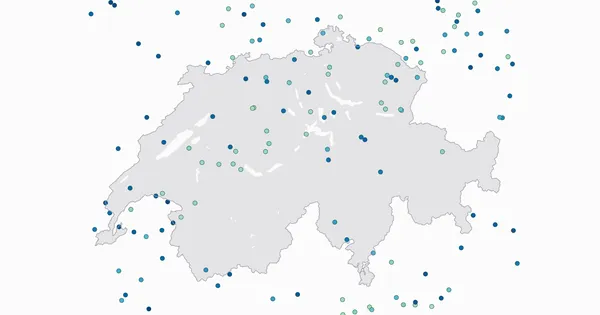
Live Flight Data Step by Step - Part 1 - OpenSky Network and the first API call
Where live flight data comes from, how ADS-B and the OpenSky Network work, and how to fetch every aircraft over Switzerland with ten lines of Python.
How to load, process and visualize weather data from OpenWeather in the Databricks Lakehouse
In this HowTo I will show you how to load weather data from the OpenWeather API into the Databricks Lakehouse. The data is loaded via REST API from OpenWeather and then processed in the Medallion arch
Secure Hetzner Docker Deployment via Cloudflare Zero Trust Tunnel
Self-hosting is awesome – you have full control over your data, no subscription fees, and you learn a lot about system administration along the way. But it comes with real challenges: security concern
Comments
Comments are powered by giscus. You need a GitHub account to comment.