Live Flight Data Step by Step - Part 3 - A collector that keeps going
 Stefan Koch
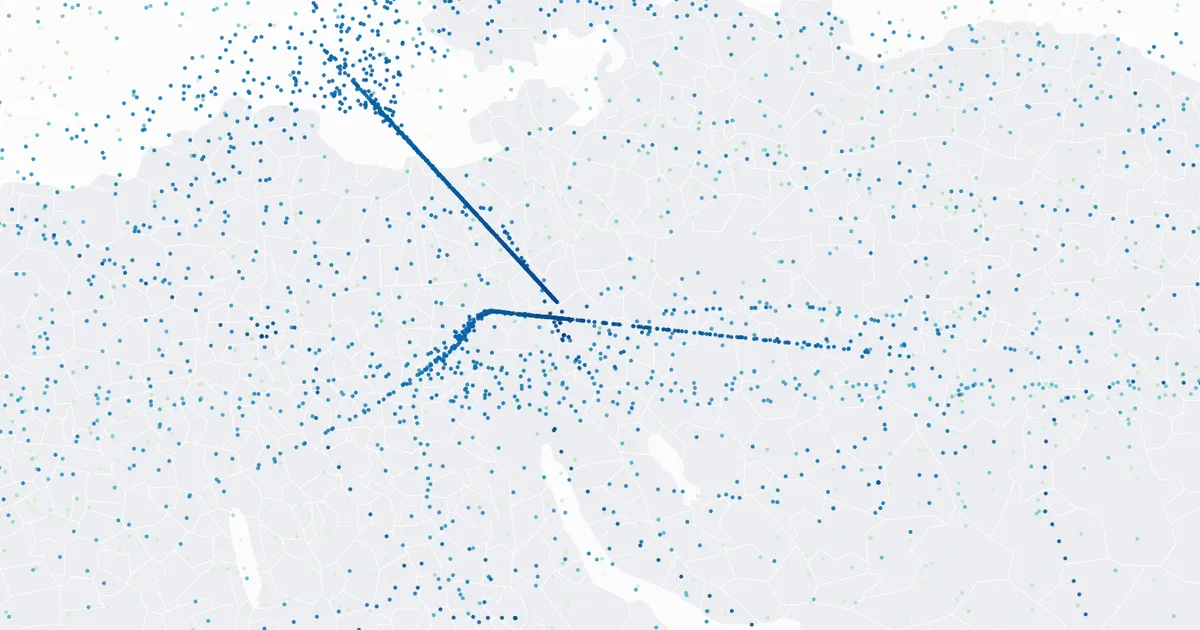
 One snapshot is a photo. To see aircraft move – climb out of Zurich, line up for the approach, circle in a holding pattern – you need the next photo 35 seconds later, and the one after that, for hours.
That sounds like a while True loop with a sleep(35). It is, almost. This post is about the “almost”: the credits that run out, the errors a long run will hit, and a loop that slowly falls out of step. And about what my own collector actually did over one afternoon and evening, including the parts I can’t fully explain.
The budget first
Before writing any loop, I should have done the maths. OpenSky charges credits per call, and how many depends on the size of the box you ask for. The Switzerland box from part 1 covers about 12 square degrees, which costs 1 credit per call.
| Credits per day | |
|---|---|
| anonymous, per IP address | 400 |
| free account | 4,000 |
| one call every 35 seconds, all day | 86,400 / 35 ≈ 2,470 |
So anonymously, a collector running every 35 seconds lasts 400 × 35 seconds – a little under four hours. Then it’s over until the next day. For a whole night you need an account, and since March 2026 that means the OAuth client credentials from part 1.
OpenSky tells you where you stand with every answer: the header X-Rate-Limit-Remaining holds the credits left. My collector stores that number in bronze.snapshots and stops on its own when fewer than 20 are left.
What one afternoon and evening looked like
Here is what my laptop collector did on 20 October, anonymously, one call every 35 seconds:
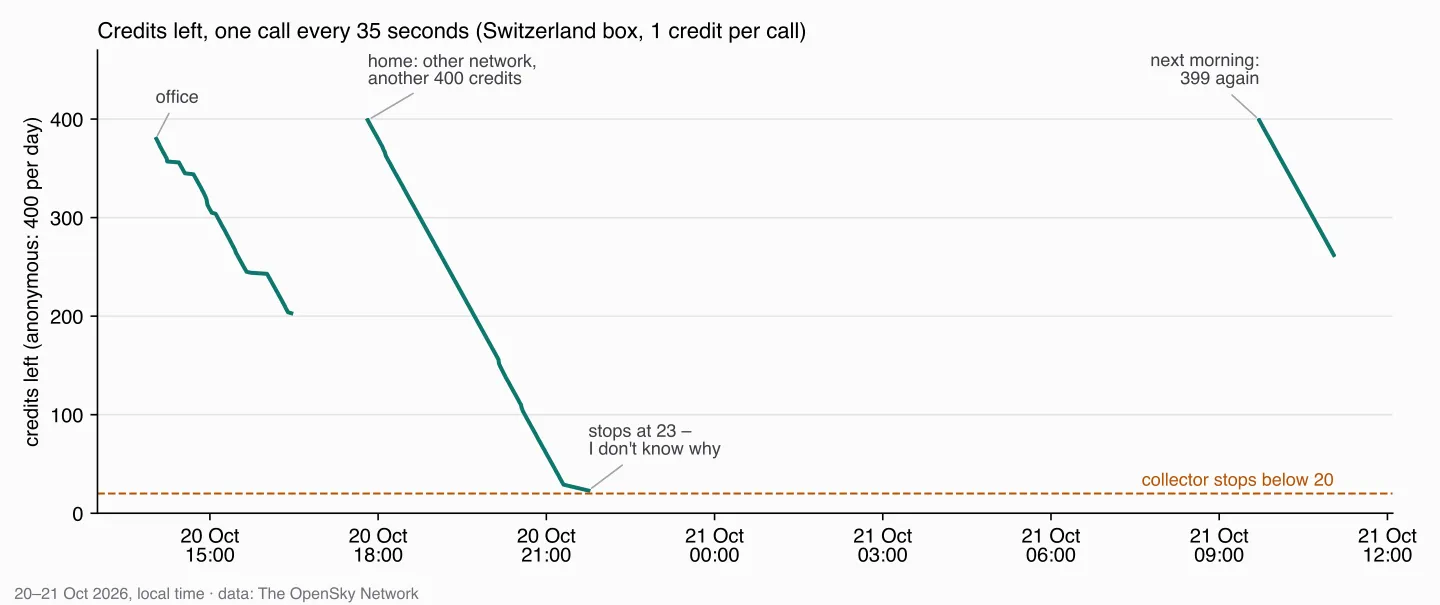
Three things in that chart I only understood afterwards – and one I still don’t.
The office and home lines. In the afternoon I collected in the office. Then I packed up, went home and started again – and had 399 credits instead of about 200. The anonymous budget belongs to the IP address, and at home I had a different one. Nice to see in the data, and a warning for a classroom: twenty students behind one school network share one budget of 400.
The steady slope. At home, the collector ran from 17:48 to 21:45 and went from 399 to 23 credits: 376 credits for 362 further snapshots. Every call costs a credit, whether its answer is new or not, so the other 14 probably went to calls that brought nothing new – or to something else on the same network. The data can’t tell me which.
The end at 23. The collector stops below 20 credits. It stopped at 23. I don’t know why – maybe I closed the laptop, maybe something else. The data doesn’t say, and I don’t remember. The same goes for the short gaps in the office line, between 4 and 17 minutes long.
The next morning, the counter was back at 399.
What a long run will hit: 429
When the credits are gone, OpenSky answers 429 Too Many Requests. Network errors happen too – on a train, in a café, when the laptop wakes up and the Wi-Fi isn’t there yet. A collector that crashes at the first error isn’t a collector.
The textbook answer for “try again later” is exponential backoff: wait, and if it fails again, wait twice as long. My first version did exactly that – 70 seconds, 140, 280, up to a cap of 600.
While writing this post, I reread the OpenSky documentation and found what I had ignored: with a 429, OpenSky sends the header X-Rate-Limit-Retry-After-Seconds – how long to wait until there are credits again. OpenSky knows when the budget refills; my loop was guessing. So I changed it: if the header is there, wait exactly that long. Only without the header (or with something unreadable in it) fall back to doubling.
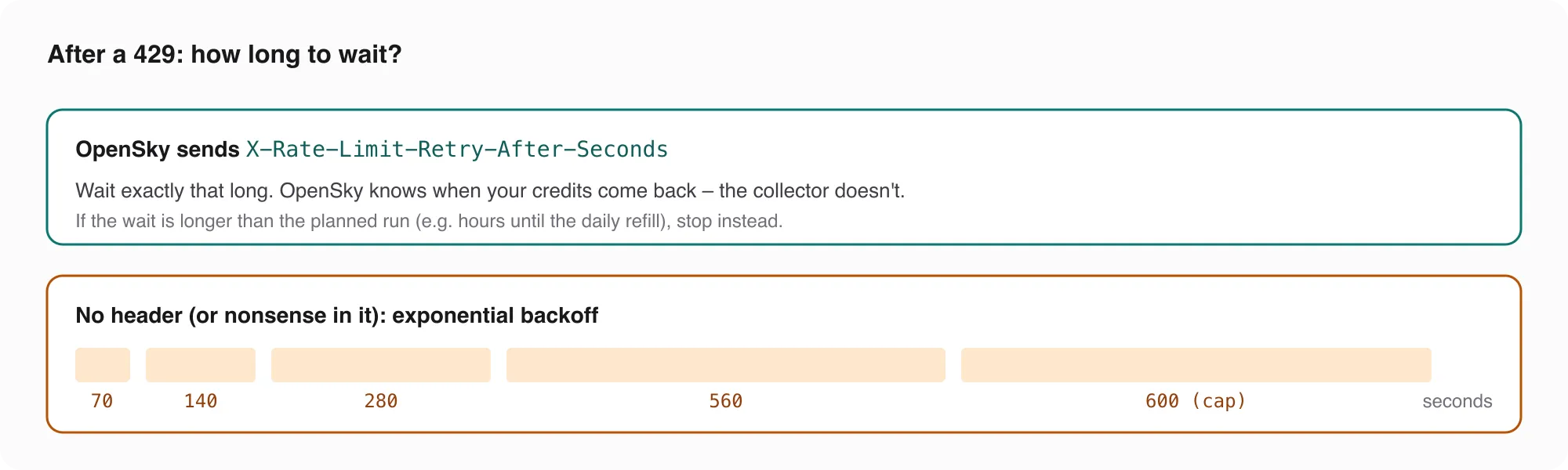
One more case: when the credits are used up, that header can say “wait several hours” – until the daily refill. If the collector is only supposed to run for the next twenty minutes, waiting makes no sense. It stops instead.
I should be honest about one thing: in the run above, I never got a 429. The collector stops at 20 credits, before OpenSky has to say no. The 429 handling is there for the cases I don’t plan for.
A loop that doesn’t drift
The naive loop sleeps 35 seconds after every call. But the call itself takes time – say two seconds. Then the calls start at 0, 37, 74, 111 seconds, and instead of 103 calls an hour you get about 97. Not dramatic, but it adds up, and the data no longer has the rhythm you think it has.
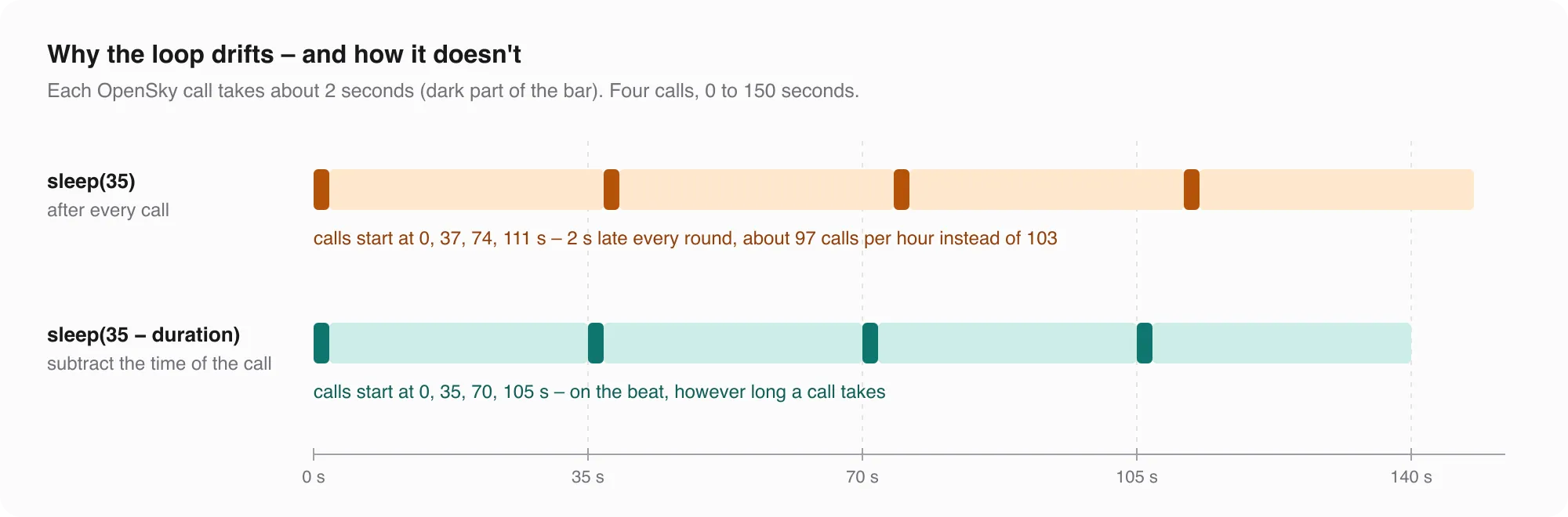
The fix is one subtraction: measure how long the call took, and sleep for the rest of the 35 seconds.
Did it work? At home, between 17:48 and 21:18, the collector stored 361 snapshots in a row without a gap. The median time between two of my requests was 35.005 seconds, and nine out of ten were between 34.75 and 35.25 seconds. The snapshot times from OpenSky are less regular – between 28 and 42 seconds apart in most cases – because OpenSky’s anonymous data has a resolution of 10 seconds. That’s their clock, not my loop.
The loop
Here is the whole thing. fetch is the API call from part 1, store is store_snapshot from part 2:
import time

import requests


def collect(minutes, interval, fetch, store, sleep=time.sleep, min_credits=20):
    """Call fetch() every `interval` seconds for `minutes`. Returns the number of new snapshots."""
    end, new, backoff = time.time() + minutes * 60, 0, interval
    while time.time() < end:
        t0 = time.time()
        try:
            data, credits = fetch()
        except requests.HTTPError as e:
            if e.response is not None and e.response.status_code == 429:
                header = e.response.headers.get("X-Rate-Limit-Retry-After-Seconds")
                if header is not None:
                    sleep(float(header))                # OpenSky knows best
                else:
                    backoff = min(backoff * 2, 600)     # guess, longer each time
                    sleep(backoff)
                continue
            raise
        new += bool(store(data, credits))
        backoff = interval
        if credits is not None and credits < min_credits:
            break
        sleep(max(0.0, interval - (time.time() - t0)))  # stay on the beat
    return new
The version that runs in my project additionally retries network errors and stops when the wait from the header would outlast the run. The core is the same.
Testing without waiting
You might wonder why fetch, store and sleep are parameters instead of being called directly. Because otherwise testing this loop means waiting 35 seconds per call and hoping OpenSky sends a 429 at the right moment.
With parameters, a fake API does the job in milliseconds:
def answer(t, credits):
    return lambda: ({"time": t, "states": []}, credits)

def too_many(retry_after=None):
    def call():
        r = requests.Response()
        r.status_code = 429
        if retry_after is not None:
            r.headers["X-Rate-Limit-Retry-After-Seconds"] = str(retry_after)
        raise requests.HTTPError("429", response=r)
    return call

script = iter([answer(1, 100), too_many(), too_many(120), answer(1, 99),
               answer(2, 98), answer(3, 10)])
seen, waits = set(), []

def store(data, credits):
    new = data["time"] not in seen
    seen.add(data["time"])
    return new

n = collect(minutes=1, interval=35, fetch=lambda: next(script)(), store=store, sleep=waits.append)
print(n, [round(w) for w in waits])
3 [35, 70, 120, 35, 35]Three new snapshots (time 1 came twice, the second one was skipped), 70 seconds after the 429 without a header, exactly 120 after the one with the header, and a stop at 10 credits. sleep=waits.append is the trick: instead of sleeping, the loop writes down how long it would have slept.
Out of the notebook
A loop that runs for hours doesn’t belong in a notebook. In my project it’s a small script that writes into flights.duckdb:
uv run collector.py --region switzerland --interval 35 --minutes 0 # 0 = until Ctrl+CThat’s fine while the laptop is open. But a laptop sleeps, changes networks and goes home in a backpack. For my students I wanted data that keeps coming, also at three in the morning. So I built a second collector – and switched it off again after three days. More on why below.
The second collector: Switzerland and the world, into Cloudflare R2
At home I have an Ubuntu server where several of my services run around the clock. For three days it also ran a producer – as two systemd services that start at boot and restart after a failure. It used an OpenSky account with 4,000 credits and asked for two boxes:
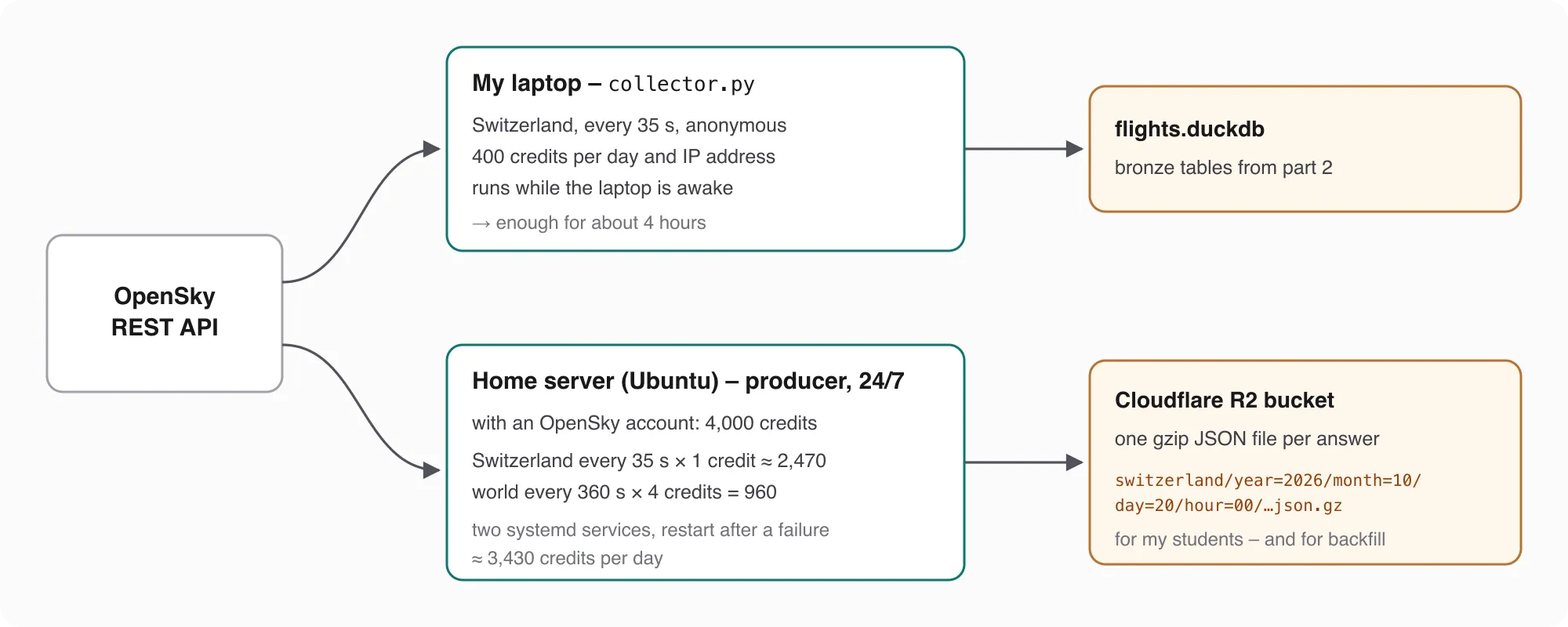
- Switzerland every 35 seconds, 1 credit per call: about 2,470 credits a day
- the whole world every 360 seconds, 4 credits per call (the most expensive class – anything above 400 square degrees): 240 calls, 960 credits a day
Together that’s about 3,430 of the 4,000 credits – enough room that the daily budget doesn’t run out.
Each answer goes into a Cloudflare R2 bucket as one gzip-compressed JSON file, sorted into folders by region and hour:
switzerland/year=2026/month=10/day=20/hour=00/switzerland_1792454415.json.gz
world/year=2026/month=10/day=20/hour=00/world_1792454740.json.gz
Wait – one file per answer? Didn’t I argue against exactly that in part 2? I did, for analysis. Here the files are a delivery format: R2 is the shared mailbox for a whole class, and nobody queries it directly. Every student loads the files into their own DuckDB bronze layer – and that’s where the analysis happens.
What it adds up to, counted in the bucket for 20 October:
| Files | Median file size | Per day | |
|---|---|---|---|
| Switzerland | 2,467 | 4.4 KB | 9.7 MB |
| world | 240 | 359 KB | 88.8 MB |
2,467 files out of a theoretical 2,469 – the server did what the laptop couldn’t. Together it’s about 100 MB a day. Had I let it run, that would have been about 3 GB a month: R2’s free tier includes 10 GB of storage per month, so it would have lasted about three months; after that, each additional GB costs $0.015 a month. The writes – about 81,000 a month – would have stayed far below the free million.
The producer was simpler than the laptop collector in one respect: after a 429 it didn’t wait, it stopped – and systemd started it again a minute later. Not elegant, but with the budget above it shouldn’t have come to that.
Why I switched it off after three days
Technically, this setup works. Whether it should run is a different question, and I asked OpenSky. Their answer was clear: the REST API isn’t meant for collecting data continuously – which is also why they block the big cloud providers. OpenSky already collects the data itself and makes it available through better interfaces, also to universities: the historical database via Trino.
So take this section for what it is: a sketch of how you could build a collector that runs around the clock – systemd, a credit budget, object storage, partitioned files – not an invitation to point it at OpenSky permanently. I stopped the producer after three days. If you need longer periods for research or teaching, ask OpenSky for access to the historical data instead.
What’s next
After a night, bronze holds two kinds of data: my laptop’s, with gaps whenever the laptop slept, and the producer’s files in R2 from those three days, without gaps. In a later part I’ll fill the gaps from R2 – and merge two sources into one table without counting anything twice.
Data source
Flight data: The OpenSky Network – Matthias Schäfer, Martin Strohmeier, Vincent Lenders, Ivan Martinovic and Matthias Wilhelm. “Bringing Up OpenSky: A Large-scale ADS-B Sensor Network for Research”. In Proceedings of the 13th IEEE/ACM International Symposium on Information Processing in Sensor Networks (IPSN), pages 83–94, April 2014. doi:10.1109/IPSN.2014.6846743
Useful Links
OpenSky
- Historical database (Trino) – OpenSky’s interface for longer periods, also for universities
- OpenSky REST API – endpoints, state vector fields, limitations
- API credits – credits per box size, daily budgets, rate limit headers
Retrying
- HTTP 429 Too Many Requests (MDN) – what the status code means
Cloudflare R2
- R2 documentation – S3-compatible object storage
- R2 pricing – free tier and storage costs
Tools
- requests – HTTP for Python
- DuckDB – the database for the bronze layer
- systemd services – running a script around the clock
Related Articles
Live Flight Data Step by Step - Part 2 - Storing raw answers in a DuckDB bronze layer
Every OpenSky answer goes into DuckDB exactly as it arrived – once, no matter how often you store it. Two tables, one primary key, and what a full day of raw data looks like.
Live Flight Data Step by Step - Part 1 - OpenSky Network and the first API call
Where live flight data comes from, how ADS-B and the OpenSky Network work, and how to fetch every aircraft over Switzerland with ten lines of Python.
Secure Hetzner Docker Deployment via Cloudflare Zero Trust Tunnel
Self-hosting is awesome – you have full control over your data, no subscription fees, and you learn a lot about system administration along the way. But it comes with real challenges: security concern
Comments
Comments are powered by giscus. You need a GitHub account to comment.