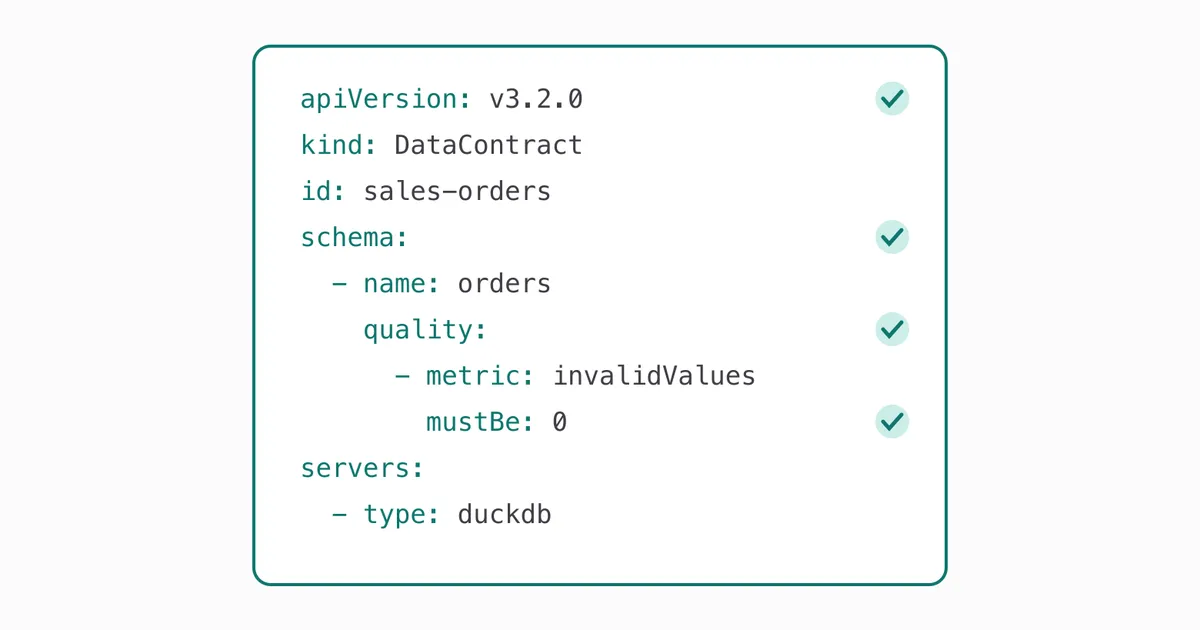
Open Data Contract Standard: writing down what your data promises
 Stefan Koch
 TL;DR – A data contract writes down what a dataset promises – schema, quality rules, service levels, ownership, usage – in a YAML file next to the code. ODCS is an open standard for that file, hosted by Bitol under the Linux Foundation AI & Data. With the open-source datacontract CLI, the contract becomes a check in CI: in the demo below it stops a one-line change that would have quietly broken 1,276 orders, and a contract change that would have removed a column consumers rely on.
Here is a pull request that looks harmless. The shop team cleans up a spelling: the order status canceled becomes cancelled, British style. One line changed, tests green, merged.
Two floors up, the revenue dashboard excludes canceled orders with WHERE status <> 'canceled'. From now on, that filter matches nothing. 1,276 cancelled orders count as revenue. Nobody gets an error message. Someone notices a week later, when the numbers don’t match the bank account.
Every table comes with promises like “status is one of four values”. They live in people’s heads, in a wiki page from last year, in a dashboard filter. A data contract writes them down in a form a machine can check – and the Open Data Contract Standard (ODCS) is an open, vendor-neutral format for it.
I didn’t go looking for data contracts. I was looking for a data quality tool for a Databricks platform – something that checks every row on its way into the clean layer and says which rule it broke. One of the candidates, DQX from Databricks Labs, can generate its checks from a data contract in a format called ODCS. Before writing rules in that format, I wanted to know what it is and who else speaks it. The standard turned out to be more interesting than the feature that led me to it.
In this post I go through what ODCS is and what goes into a contract, and then I replay exactly this story in a small public repository: the same pull request, but with a contract – and this time the check turns red before anyone merges.
What a data contract is
ODCS defines it in one sentence: “A data contract defines the agreement between a data producer and consumers.” In practice it’s a YAML file that sits next to the code that produces the data.
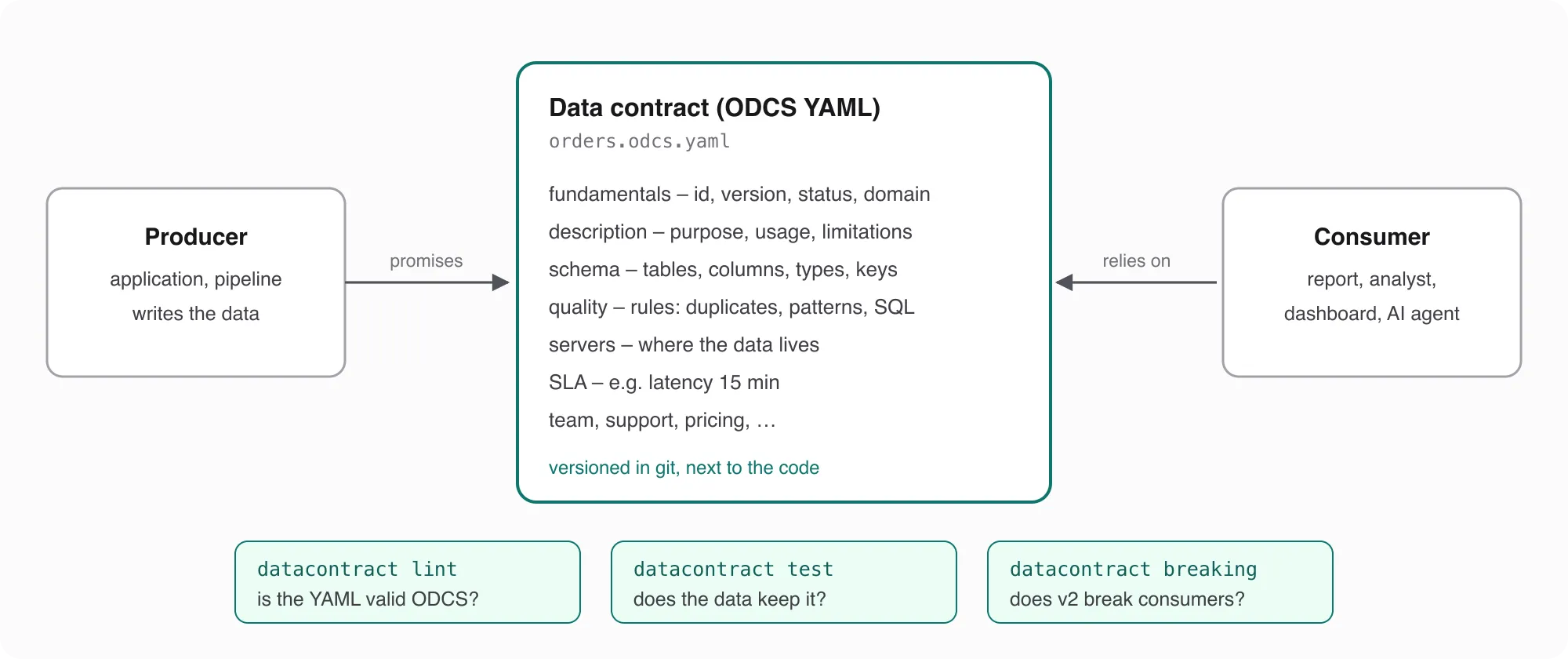
The important word is agreement. A database schema tells you what a table looks like today. A contract also says what it’s for and what it’s not for, which rules the data follows, how fresh it is, who owns it – and it has a version, so a change becomes visible before it breaks someone.
Where ODCS comes from
ODCS didn’t start in a committee. According to its history:
- It began at PayPal as the “data contract template”, used there to implement Data Mesh.
- From version 2.2.0 it was maintained by the AIDA User Group. On 30 November 2023 that group and the Linux Foundation AI & Data created Bitol, the project that now hosts ODCS and its sibling, the Open Data Product Standard (ODPS).
- v3.0.0 (October 2024) was a breaking redesign that removed PayPal-specific parts and eased migration from other formats.
- v3.1.0 followed in December 2025, v3.2.0 on 8 September 2026.
The standard is licensed under Apache 2.0, and there’s a JSON Schema you can load into VS Code or IntelliJ to get validation while you type.
What goes into a contract
An ODCS contract has a handful of sections. Only a few fundamentals are required; everything else you add when you need it.
Fundamentals and lifecycle
apiVersion, kind: DataContract, id and version are required (fundamentals). name, domain, tags and status are optional. For status the standard gives “proposed”, “draft”, “active”, “deprecated” and “retired” as examples – a lifecycle you can see at a glance.
The description block has three fields I’d always fill in: purpose (what the data is for), usage (how to use it) and limitations (technical, compliance and legal limits). That last one is where “do not join customer IDs with personal data” belongs.
Schema
The schema lists objects (tables) and their properties (columns), each with a logicalType – one of string, date, timestamp, time, number, integer, object, array, boolean, map or vector – and optionally the physicalType of the database (schema). Beyond types, a property can carry what usually lives nowhere:
required,primaryKeyandprimaryKeyPositionbusinessName– what the business calls the columnclassification– for example public, restricted, confidentialcriticalDataElement– true for the columns that really matterexamples– values that show what the data looks like
Data quality
Quality rules come in four kinds (data quality):
- Text – a rule in plain words, for example “the email address was verified”. Not executable yet, but written down.
- Library – predefined metrics the tool turns into checks.
- SQL – a query that returns a number to compare.
- Custom – checks in the syntax of a specific engine. The standard has examples for Soda and Great Expectations and allows any engine name; DQX, for instance, reads rules with
engine: dqx.
The library is small and covers the usual suspects:
| Metric | Level | Counts |
|---|---|---|
nullValues | column | null values |
missingValues | column | values you define as missing, e.g. '' or 'N/A' |
invalidValues | column | values outside a list (validValues) or not matching a pattern |
duplicateValues | column or table | duplicates in a column, or in a combination of columns |
rowCount | table | rows |
The result is compared with an operator: mustBe, mustNotBe, mustBeGreaterThan, mustBeGreaterOrEqualTo, mustBeLessThan, mustBeLessOrEqualTo, mustBeBetween or mustNotBeBetween. A rule can also say why it matters: a dimension (accuracy, completeness, conformity, consistency, coverage, timeliness, uniqueness), a severity, a businessImpact – and scheduler/schedule if it should run on a cron.
Service levels
SLAs are key-value pairs under slaProperties (SLA). The standard recommends a fixed vocabulary: availability, throughput, errorRate, generalAvailability, endOfSupport, endOfLife, retention, frequency, latency (preferred over “freshness”), timeToDetect, timeToNotify and timeToRepair.
Everything else
servers say where the data lives – from Databricks, Snowflake and BigQuery to Postgres, DuckDB, S3 and Kafka. team, roles, support and price say who owns it, who gets access, where to ask and what it costs. And since v3.2.0 there’s context for AI agents – more on that below, because it’s the most interesting addition.
Step 1: start from what’s there
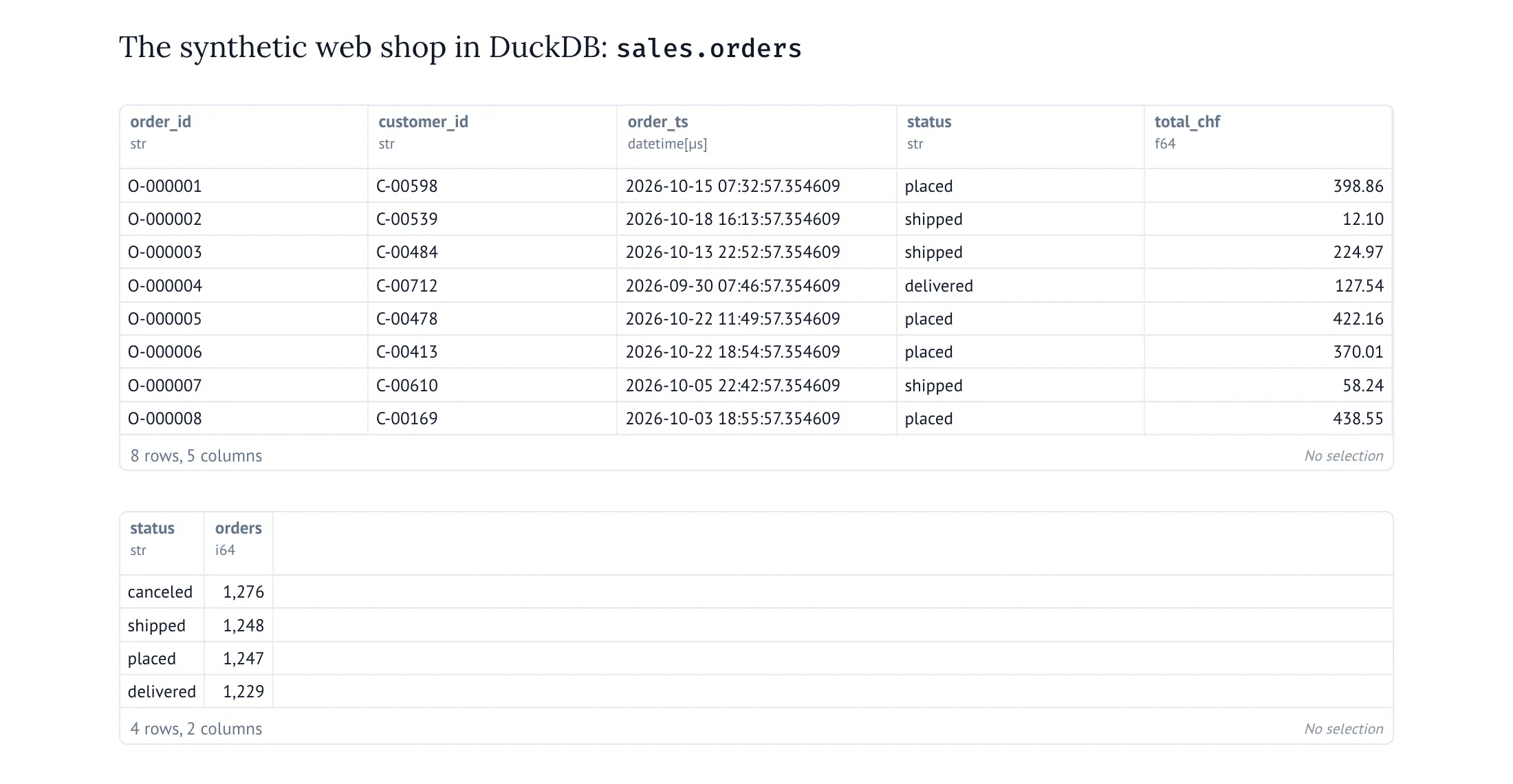
Nobody starts a data contract on a green field. There is a table, and it’s been there for years. So for this post I generated a small synthetic web shop in DuckDB – 5,000 orders in sales.orders, 12,537 order lines in sales.order_items, plus 800 customers and 300 products – and let the open-source datacontract CLI (MIT licence, version 1.2.7) write a first contract from it. Here is the shop in a marimo notebook – keep an eye on the 1,276 canceled orders:
The CLI has no direct DuckDB import, so I went through a Parquet export:
datacontract import parquet --source orders.parquet --output imported.odcs.yamlversion: 1.0.0
kind: DataContract
apiVersion: v3.2.0
id: my-data-contract
name: My Data Contract
status: draft
schema:
- name: orders
physicalType: parquet
logicalType: object
physicalName: orders
properties:
- name: order_id
physicalType: STRING
logicalType: string
- name: customer_id
physicalType: STRING
logicalType: string
- name: order_ts
physicalType: TIMESTAMP
logicalType: timestamp
- name: status
physicalType: STRING
logicalType: string
- name: total_chf
physicalType: DOUBLE
logicalType: numberA valid ODCS contract in seconds (datacontract lint agrees) – and it shows exactly where the machine stops. It knows that status is a string. It doesn’t know that only four values are allowed, that order_id is the key, that customer_id is sensitive, or that canceled orders are not revenue. That’s the part only people can write.
Step 2: write down the promises
Here is the contract after the people part, shortened. The full file is in the demo repository.
apiVersion: v3.2.0
kind: DataContract
id: sales-orders
name: Sales orders
version: 1.0.0
status: active
domain: sales

description:
  purpose: >
    All orders of the web shop with their order lines, one row per order and one row per line.
  usage: >
    Revenue reporting, order status dashboards, input for the customer analytics models.
  limitations: >
    Amounts in CHF incl. VAT. Customer IDs are pseudonymous – do not join them with personal data
    outside the CRM. Orders appear up to 15 minutes after checkout.

schema:
  - name: orders
    quality:
      - id: orders_fresh
        description: The newest order is at most one day old.
        type: sql
        query: SELECT epoch(now()) - epoch(MAX(order_ts)) FROM orders
        mustBeLessThan: 86400
        dimension: timeliness
        severity: error
        businessImpact: Dashboards show yesterday's numbers as today's.
    properties:
      - name: order_id
        businessName: order number
        logicalType: string
        physicalType: VARCHAR
        required: true
        primaryKey: true
        criticalDataElement: true
        examples: [O-000123]
        quality:
          - id: order_id_format
            metric: invalidValues
            arguments:
              pattern: '^O-[0-9]{6}$'
            mustBe: 0
      - name: customer_id
        logicalType: string
        required: true
        classification: restricted
      - name: status
        logicalType: string
        required: true
        criticalDataElement: true
        quality:
          - id: status_known
            description: Only the four states of the order process.
            metric: invalidValues
            arguments:
              validValues: [placed, shipped, delivered, canceled]
            mustBe: 0
            dimension: conformity
            severity: error
            businessImpact: Status dashboards show unknown states, filters miss orders.
      # … order_ts, total_chf

  - name: order_items
    quality:
      - id: order_items_have_order
        description: Every line belongs to an existing order.
        type: sql
        query: SELECT COUNT(*) FROM order_items i LEFT JOIN orders o USING (order_id) WHERE o.order_id IS NULL
        mustBe: 0
        dimension: consistency
    # … properties

servers:
  - server: local
    type: duckdb
    database: shop.duckdb
    schema: sales

slaProperties:
  - property: latency
    value: 15
    unit: m
  - property: retention
    value: 10
    unit: y
Look at status_known. That’s the promise the cleanup pull request is about to break – written down, with the reason it matters right next to it.
Locally, against the clean data – everything is installed with uv, the setup is in the repository’s README:
uv sync
uv run python make_data.py
uv run datacontract lint orders.odcs.yaml
uv run datacontract test orders.odcs.yaml
🟢 Data contract is valid. Ran 1 checks. Took 0.066375 seconds.
🟢 Data contract is valid. Ran 61 checks. Took 1.116703 seconds.61 checks from one YAML file, for all four tables: the explicit rules, plus the ones the CLI derives from the schema – every required column has no missing values, every primary key has no duplicates, every type matches, and every relationship points to rows that exist (more on relationships below).
Step 3: the contract in CI
A contract that only runs when someone remembers is documentation. To make it a guard, it has to run on every change. The demo repository has a GitHub Actions workflow that does three things on every pull request:
name: Data contract

on:
  pull_request:
  push:
    branches: [main]

jobs:
  contract:
    runs-on: ubuntu-latest
    steps:
      - uses: actions/[email protected]
        with:
          fetch-depth: 0

      - uses: astral-sh/[email protected]

      - name: Install the datacontract CLI and DuckDB (versions from uv.lock)
        run: uv sync --locked

      - name: Lint – is the contract valid ODCS?
        run: uv run datacontract lint orders.odcs.yaml

      - name: Breaking – does the change break consumers?
        if: github.event_name == 'pull_request'
        run: |
          git show "origin/${{ github.base_ref }}:orders.odcs.yaml" > base.odcs.yaml
          uv run datacontract breaking base.odcs.yaml orders.odcs.yaml

      - name: Produce the data
        run: uv run python make_data.py

      - name: Test – does the data keep the contract?
        run: uv run datacontract ci orders.odcs.yaml
make_data.py stands in for the producer – the shop application or pipeline. For this demo it creates the data itself, fresh on every run: 5,000 synthetic orders in a DuckDB file on the runner, gone when the run ends. Nothing real, and nothing stored in the repository. How this looks with real data is further down. datacontract ci is the test command made for CI: it writes the failures as GitHub annotations, so they show up on the run page without anyone digging through logs.
On main, the run is green. Then I opened two pull requests. The shop is synthetic and the story is constructed – but the checks, the numbers and the red runs below are real.
Pull request 1: the harmless cleanup
The first pull request is the story from the beginning. One line in the producer:
-STATUSES = ["placed", "shipped", "delivered", "canceled"]
+STATUSES = ["placed", "shipped", "delivered", "cancelled"]
The contract didn’t change, so lint and breaking pass. Then the data is produced and tested:
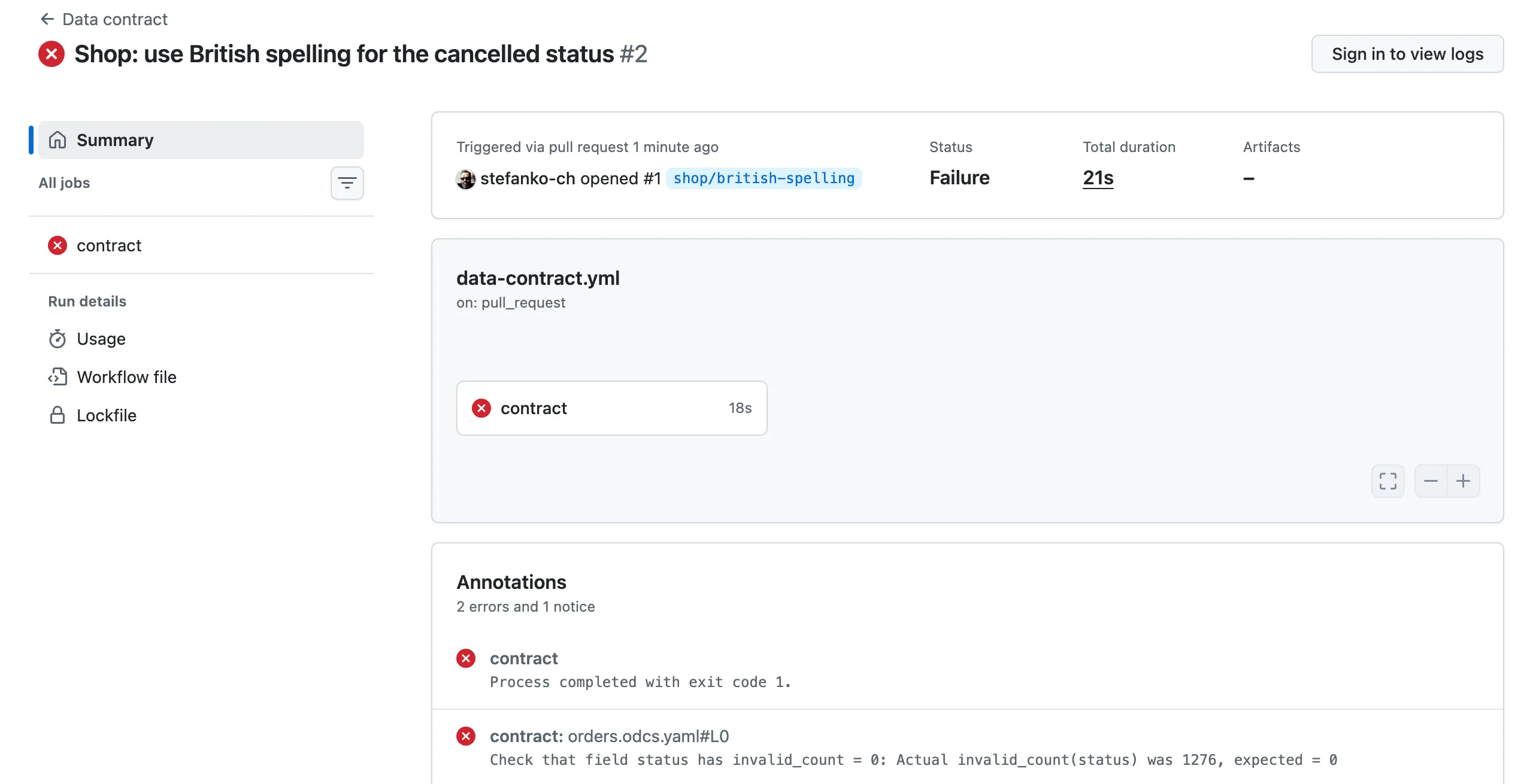
Check that field status has invalid_count = 0: Actual invalid_count(status) was 1276, expected = 01,276 orders with a status the contract doesn’t know. The pull request is red before anyone merges it, and the shop team learns that someone downstream relies on the old spelling – from a check, not from an angry email a week later.
Pull request 2: the contract itself changes
The second pull request is the other direction: the producer wants to drop customer_id and changes the contract to version 2.0.0. Two changes in one file – the version and nine lines less:
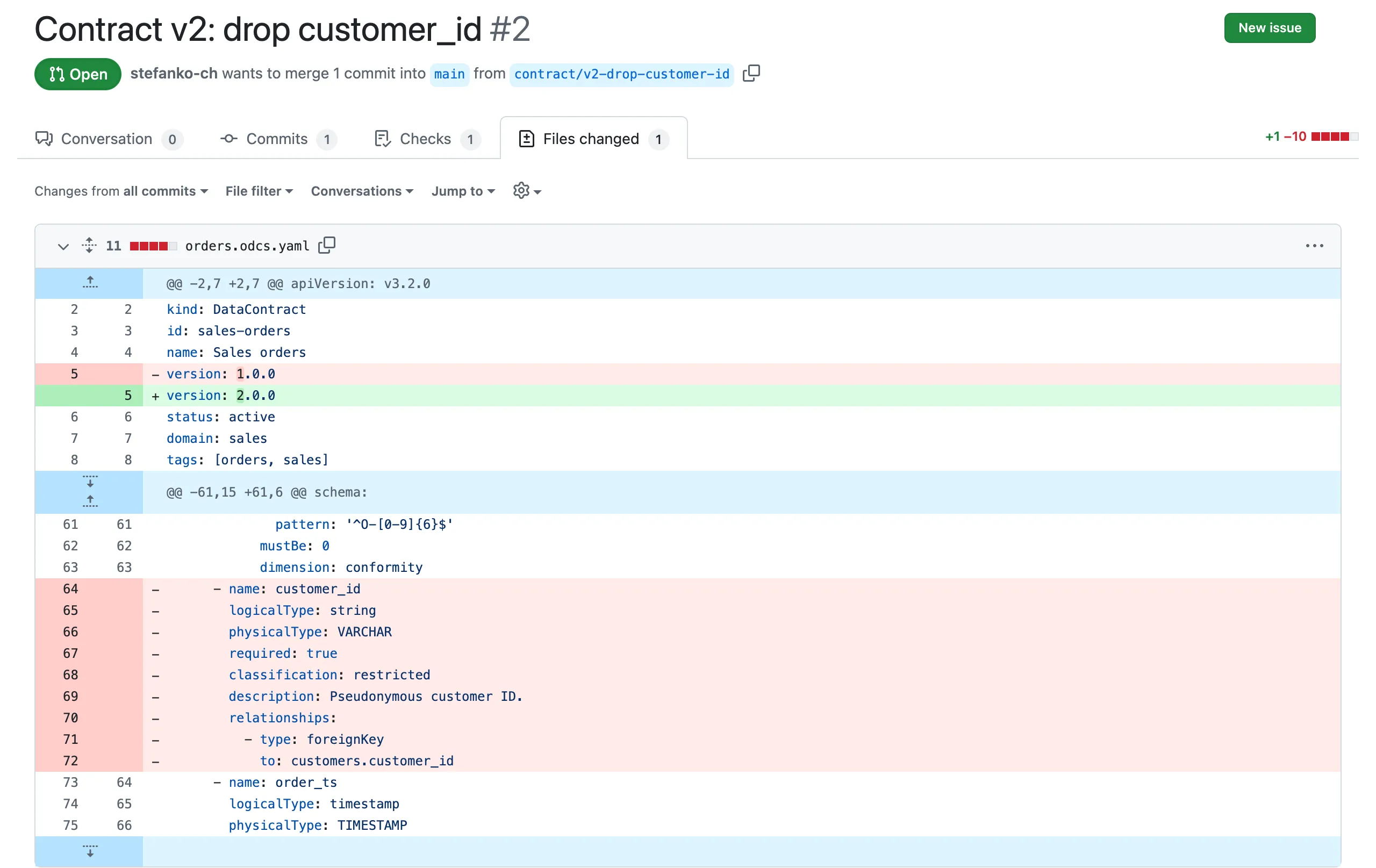
This time the data is fine, but breaking compares the new contract with the one on main:
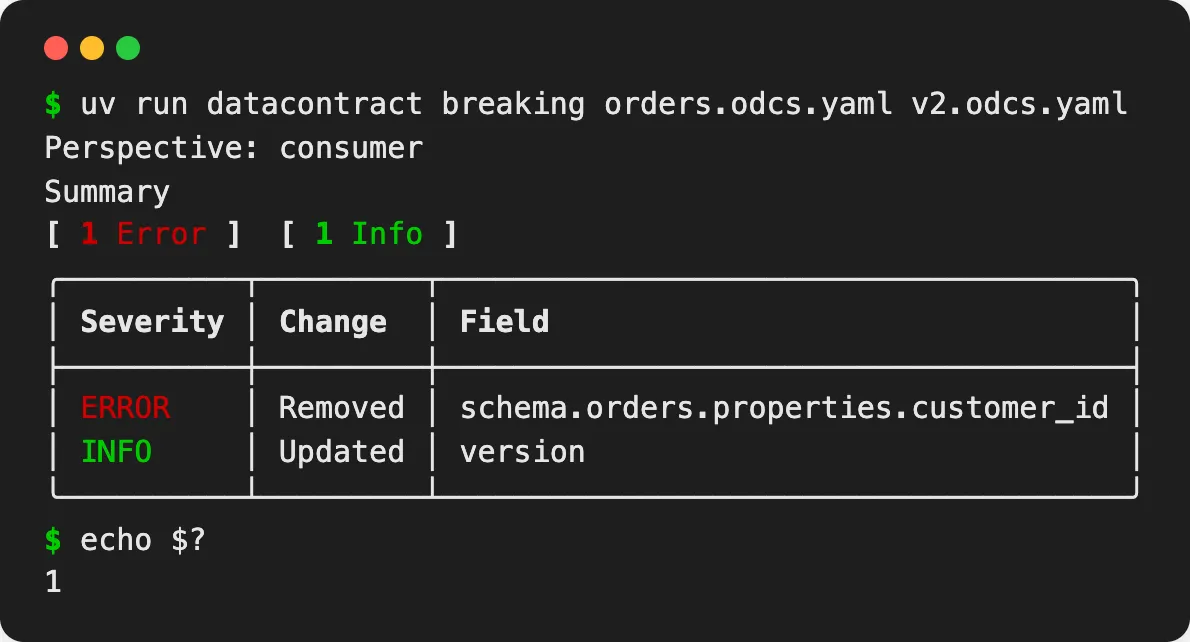
Exit code 1, red pull request. Removing a column might be the right decision – but it’s a decision to make with the consumers, not one they discover in production.
Both pull requests stay open in the repository, so you can look at the runs yourself.
What counts as a breaking change?
datacontract breaking doesn’t just say yes or no – it rates every difference as error, warning or info, and only errors make it fail (exit code 1). And it can look at a change from two sides: --perspective consumer (the default) flags changes that lead to unexpected data for consumers, --perspective producer flags changes that can make the data fail the contract tests. I ran ten typical changes against the contract from this post:
| Change | Consumer view (default) | Producer view |
|---|---|---|
| Remove a column | error | info |
| Rename a column | error | error |
| Change a type (number → integer) | error | error |
| Make a required column optional | error | info |
| Add a required column | info | error |
| Add an optional column | info | error |
| Add a quality rule | 2 warnings, 1 info | error, 2 warnings |
| Allow one more status value | warning | warning |
| Allow one status value less | warning | warning |
| Change only a description | info | info |
Most of it makes sense once you think from the respective side: a new column doesn’t hurt anyone reading the table, but data produced before the change doesn’t have it yet – so for the producer it’s an error.
One row deserves a second look, though. Allow one more status value is only a warning, and warnings don’t fail the build. So if the shop team from pull request 1 had added cancelled to the list of valid values in the contract, CI would have been green – and the dashboard filter would have been just as wrong. The contract makes the change visible in the pull request; whether someone asks the dashboard owners is still up to people.
Two habits follow from that. Use version like semantic versioning – a new major version for anything that’s an error in the consumer view. And read the warnings in a contract pull request, don’t just look at the colour of the check.
In practice: where the data comes from
The demo generates its own data so that it runs anywhere, without a database to connect to. With real data, I wouldn’t point the CI pipeline at the production database. The demo mixes two questions that are answered at different times, in different places.
Does a change break consumers? That’s the question for a pull request, and it doesn’t need production data:
- A change to the contract only needs the contract:
lintandbreakingcompare YAML files. That part of the demo stays exactly as it is. - A change to the producer’s code – pull request 1 – needs data written by that code. So CI runs the changed code against a test or staging environment, or against a small fixture dataset, and tests the result there. A contract can list several servers, and
testpicks one with--server:
servers:
  - server: staging
    type: databricks
    catalog: staging_sales
    schema: orders
  - server: production
    type: databricks
    catalog: prod_sales
    schema: orders
datacontract test --server staging orders.odcs.yamlDoes the real data keep the contract? That’s a question for every load, and it’s answered where the data lives – as a step of the job that loads it, right after loading, running with the job’s own identity. Most checks the CLI runs are aggregate queries – counts of missing, invalid and duplicate values – so what leaves the database is numbers, not rows. The results go to a table or a dashboard, and an alert goes to the owner named in the contract.
Why not simply query production from CI?
- Credentials. The CI runner would need access to production, and every pull request could use it.
- Timing. A pull request changes code that hasn’t written any production data yet. Production always shows yesterday’s state.
- Load and cost. Full checks on large tables for every push.
If you do want a scheduled check from outside, give it its own read-only identity and keep it to aggregate checks.
Put together:
| When | Where | What |
|---|---|---|
| Pull request | CI | lint and breaking against the contract on main; producer code tested on staging or fixture data |
| Deployment to staging | the data platform | the pipeline runs on staging data, then test --server staging |
| Every load in production | a step of the load job | test --server production on the real tables; results stored, owner alerted |
For checks per row – which order is wrong, and keep it out of the clean layer – a contract test isn’t enough; it counts, it doesn’t sort rows. That needs a data quality tool in the pipeline – a topic for another post.
Step 4: context for AI agents
So far the consumers were dashboards and people. More and more often, it’s an AI agent with SQL access. ODCS v3.2.0 added a context block for exactly that (context): guidance for “AI agents, LLMs, BI tools, and semantic layer platforms”, at the level of the contract or of a single table. It has three parts:
- instructions – how to use the data, in natural language. The docs describe it as “equivalent to a system prompt scoped to this level”.
- verifiedStatements – canonical business questions, optionally with a curated answer.
- constraints – what an agent must not do.
For the orders, that’s where the knowledge from the dashboard filter belongs:
context:
  instructions: >
    Use this contract for questions about orders, revenue and order status. Revenue is the sum of
    orders.total_chf; exclude orders with status canceled unless the question asks for them.
  verifiedStatements:
    - id: revenue-last-30-days
      question: What was the revenue in the last 30 days?
      answer: >
        SELECT SUM(total_chf) FROM sales.orders
        WHERE status <> 'canceled' AND order_ts >= now() - INTERVAL 30 DAY
  constraints:
    - id: no-customer-identification
      constraint: Do not try to identify customers or join customer_id with personal data.
      tags: [privacy]
The contract with this block passes datacontract lint against ODCS v3.2.0. To be clear about what I tested and what not: the CLI validates the block, but it doesn’t use it – the block is for agents and tools that read the contract. I haven’t connected an agent to it for this post. But I find the idea convincing: the definition of revenue and the privacy rule sit in the same versioned file as the schema and the tests, instead of in a prompt somewhere.
Exports: one contract, many formats
From the same YAML, the CLI generates DDL, documentation and more. For Databricks:
uv run datacontract export sql orders.odcs.yaml --dialect databricks-- Data Contract: sales-orders
-- SQL Dialect: databricks
CREATE OR REPLACE TABLE orders (
order_id STRING not null primary key,
customer_id STRING not null COMMENT "Pseudonymous customer ID.",
order_ts TIMESTAMP not null COMMENT "Time of checkout (UTC).",
status STRING not null,
total_chf DOUBLE not null COMMENT "Order total in CHF incl. VAT."
) COMMENT "One row per order.";
-- … order_items, customers, productsThe descriptions become column and table comments. Not every type maps, though: in a first attempt I had a column with physicalType: JSON, and the Databricks export kept it as JSON – a type Databricks doesn’t have (data types). The CLI warned (Cannot map type to databricks SQL type), but the DDL wouldn’t have run. A generated DDL is a starting point, not a deployment.
datacontract export html turns the contract into a page for people who don’t read YAML:
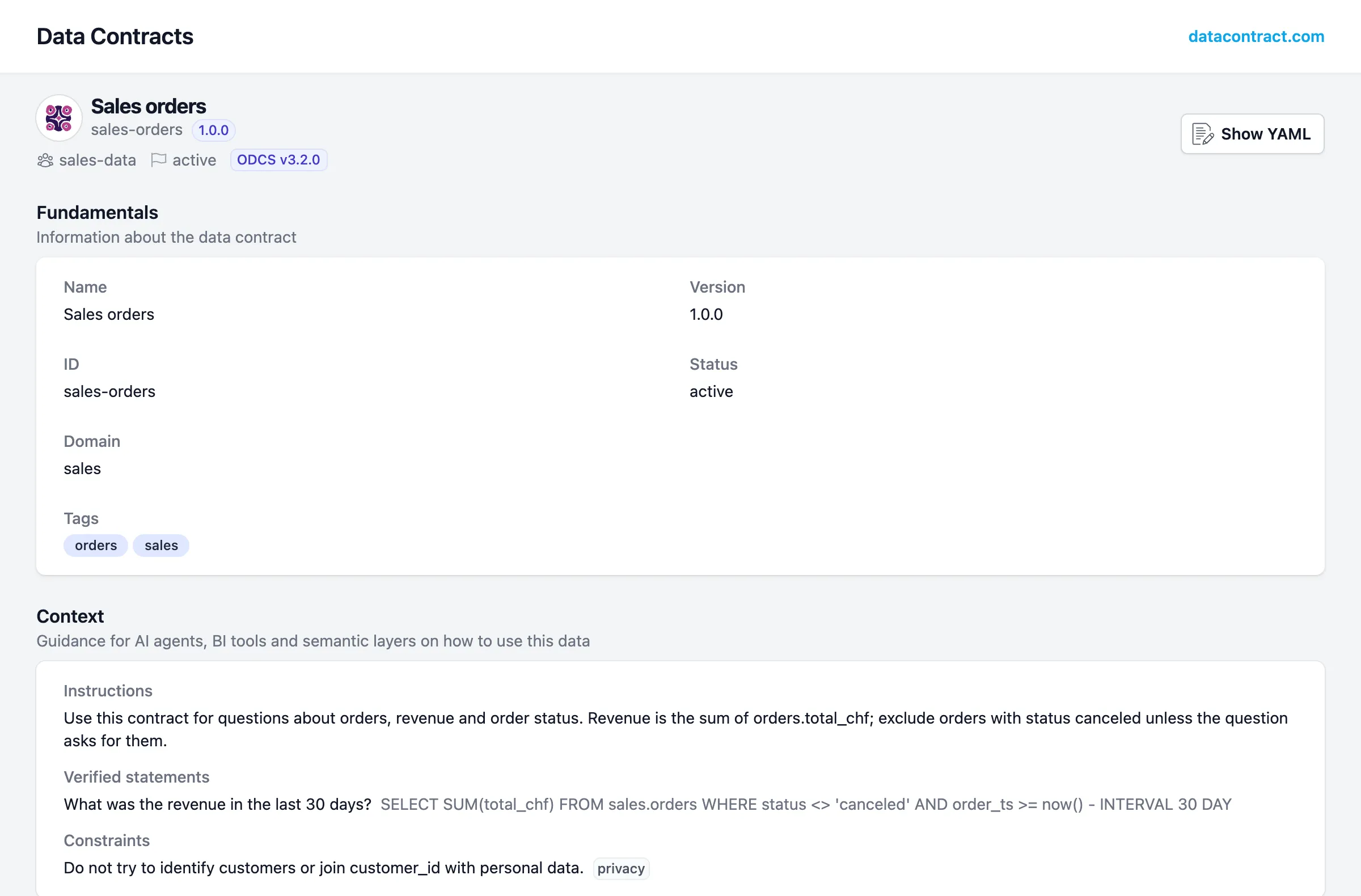
The Data Contract Editor: the same file, for people
Everything so far happened in YAML and on the command line. That’s fine for engineers, but the people who know what status may contain, or what revenue means, often don’t write YAML. For them there’s the Data Contract Editor, from the same people as the CLI, MIT-licensed. It works on the same ODCS file – nothing is stored anywhere else.
It runs in three ways:
-
Online at editor.datacontract.com, to try it out.
-
Bundled with the CLI.
datacontract editstarts it locally for one file, without internet access; Save writes straight back to the file. In the demo repository:uv run --group explore datacontract edit orders.odcs.yamlIt opens on
http://localhost:4243. Theexploregroup adds the CLI’sapiextra the editor’s local server needs. -
In Docker, as a standalone editor:
docker run -d -p 4173:4173 datacontract/editorIt opens on
http://localhost:4173with an example contract; you open and save files through the browser. Running tests from there needs the CLI as a server next to it – with the localdatacontract edit, that comes built in.
What you can do with it
Edit with forms instead of YAML. The sidebar follows the sections of the standard – fundamentals, terms of use, schemas, servers, team, support, roles, pricing, SLA, context, custom properties. Every property opens in a panel with its types, constraints, allowed values, classification and quality rules. Here is the status rule from step 2, the one the cleanup pull request breaks:
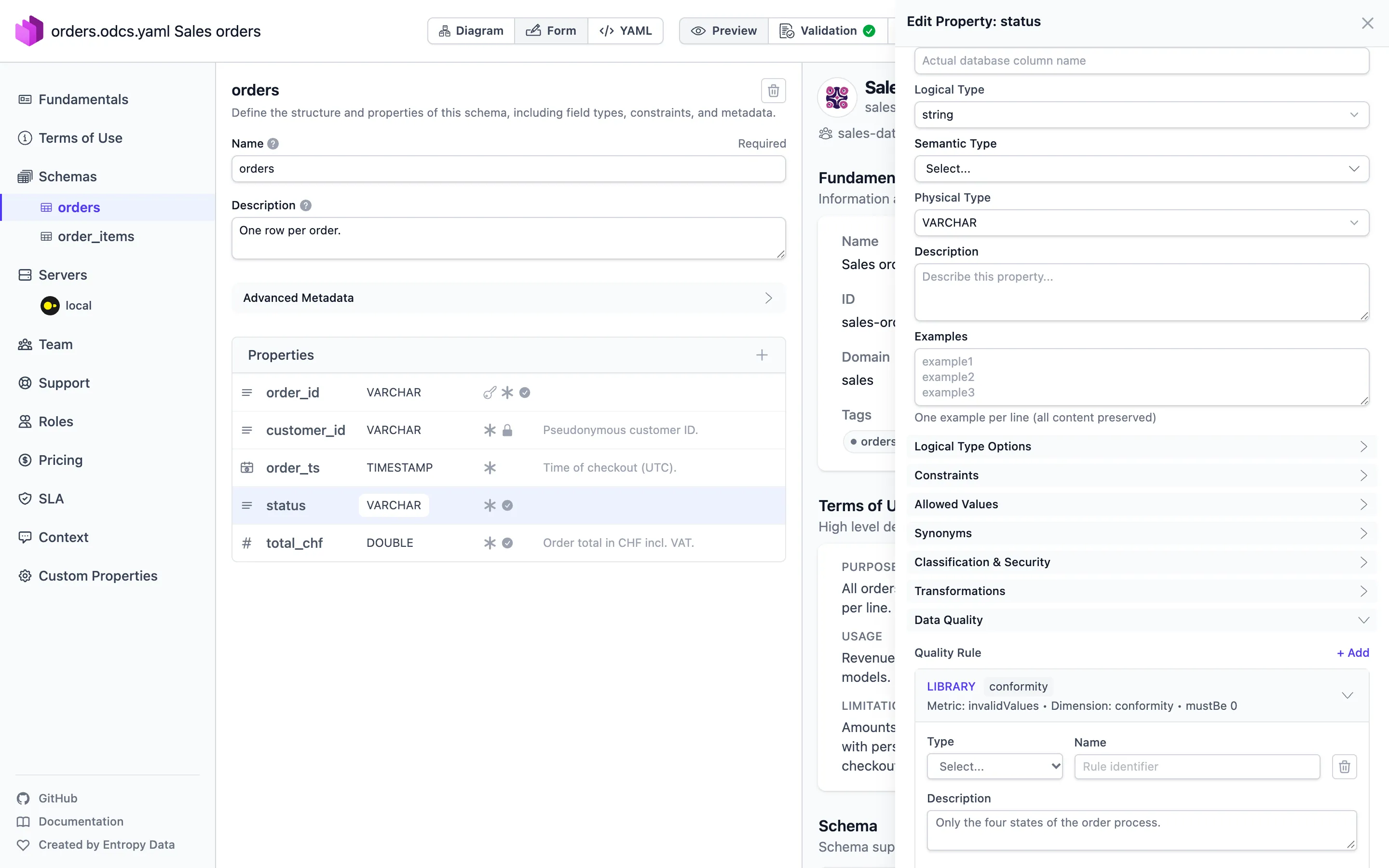
See and draw relationships. The diagram view shows the tables and how they’re connected – here the four tables of the shop and the three relationships between them:
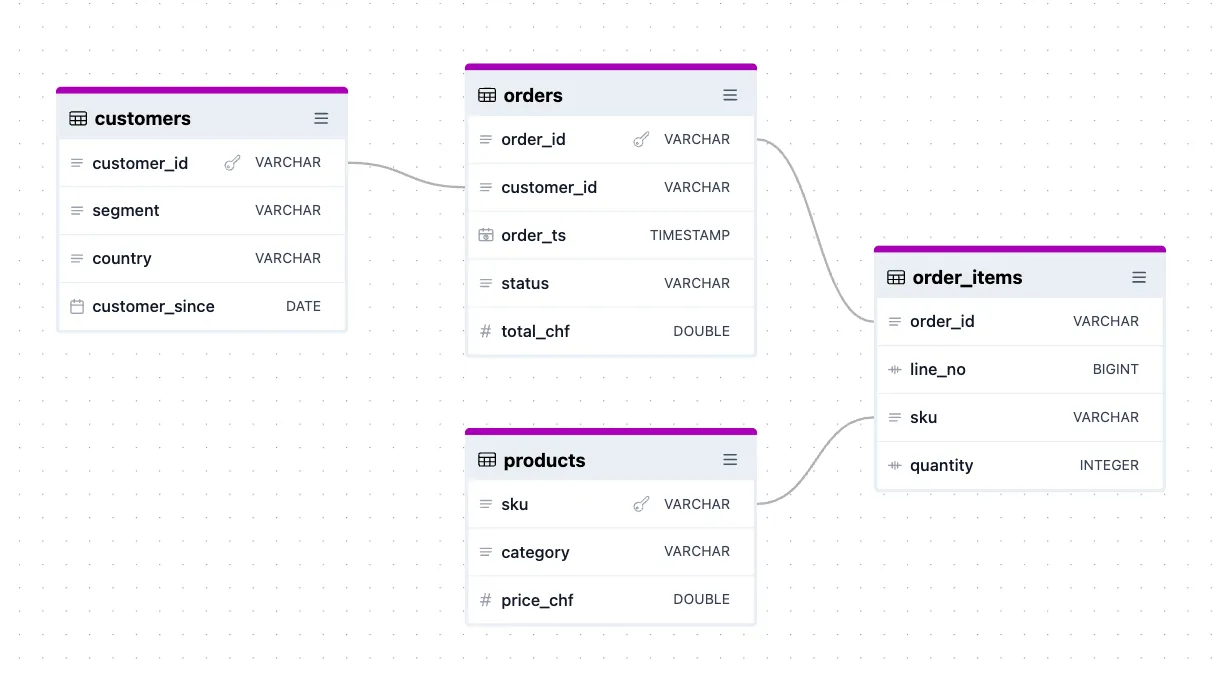
To add one, hover a column and drag its dot onto the column it refers to. In the contract, a relationship is a few lines on the property – relationships are part of ODCS since v3.1.0:
- name: order_id
  logicalType: string
  physicalType: VARCHAR
  required: true
  relationships:
    - type: foreignKey
      to: orders.order_id
And they’re not just documentation. For every relationship, datacontract test runs a check of its own – for this one Check that field order_id has no values missing from orders.order_id, an anti join between the two tables. That’s exactly what the hand-written SQL rule order_items_have_order from step 2 does; with the relationship in place, I wouldn’t need it anymore.
Validate and test while editing. Validation checks the contract against the ODCS JSON Schema as you type – and it’s stricter than the CLI. I misspelled required as requird on order_id, a typo that would quietly drop the rule:
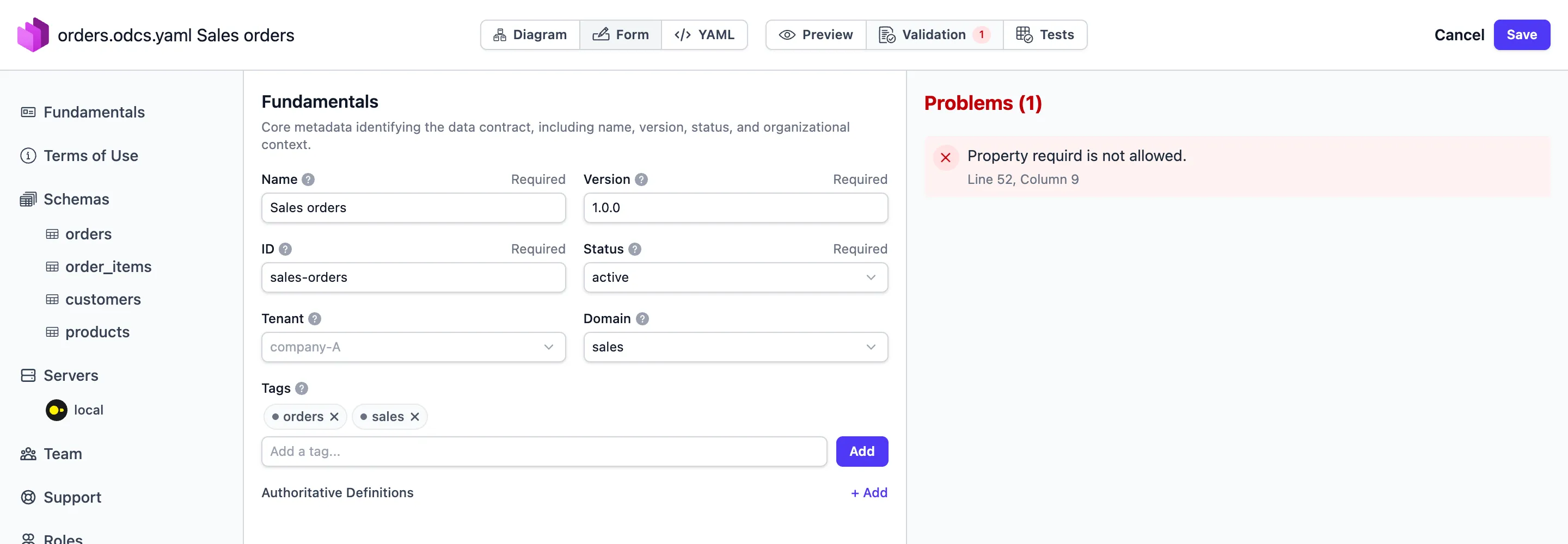
The editor calls it a problem. datacontract lint (1.2.7) only warns – unknown fields are ignored: ‘requird’. This will become an error in the next major version (January 2027) – and exits with 0, so CI stays green. Until then, the editor is the better place to catch typos.
Tests runs the contract tests against the servers in the contract – in the local editor, that’s the CLI on my machine against the DuckDB file. With the data from pull request 1, the editor shows the same failure as CI:
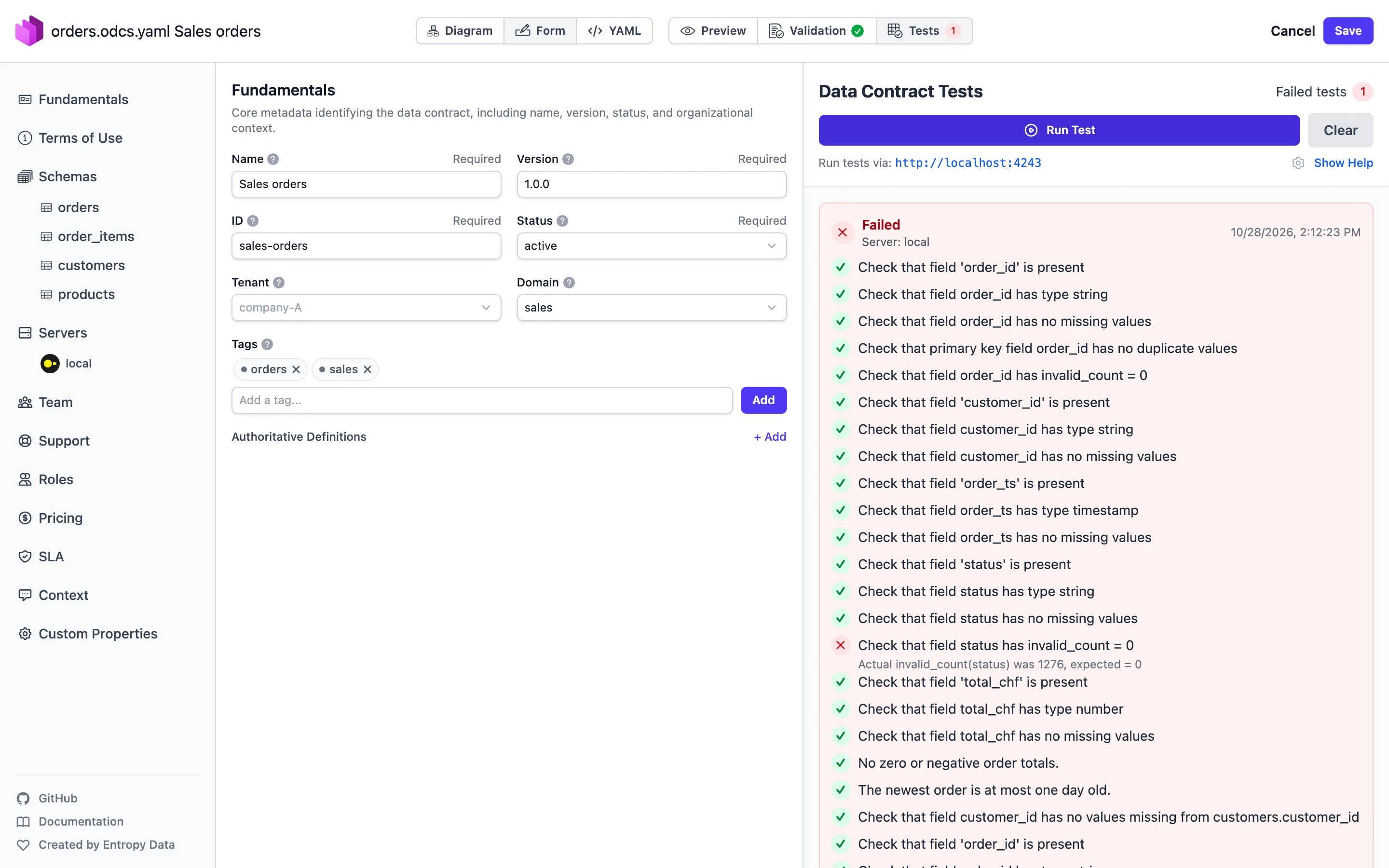
Besides that: a YAML view with a diff, a Preview as HTML, and an AI assistant – on the website it’s there, locally and in Docker it stays off until you configure your own model endpoint.
Do you need it?
For automation, no. Everything the editor checks, the CLI checks too – Validation is lint (if more forgiving, for now), Tests is test, Preview is export html, and the diagram has an export mermaid counterpart. CI runs the CLI either way.
The editor is the human interface: for the domain expert who should write the purpose and the limitations, for the person who knows which values status may take, for a review where someone wants to see the tables instead of indentation. The forms also show what the standard offers – fields you wouldn’t think of in a blank YAML file.
One thing to know before you mix both: the editor rewrites the whole file. Its own diff view shows it before you even save – I only changed the version from 1.0.0 to 1.1.0:
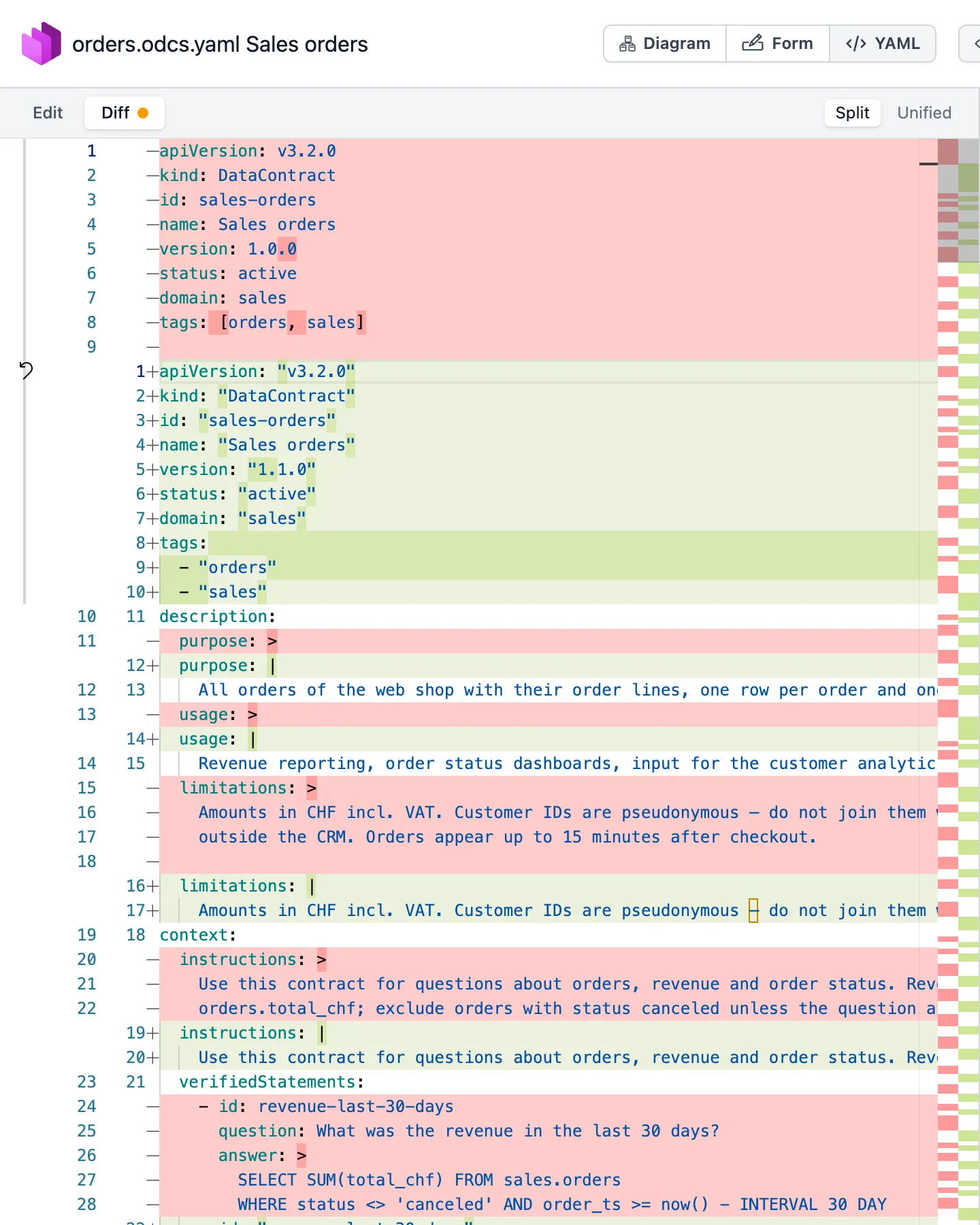
One relationship drawn and saved, and git showed 241 changed lines – quotes around every string, folded text blocks turned into single lines. The content was the same and still passed lint, but the real change disappears in the diff. So either let one tool own the formatting, or compare contracts by content: datacontract changelog old.odcs.yaml new.odcs.yaml lists what changed in the contract, not in the text.
What else is in the standard
The demo contract uses the parts of ODCS I’d start with. The standard has more, and some of it – especially what came with v3.2.0 – is worth knowing before you write the second contract. I added each of the following to a copy of the demo contract and ran it through lint (valid against v3.2.0) and test, to see what the CLI makes of it.
A fixed list of values: enum
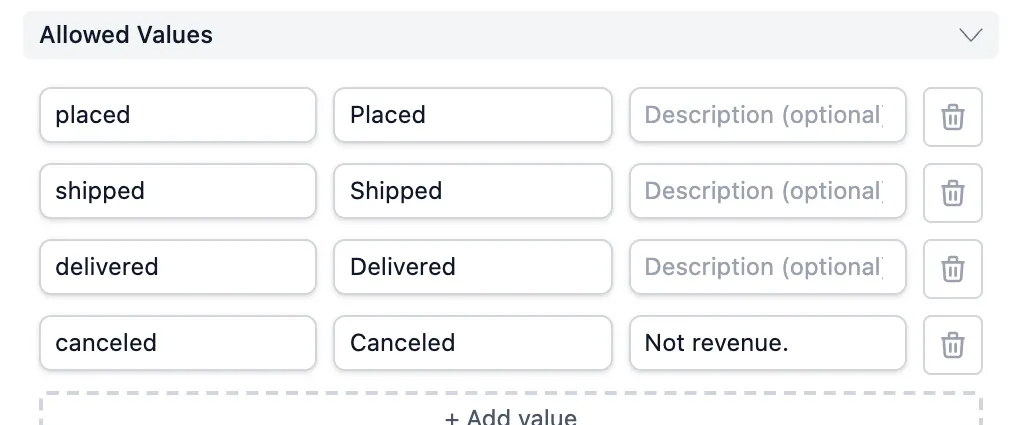
Step 2 checks the status with a library rule (invalidValues with validValues). Since v3.2.0, a property can declare its allowed values directly – and each value can explain itself:
- name: status
  logicalType: string
  enum:
    - value: placed
      label: Placed
    - value: shipped
      label: Shipped
    - value: delivered
      label: Delivered
    - value: canceled
      label: Canceled
      description: Not revenue.
That’s documentation and a rule in one place. datacontract test turns it into a check of its own – Check that field status only contains enum values ['placed', 'shipped', 'delivered', 'canceled'] – so the library rule from step 2 would no longer be needed. Entries can also carry tags, custom properties and links to a definition. In the Data Contract Editor, the list shows up as Allowed Values – value, label and description per entry:
Other names for the same thing: synonyms
The finance team says purchases, the shop says orders, the Swiss colleagues say Bestellungen. synonyms on a table or column writes that down, optionally with a language:
- name: orders
  synonyms:
    - synonym: purchases
    - synonym: Bestellungen
      locale: de-CH
The standard names catalogs and AI or natural-language tools as the audience: they can map a question in business words to the right table. Synonyms are allowed on tables and columns only.
Retiring a column: deprecated
Removing a column is a breaking change (pull request 2). The friendlier way is to announce it first. Since v3.2.0, any table or column can be marked as deprecated, with the replacement in the description:
- name: segment_code
  logicalType: string
  deprecated: true
  description: "DEPRECATED: use segment instead. Will be removed in version 2.0.0."
One thing I didn’t expect: a deprecated column is still tested like any other. When I added segment_code to the contract but not to the data, test failed with Required column 'segment_code' is missing. Which is the right reading of “deprecated”: the column is still there and still promised – until the next major version removes it.
Where the meaning is defined: authoritativeDefinitions
A contract doesn’t have to define every business term itself. authoritativeDefinitions points to the place that does – a glossary entry, an ontology, the dbt model that builds the table, a tutorial:
- name: orders
  authoritativeDefinitions:
    - type: businessDefinition
      url: https://wiki.example.com/glossary/order
      description: What counts as an order, agreed with finance.
The standard recommends a set of types: businessDefinition, glossary, ontology, taxonomy, implementation, transformationImplementation (the code that produces the data), tutorial, videoTutorial, and canonicalUrl for the latest version of the contract itself. The block works in many sections, down to a single enum value.
Where a column comes from: transform… and semanticType
Three fields describe lineage per column – which tables it’s built from, with which logic, in plain words:
- name: total_chf
  transformSourceObjects: [order_items, products]
  transformLogic: SUM(order_items.quantity * products.price_chf)
  transformDescription: Sum of all order lines at list price.
And since v3.2.0, semanticType says what role a column plays: a plain column (the default), a measure – an aggregated value, with the aggregation in transformLogic – or a dimension to group and filter by. That’s the vocabulary of a semantic layer, written into the contract.
Partitions: partitioned
partitioned: true and partitionKeyPosition record how a table is partitioned – useful for consumers who want their queries to hit only the partitions they need:
- name: order_ts
  partitioned: true
  partitionKeyPosition: 1
Access, support, price: roles, support, price
The step-2 contract names a team. Three more sections answer the questions consumers ask next. Who gets access, and who approves it? Where do I ask? What does it cost?
roles:
  - role: sales_orders_reader
    access: read
    firstLevelApprovers: sales-data owner

support:
  - channel: "#sales-data"
    tool: slack
    scope: interactive
  - channel: sales-data-announce
    tool: email
    scope: announcements
    url: mailto:[email protected]

price:
  priceAmount: 0
  priceCurrency: CHF
  priceUnit: month
roles names IAM roles, not people. support knows tools from Slack and Teams to tickets, and scopes from interactive and issues to announcements. And yes, the key is price, even though the section of the standard is called Pricing.
Environments and secrets: variables
A contract in git shouldn’t contain hostnames or passwords, and it should work for dev and prod alike. Since v3.2.0, any string value can contain a variable, with an optional default:
servers:
  - server: local
    type: duckdb
    database: ${SHOP_DB:-shop.duckdb}
The CLI resolves it from the environment: without SHOP_DB it tested shop.duckdb; with SHOP_DB=missing.duckdb it tried to open that file and failed. The standard asks tools to report an unset variable without a default as an error, never to silently use an empty string.
And the rest
tenant– the organisation or unit the data primarily belongs to.customProperties– your own key-value pairs, wherever the standard has no field. Since v3.2.0 with avendorfield, so tool-specific extensions don’t collide.- IDs and references – since v3.1.0, elements can carry an
id, and references like a foreign key can point to that id instead of a name, so renaming a column doesn’t break them.
None of this is required. But it’s what turns a contract from a schema with tests into the place where a dataset is explained – and the editor from the previous section shows most of these fields as forms, so nobody has to remember them.
Where contracts fit next to dbt tests, Great Expectations and Soda
If you already test your data, a contract can look like a second copy of the same checks. The difference is less about what gets checked than about who owns it and where it lives:
| Data contract (ODCS) | dbt tests | Great Expectations, Soda | |
|---|---|---|---|
| What it is | an agreement in a vendor-neutral file | tests inside a dbt project | check engines with their own rule syntax |
| Owned by | producer, agreed with the consumers | whoever owns the dbt project | whoever runs the checks |
| Covers | schema, quality, SLA, ownership, usage, limits, context for AI | data tests on dbt models | data quality checks |
One thing to watch with the names: since version 4, Soda Core calls its YAML files “data contracts” too. They are Soda’s own format, not ODCS. In an ODCS contract, Soda checks appear as custom rules with engine: soda.
They don’t exclude each other. ODCS has a custom rule type for any engine – the standard shows Soda and Great Expectations, DQX uses it with engine: dqx – and the datacontract CLI has a dbt command to sync contracts with a dbt project. A contract can be the place where the promise is written down, and an existing engine the place where it’s checked.
What I ran into
- Library checks ignore your description. For SQL rules, the result shows my description (“No zero or negative order totals.”). For library metrics, it shows a generated text (“Check that field status has invalid_count = 0”), even when the rule has a description. Give every rule a meaningful
id– that’s what you’ll search for. - Logs need a login, annotations don’t. On a public repository, the run page says “Sign in to view logs”. The annotations from
datacontract ciare visible anyway – another reason to useciinstead oftestin pipelines. - Freshness depends on when you test.
now()is evaluated at test time. Right for a scheduled check, but the same contract passes or fails depending on when it runs. NULLslips through comparisons. A rule like… WHERE x NOT BETWEEN a AND bdoesn’t count rows wherexis missing – the comparison isNULL, not true. Decide what a rule should do with missing values and write it into the query.- The CLI contradicts itself once. Exporting without a dialect logs
Pass --sql-server-type to choose one.Passing--sql-server-typethen fails with--sql-server-type was replaced with --dialect in v0.12.0. Use--dialect. - No DuckDB dialect for DDL export, no direct DuckDB import. Testing against DuckDB works fine; for import I went through Parquet, and
--dialect duckdbisn’t accepted for export. - A contract enforces nothing by itself. It’s a description plus tests. The CI step is what turns it into a guard.
How I’d start in a team
This is my recommendation, not something the standard prescribes:
- Pick one table that causes trouble. The one with the most “why are the numbers different?” questions – not the cleanest one.
- Write the contract together. Producer and at least one consumer in the same room or pull request. The import gives you the schema; the meeting gives you purpose, limitations and the rules that matter.
- Start with few, important rules. Keys, allowed values, freshness. Ten rules everyone understands beat fifty nobody reads.
- Put
lintandtestinto CI first. A test that runs on every change is worth more than a perfect contract in a wiki. - Add
breakingonce the contract is stable. Before that, every change is a “breaking change” and the check just gets ignored. - Treat the contract like code. Pull requests, reviews, version numbers – and the consumers as reviewers when something changes.
Who supports ODCS
An open format is only worth as much as the tools that read it. Bitol keeps a list of tools that support ODCS natively – written by the vendors themselves, and not complete. So I checked the big names against their own documentation (as of October 2026):
| Product | What it does with ODCS | Status |
|---|---|---|
| Collibra | In the Data Products application, a data contract is an asset with a YAML manifest. Collibra generates the manifest from its own metadata or takes an uploaded one, applies it to its knowledge graph and checks every 24 hours whether manifest and catalog still match. The docs link to ODCS v3.1.0; files that aren’t ODCS are only shown as raw code. | in the product |
| OpenMetadata (and Collate, its managed version) | Import and export through the API, an import dialog in the UI. Exports are v3.1.0; v3.2.0 is read with the v3.1.0 mapping. Some attributes don’t round-trip yet – classification, examples, customProperties, among others – and servers aren’t imported. | in the product |
| DataHub | An ingestion source that reads ODCS v3.0 to v3.2 files: schema, owners from team, tags, and every quality rule as an assertion. SLAs, support and pricing are not mapped. | Alpha; the logical models it creates only show in the UI behind a feature flag |
| IBM watsonx.data intelligence | Contracts “must be set up in YAML or JSON format and conform to the Open Data Contract Standard”; it runs their SQL rules and library metrics as quality checks, managed in its Data Product Hub or through an API. | in the product |
| Ontos (Databricks Labs) | A governance app on Databricks for writing and managing contracts (ODCS v3.1.0) and data products. | Labs project, no support |
| DQX (Databricks Labs) | Generates data quality checks for Databricks from a contract. | Labs project, no support |
| Data Contract CLI, Data Contract Editor, Entropy Data | The tools from this post, and the commercial platform from the same team. | open source (CLI, Editor), commercial (Entropy Data) |
Others on Bitol’s list include Actian, Witboost and a few smaller open-source tools; I didn’t check those in detail.
Just as telling is who’s missing. In the documentation of Atlan, Microsoft Purview, Google Dataplex, Informatica and Alation I found nothing about ODCS. Atlan and Dataplex do talk about data contracts – in their own terms. Informatica’s catalog shows up only indirectly: IBM has a generator that creates ODCS files from it and from Collibra. Soda has data contracts of its own format; ODCS can only carry Soda checks as custom rules. And in the Databricks documentation itself I didn’t find ODCS either; on Databricks, it comes through the two Labs projects above and through partners on the Marketplace.
So: the open catalogs (OpenMetadata, DataHub) and two of the big commercial ones (Collibra, IBM) read ODCS today. A contract written in it won’t be stuck in one tool – but “supports ODCS” means something different in each of them, from a full round trip to “we store the file”.
Is it worth it?
For a table only I use, a contract is mostly good documentation. The value starts with the first consumer who isn’t me: a dashboard, a downstream model, an AI agent. The cleanup pull request in this post is not an exotic example – it’s a one-line change that any careful developer could make, with consequences they had no way of seeing. A contract makes those consequences visible at the only moment it’s cheap to react: before the merge.
What I like about ODCS in particular: it’s an open format with a public JSON Schema, and the tools that read it – from Collibra to DQX – are real, even if each reads a different part of it. A contract written today isn’t locked into the tool I happened to test it with. How that works on Databricks – and where it doesn’t yet – is something I’ll come back to.
Useful Links
Open Data Contract Standard
- ODCS documentation – the standard, reader-friendly
- ODCS on GitHub – source, JSON Schema, examples
- History – from PayPal to Bitol
- v3.2.0 release notes – what’s new
- Fundamentals, Schema, Data quality, SLA, Context – the chapters used in this post
- Vendors and tools – who supports ODCS
- Bitol – the Linux Foundation AI & Data project behind ODCS and ODPS
- Open Data Product Standard – the sibling standard
Tools
- datacontract-ci-demo – the demo repository from this post, with both pull requests
- datacontract CLI – lint, test, ci, breaking, import, export
- datacontract CLI documentation – commands and quality rules
- DQX – the Databricks Labs data quality library that brought me to ODCS
- GitHub Actions – where the contract runs on every pull request
- DuckDB – the database under test
- uv – installs Python and the dependencies, locally and in CI
- marimo – the notebook for looking at the shop data
- Data Contract Editor – the web editor for ODCS contracts, also online
- Docker – to run the editor as a container
- Databricks data types – why
JSONisn’t one
Related Articles
Live Flight Data Step by Step - Part 7 - Routes, and why almost a quarter are wrong
ADS-B doesn't say where a flight is going. A free route database does – and my own positions contradict almost a quarter of its answers. How I checked 3,664 routes, and how far flights over Switzerland really deviate from the great circle.
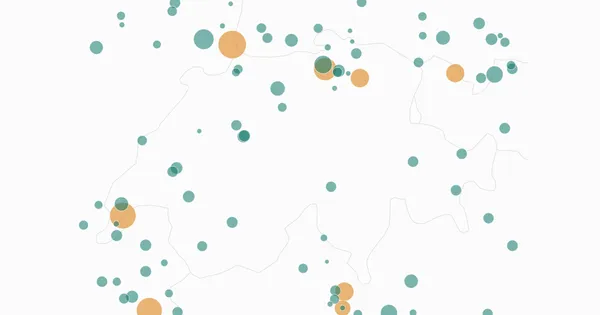
Live Flight Data Step by Step - Part 8 - How much CO₂ is flying over Switzerland?
A transponder doesn't send fuel flow. An open aircraft performance model turns type, altitude and speed into an estimate: about 8,800 tonnes of CO₂ over Switzerland in 22 hours – with a range of −18 to +24 % from one unknown alone, and a third of the traffic the model can't see.
Live Flight Data Step by Step - Part 6 - Gold, and the airport that steals Zurich's arrivals
Gold answers questions: where is every aircraft right now, who is landing where, how busy is each hour? Three SQL views on silver – and why 'the nearest airport' sent 129 Zurich arrivals to an air base.
Comments
Comments are powered by giscus. You need a GitHub account to comment.