Live Flight Data Step by Step - Part 6 - Gold, and the airport that steals Zurich's arrivals
 Stefan Koch
 Silver, after part 5, has every position over Switzerland: clean, in feet and km/h, with the airline’s name. What it doesn’t do is answer a question. Ask silver “where is SWR39W?” and you get 52 rows – every position of that flight in the last half hour before it reached Zurich.
That’s what gold is for. In part 2 I described it as “what you actually look at: current positions, approaches per airport, traffic per hour”. This post builds exactly those three, as SQL views on silver. And one of them looked right until I drew it on a map.
Everything below runs on the day from parts 4 and 5: 266,832 positions from 20 October, 14:00 to 21 October, 11:59 local time. “Now” is the newest snapshot in that data – 21 October, 11:59:30.
Views, not tables
Gold in this project is a set of views. A view is a stored query: it has a name, you query it like a table, but DuckDB computes it at the moment you ask. Nothing is copied, nothing has to be refreshed – when the collector adds a snapshot to silver, every gold view includes it on the next query.
Whether that’s fast enough is a question of measuring, not believing. On this data, the view of current positions takes 1.1 milliseconds, the one with airport approaches 2.3 milliseconds. For a map that refreshes every 35 seconds, a table would be extra work for nothing. That changes when a view becomes expensive or many people read it at once – then you materialise it. Here, it isn’t and they don’t.
Where is every aircraft right now?
The first view: the newest position of each aircraft – but only aircraft seen in the last two minutes. Without that window, an aircraft that landed an hour ago would stay on the map forever, frozen at its last position.
CREATE OR REPLACE VIEW gold.current_positions AS
WITH latest AS (SELECT MAX(snapshot_time) AS max_time FROM silver.flights)
SELECT f.snapshot_time, f.icao24, f.callsign,
       COALESCE(f.airline_name, 'unknown / private') AS airline_name,
       f.latitude, f.longitude, f.altitude_ft, f.altitude_m, f.speed_kmh, f.heading,
       f.flight_phase, f.on_ground, f.aircraft_category,
       epoch(l.max_time) - epoch(f.snapshot_time) AS position_age_s
FROM silver.flights f CROSS JOIN latest l
WHERE f.snapshot_time >= l.max_time - INTERVAL 2 MINUTE
QUALIFY ROW_NUMBER() OVER (PARTITION BY f.icao24 ORDER BY f.snapshot_time DESC) = 1
QUALIFY is the part worth knowing. It filters on the result of a window function, the way HAVING filters on an aggregate. ROW_NUMBER() OVER (PARTITION BY icao24 ORDER BY snapshot_time DESC) numbers the positions of each aircraft from newest to oldest, and QUALIFY … = 1 keeps the newest. Without QUALIFY, that’s a subquery and an outer WHERE.
The COALESCE is the one piece of presentation logic: silver stores no name when there is none, gold shows “unknown / private”.
At 11:59:30, the view has 173 aircraft, 48 of them on the ground. And it picks up the open point from part 5 – positions that are older than the snapshot they arrived in. 158 of the 173 are at most 35 seconds old, 15 are more than a minute old, the oldest 105 seconds. The column position_age_s makes that visible instead of hiding it, and the map can draw old positions differently.
Who is landing or taking off?
The second view is the one with a story. For every aircraft in the air below 3,000 metres, find the nearest airport within 40 kilometres, and call the movement arriving if it’s descending, departing if it’s climbing, nearby otherwise.
The airports come from OurAirports – in my copy, 5,280 large and medium airports worldwide, with coordinates. The distance between two points on a sphere is the haversine formula:
2 * 6371 * ASIN(SQRT(
    POWER(SIN(RADIANS(ap.latitude - p.latitude) / 2), 2)
  + COS(RADIANS(p.latitude)) * COS(RADIANS(ap.latitude))
    * POWER(SIN(RADIANS(ap.longitude - p.longitude) / 2), 2)))   -- km
A cheap filter before the expensive formula
33 aircraft were low enough at 11:59:30. Paired with every airport, that’s 174,240 distances to compute – almost all of them for airports on other continents. So the join first keeps only airports in a rough box around the aircraft:
JOIN silver.airports ap
  ON ap.latitude  BETWEEN p.latitude  - 0.5 AND p.latitude  + 0.5
 AND ap.longitude BETWEEN p.longitude - 0.8 AND p.longitude + 0.8
Half a degree of latitude is about 55 kilometres, 0.8 degrees of longitude about 60 kilometres at Swiss latitudes – enough to contain the 40-kilometre circle. That leaves 152 pairs instead of 174,240, and the query takes 1.8 instead of 6.0 milliseconds. Same result: 73 aircraft–airport pairs within 40 kilometres either way. On this small “now”, the gain is milliseconds. On a whole day of positions, it’s the difference between a query you run and one you wait for.
The nearest airport isn’t always the right one
The first version picked the nearest airport, full stop. The list for 11:59:30 looked plausible – until I saw that three Swiss and Edelweiss flights descending towards Zurich were “arriving” at Dübendorf Air Base.
Dübendorf is a military airfield 10 kilometres southeast of Zurich Airport. For an aircraft on the approach from the east or the south, it’s simply closer. Drawn for the whole day, it looks like this:
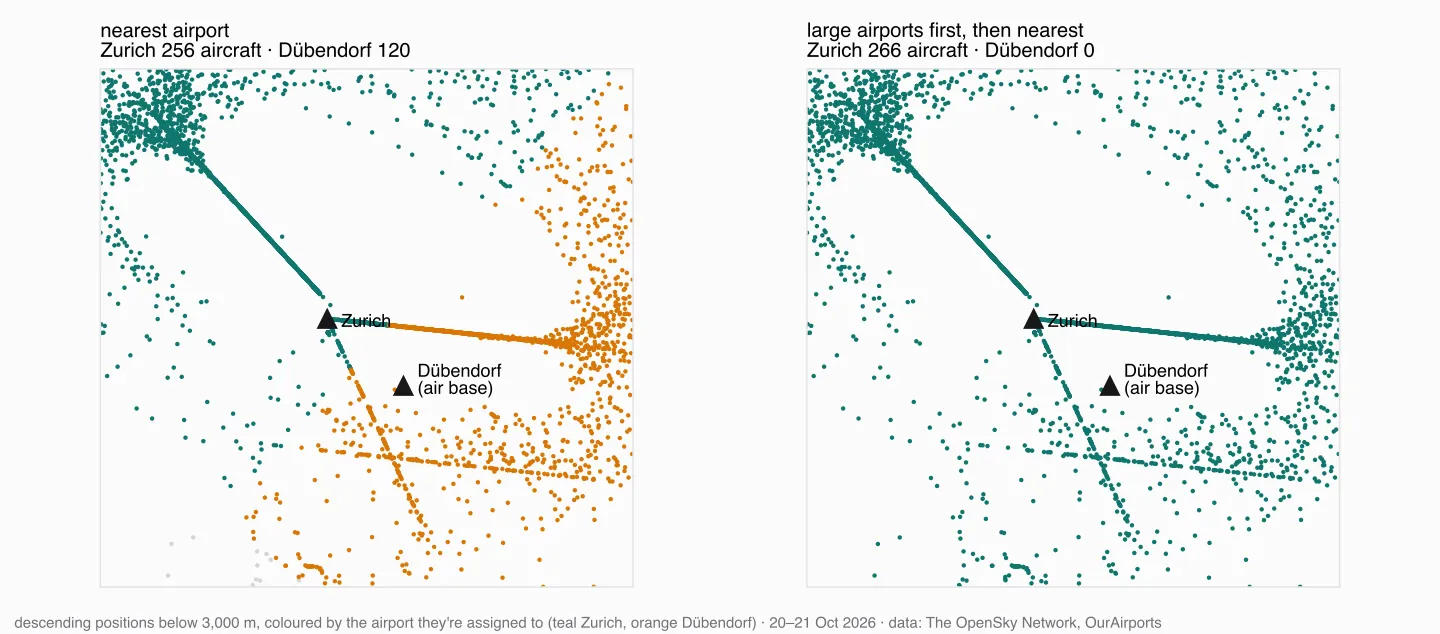
Over the whole day, “nearest airport” assigned descending aircraft to Dübendorf 129 times, to Annemasse Airfield next to Geneva 148 times, and to the airfield of Donaueschingen 90 times. None of them is plausible for airline traffic.
A pure “large airports only” filter fixes that, but throws out Bern, Lugano and Sion, which OurAirports lists as medium airports. What works better is an order: within the 40 kilometres, a large airport wins; only if there is none, the nearest medium one.
QUALIFY ROW_NUMBER() OVER (
    PARTITION BY icao24
    ORDER BY ap.airport_type <> 'large_airport', distance_km) = 1
airport_type <> 'large_airport' is false for large airports, and false sorts before true. Over the day, that moves Dübendorf from 129 to 10 aircraft, Annemasse from 148 to 35, and Zurich from 257 to 276. Bern keeps its 23 aircraft and Sion its 8; Lugano drops from 7 to 5 – probably aircraft that are also within 40 kilometres of Milan Malpensa.
It’s still a heuristic, and it makes new mistakes: at 11:59:30, SUI555 – Swiss Air Force, flying level near Dübendorf – now counts as Zurich traffic. A real solution would know where each flight is going; part of that is coming later in this series, with routes.
Three aircraft at runway height
One more thing the list showed: three aircraft within 1.2 kilometres of Zurich Airport, at 1,425 feet, 150 to 180 km/h, marked as nearby. The airport’s elevation is 1,417 feet. These aircraft are on the runway or a few metres above it – landing or taking off – but OpenSky doesn’t mark them as on the ground, and their vertical rate is between −0.65 and −0.33 m/s, inside the band I called “cruise” in part 5. Rules that work at 30,000 feet don’t necessarily work at the runway threshold.
Traffic per hour
The third question needs no view of its own – it’s one GROUP BY on silver:
SELECT time_bucket(INTERVAL 1 HOUR,
                   timezone('Europe/Zurich', timezone('UTC', snapshot_time))) AS hour,
       COUNT(DISTINCT icao24) AS aircraft
FROM silver.flights
GROUP BY ALL
ORDER BY hour
The double timezone() is the lesson from part 2 again: silver stores UTC without a time zone, so the first call says “this is UTC”, the second converts to Swiss time.
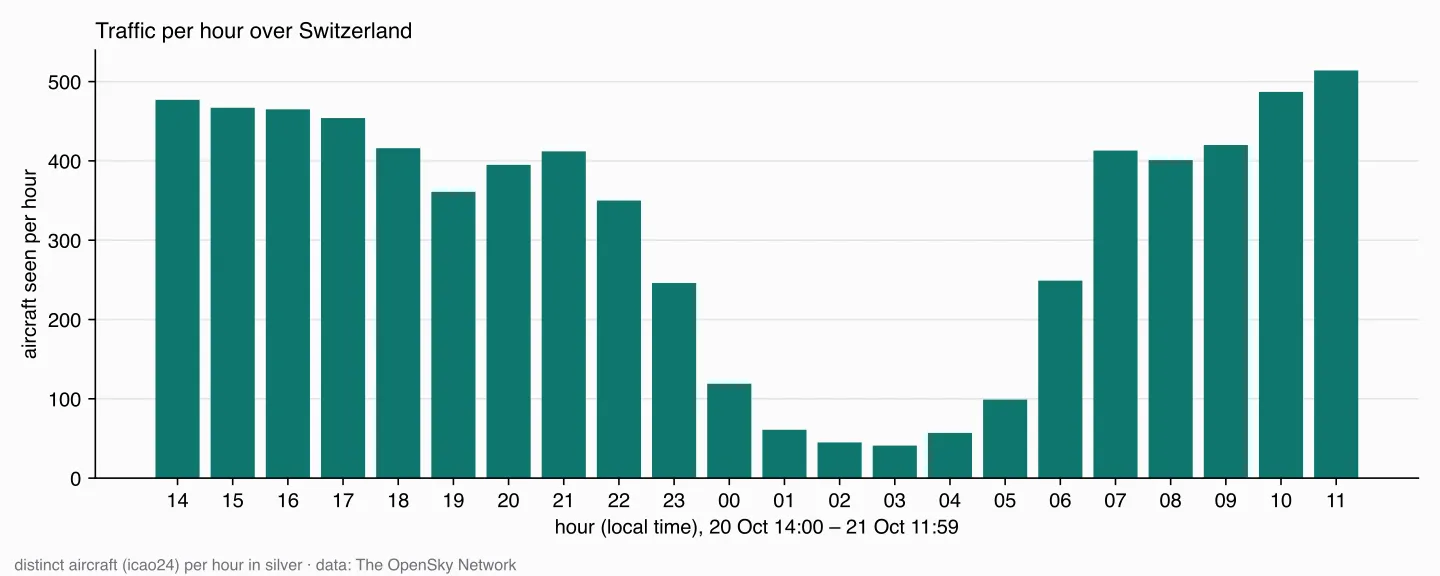
Between 41 aircraft at 3 a.m. and 514 at 11 a.m., with the night as a deep valley. Counting distinct aircraft instead of positions matters here: the evening has two collectors and twice as many positions (part 5), but an aircraft counts once per hour no matter how often we asked.
The live map
The views are what the map reads. The app I built for the course is a small Dash application with a Leaflet map: every 15 seconds it reads gold.current_positions and draws one aircraft per row, rotated by heading and coloured by altitude. The counters in the header are the gold views counted – here on the same data, with the collector stopped so that “now” stays at 09:59:30 UTC:
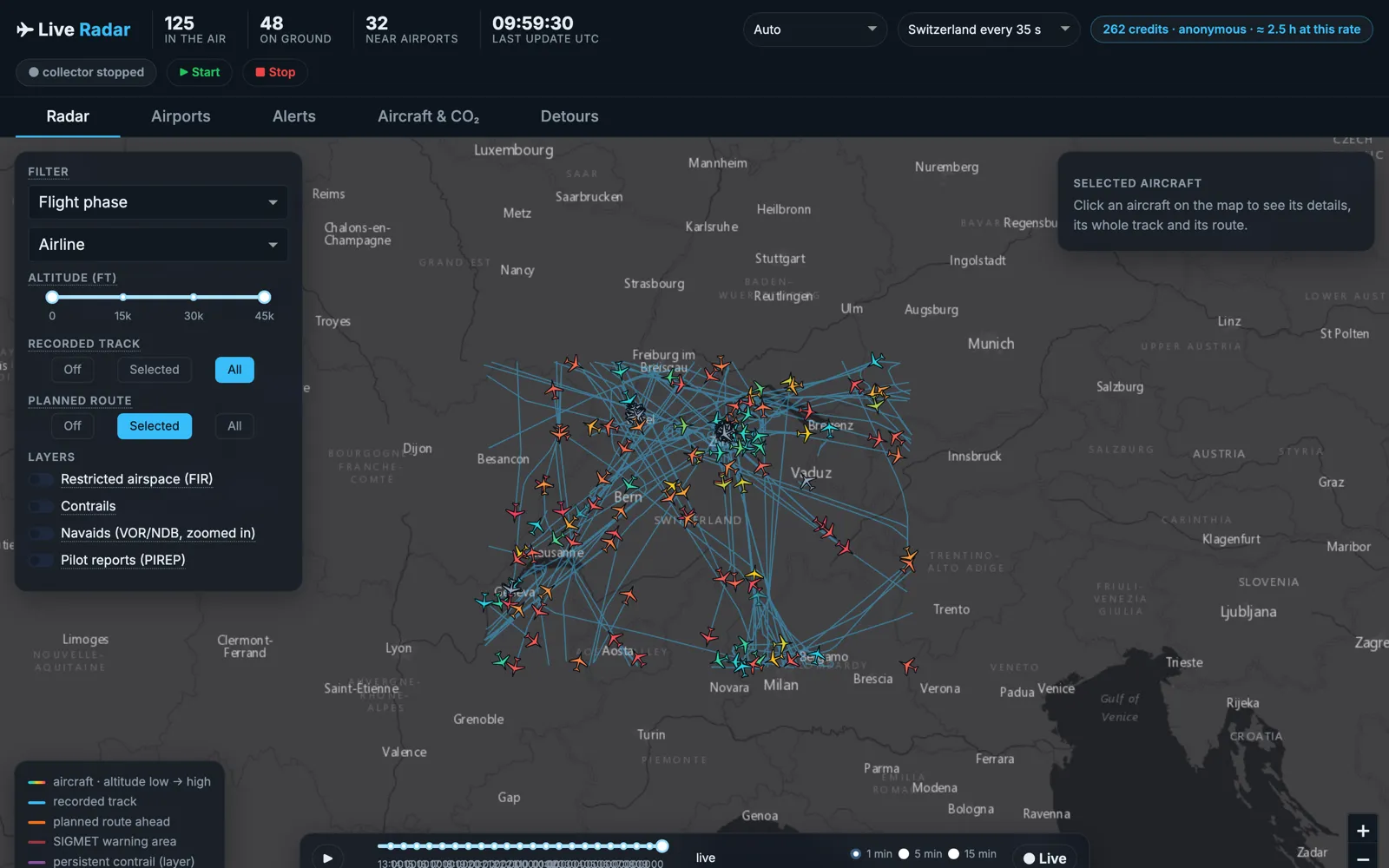
125 in the air plus 48 on the ground are the 173 rows of gold.current_positions. The 32 near airports are gold.airport_approaches – the same number as in the query above. The blue lines are the recorded tracks, straight from silver.
The slider at the bottom is a replay: it shows the map for a moment in the past – current_positions, but with an older “now”. That only works because silver keeps every position, which was the decision at the end of part 5.
What’s next
Gold now answers the three questions from part 2. What it can’t say is where a flight is going – which is exactly what the airport heuristic is missing. That needs routes: callsign to origin and destination. Next part.
Data source
Flight data: The OpenSky Network – Matthias Schäfer, Martin Strohmeier, Vincent Lenders, Ivan Martinovic and Matthias Wilhelm. “Bringing Up OpenSky: A Large-scale ADS-B Sensor Network for Research”. In Proceedings of the 13th IEEE/ACM International Symposium on Information Processing in Sensor Networks (IPSN), pages 83–94, April 2014. doi:10.1109/IPSN.2014.6846743
Airports: OurAirports, public domain.
Useful Links
DuckDB
- QUALIFY – filtering on window functions
- CREATE VIEW – gold as stored queries
- time_bucket and date functions – traffic per hour
- Timestamp with time zone functions –
timezone()
Data
- OurAirports data – airports with type, coordinates and elevation
- Haversine formula – distance on a sphere
Related posts
- Part 2 – the bronze layer – where gold was first described
- Part 5 – silver – the positions and lookups gold reads
Related Articles
Live Flight Data Step by Step - Part 5 - Silver, and the trap a backfill sets
Turning raw OpenSky answers into clean, typed positions with airline names – incrementally. And the bug that would have silently dropped 2,150 snapshots: a time watermark meets a backfill.
Live Flight Data Step by Step - Part 2 - Storing raw answers in a DuckDB bronze layer
Every OpenSky answer goes into DuckDB exactly as it arrived – once, no matter how often you store it. Two tables, one primary key, and what a full day of raw data looks like.

Live Flight Data Step by Step - Part 4 - Filling the gaps from Cloudflare R2
My laptop slept, the home server didn't. How the OpenSky answers in a Cloudflare R2 bucket are organised, how a backfill fills the gaps in bronze without downloading anything twice – and what it means when two sources write into the same table.
Comments
Comments are powered by giscus. You need a GitHub account to comment.