Live Flight Data Step by Step - Part 4 - Filling the gaps from Cloudflare R2
 Stefan Koch
 At the end of part 3, bronze had a hole. My laptop collected until 21:45 on 20 October and started again at 09:42 the next morning – twelve hours without a single snapshot. The producer on my home server, which I ran for three days, didn’t sleep: it wrote every answer into a Cloudflare R2 bucket.
This post fills the hole. It’s about where those files are, how they’re organised, how to load them into the bronze layer from part 2 without loading anything twice – and about a question that sounds simple and isn’t: what happens when two sources write into the same table?
What R2 is
Cloudflare R2 is object storage: you put files in, you get files out, organised in buckets. Three things made it the right choice for a class:
- It speaks the S3 API. In Cloudflare’s words, “R2 implements the S3 API to allow users and their applications to migrate with ease” (S3 API). Every tool that can read from Amazon S3 –
boto3, DuckDB, Spark, the AWS CLI – can read from R2. - Downloads are free. Egress costs nothing, whether through the S3 API or otherwise (pricing). With twenty students each downloading the same data, that matters.
- The free tier fits a course. 10 GB of storage per month, a million write-type operations (Class A, e.g.
PutObject,ListObjects) and ten million read-type operations (Class B, e.g.GetObject) per month.
What’s in the bucket
Three folders:
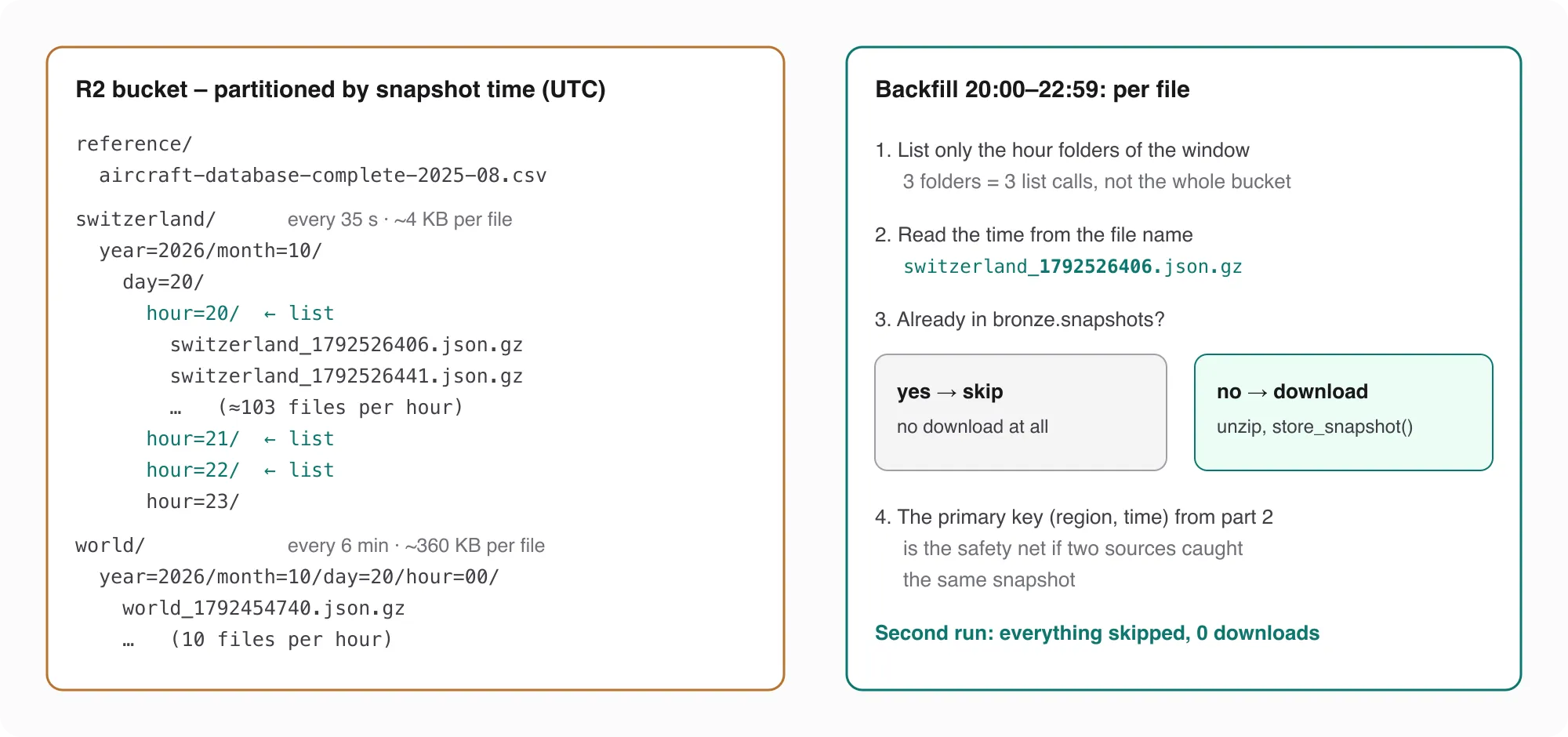
switzerland/ and world/ are two separate sources. They come from the same producer, but they answer different questions and cost very differently. The Switzerland box costs 1 credit per call and was asked every 35 seconds. The whole world costs 4 credits per call – the most expensive class – and was asked every 6 minutes. In bronze they end up as two values of the region column, so they never mix: (region, time) is the primary key, and a world snapshot and a Switzerland snapshot with the same time are simply two different rows.
What the files look like, measured on 20 October:
| Files | Raw JSON (median) | gzip (median) | Smaller by | Aircraft per snapshot (median) | |
|---|---|---|---|---|---|
| Switzerland | 2,467 | 13.8 KB | 4.4 KB | 68 % | 106 |
| world | 240 | 1,238 KB | 359 KB | 71 % | 9,303 |
gzip saves about two thirds – a lot for a bucket, but less than I had written in a code comment. The comment said 85 %; the measurement says 68 to 71 %. Measure before you write numbers into comments.
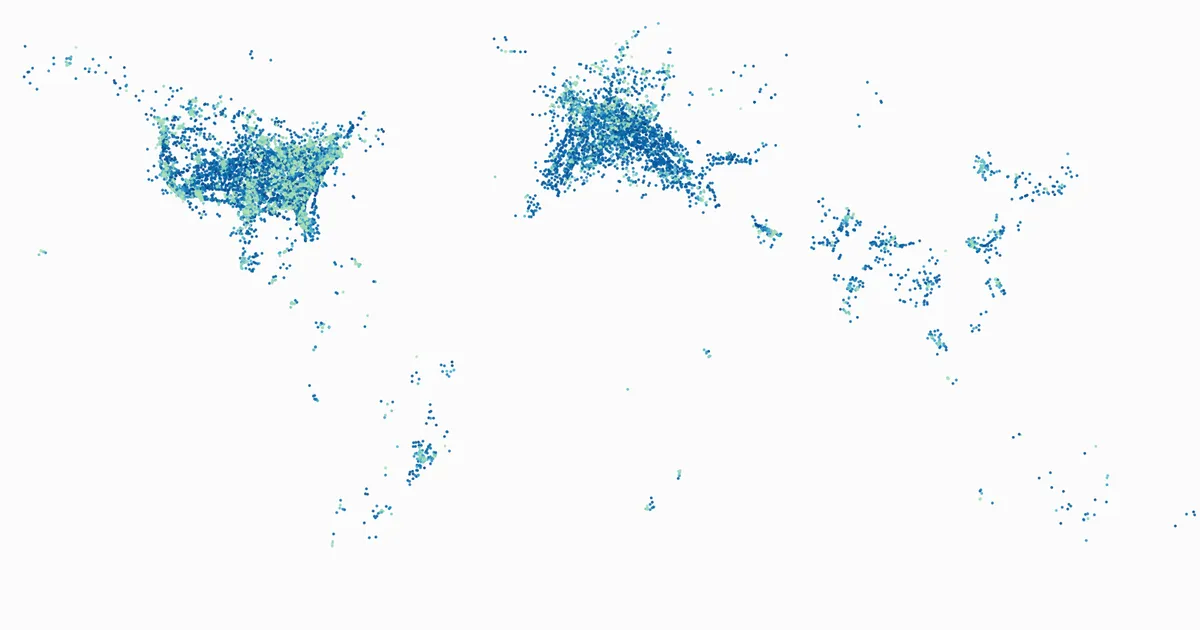
A world snapshot is a different animal: between 6,237 and 13,407 aircraft on 20 October. The cover image of this post is one of them – 20 October, 15:35 UTC, every dot an aircraft in the air. You can see more than air traffic in it: Europe and the US are dense, large parts of the world are almost empty. That’s OpenSky’s receiver coverage as much as it is traffic – where there’s no receiver nearby, there’s no data.
reference/ holds one file that isn’t a snapshot: aircraft-database-complete-2025-08.csv, OpenSky’s database of aircraft – transponder address, registration, type, operator. 108 MB, and the newest complete file OpenSky had published when I copied it. It’s in the bucket for a practical reason: the notebooks of my course also run on Databricks, and Databricks can’t reach OpenSky’s download server, while a home internet connection can. The bucket is private for a non-practical reason: OpenSky’s terms of use don’t allow redistributing their data.
Partitioning: folders as an index
The folder names aren’t decoration. year=2026/month=10/day=20/hour=20/ is the hive-style partitioning you’ll know from data lakes: one folder per hour, named key=value. The hour is the hour of the snapshot time in UTC, not of the moment the file was written – so a snapshot always lands in the same folder, no matter when or how often it’s uploaded.
That’s what makes a backfill cheap. For “20:00 to 22:59” I don’t list the bucket – 2,707 new files a day would make that slower every day. I list exactly three folders:
def hour_prefixes(region, since, until):
    """The partition folders region/year=/month=/day=/hour=/ between two datetimes (UTC)."""
    t = since.replace(minute=0, second=0, microsecond=0)
    out = []
    while t <= until:
        out.append(f"{region}/year={t:%Y}/month={t:%m}/day={t:%d}/hour={t:%H}/")
        t += timedelta(hours=1)
    return out
One list call per folder – an S3 listing returns up to 1,000 keys per call, and an hour has about 103 files. The cost of a listing grows with the time window, not with the age of the bucket.
Two keys, two permissions
R2 has API tokens with four permission levels: Admin Read & Write, Admin Read only, Object Read & Write and Object Read only – and the object-level ones can be limited to specific buckets (API tokens). That’s exactly the split a class needs:
- The producer has an Object Read & Write token for this one bucket.
- Students get an Object Read only token for the same bucket. They can download everything and change nothing.
Both live in a .env file that git ignores. If a read key leaks, the damage is that someone can read flight data; if the write key leaked, someone could fill or empty the bucket. The two keys have different owners, so they’re different keys.
Reading R2 from Python
Because R2 speaks S3, reading it is boto3 with a different endpoint:
import gzip
import json

import boto3

s3 = boto3.client(
    "s3",
    endpoint_url="https://<account-id>.r2.cloudflarestorage.com",
    aws_access_key_id=env["R2_ACCESS_KEY_ID"],
    aws_secret_access_key=env["R2_SECRET_ACCESS_KEY"],
    region_name="auto",
)


def list_keys(region, since, until):
    keys = []
    for prefix in hour_prefixes(region, since, until):
        for page in s3.get_paginator("list_objects_v2").paginate(Bucket=BUCKET, Prefix=prefix):
            keys += [o["Key"] for o in page.get("Contents", []) if o["Key"].endswith(".json.gz")]
    return sorted(keys)


def read_snapshot(key):
    body = s3.get_object(Bucket=BUCKET, Key=key)["Body"].read()
    return json.loads(gzip.decompress(body))
region_name="auto" is what R2 expects. The file is unzipped and parsed in memory – there’s no reason to write it to disk first.
The backfill: merge, don’t append
Now the actual work. Every file goes through the same store_snapshot as the live data from part 2 – the one with ON CONFLICT DO NOTHING on (region, time). That alone would already be correct: a snapshot the laptop already stored is rejected, a new one is stored.
But it would still download every file. And the file name already tells us the snapshot time: switzerland_1792526406.json.gz is the snapshot from 1792526406 – 20 October, 20:00:06 UTC. So the backfill first asks bronze which times it already has, and skips those files without touching them:
def backfill(region, since, until):
    keys = list_keys(region, since, until)
    have = {t for (t,) in con.execute(
        "SELECT time FROM bronze.snapshots WHERE region = ?", [region]).fetchall()}
    new = 0
    for key in keys:
        stamp = key.rsplit("_", 1)[-1].split(".")[0]      # <region>_<unix time>.json.gz
        if stamp.isdigit() and int(stamp) in have:
            continue                                        # known – no download
        data = read_snapshot(key)
        new += store_snapshot(data, region, source="r2", credits=data.get("credits_remaining"))
    return len(keys), new
The primary key stays the safety net. The skip is the optimisation.
I ran it on a copy of bronze that only had the laptop’s data – 675 snapshots – for 20 October 12:00 to 21 October 09:00 UTC:
| Hour folders | List calls | Files | Skipped | Downloaded | New snapshots | Time | |
|---|---|---|---|---|---|---|---|
| First run | 22 | 22 | 2,262 | 14 | 2,248 | 2,248 | 314.5 s |
| Second run | 22 | 22 | 2,262 | 2,262 | 0 | 0 | 4.8 s |
The first run took a bit over five minutes, almost all of it downloads – one file after the other, about seven per second. The second run did nothing, in under five seconds. That’s the property this whole series relies on: running a step twice must not change the result.
What it cost: 22 list calls (Class A) and 2,248 downloads (Class B), against a free tier of a million and ten million per month. You could run this backfill a few thousand times a month before paying anything.
Two sources in one table
Here is bronze after the backfill, per hour:
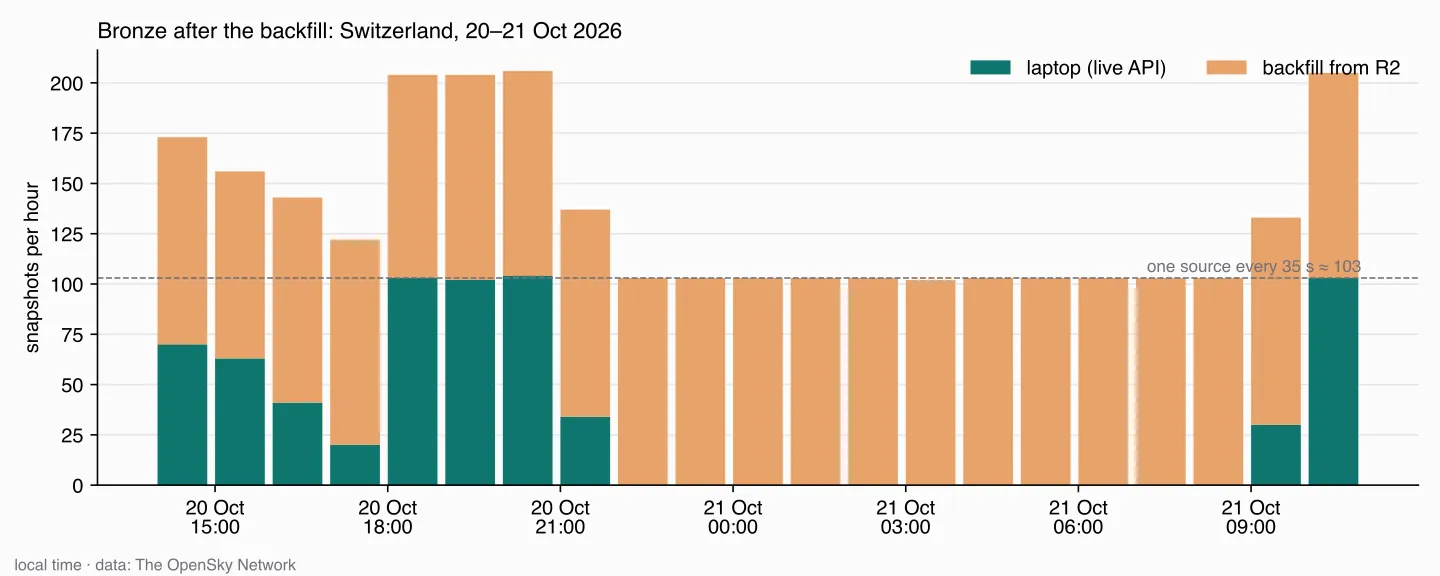
The night is filled: 102 or 103 snapshots every hour from 22:00 to 08:59, all from R2. The server’s only visible dip is 93 snapshots between 15:00 and 16:00 – I don’t know why.
But look at the evening. Between 18:00 and 21:00, both collectors were running, and bronze has about 205 snapshots per hour – twice as many as one source every 35 seconds produces. Only 14 snapshots were the same in both sources, the ones the backfill skipped. The rest are different moments: the first snapshots after 18:00 are from 18:00:22 (server) and 18:00:31 (laptop), then 18:00:53 and 18:00:58. OpenSky gave each of them the snapshot of its moment.
Is that a problem? For bronze, no. Bronze keeps what came in, and every one of those snapshots is a real answer. For everything built on top of it, it can be:
- “Aircraft per snapshot” over a day is fine – it’s an average per answer.
- “Snapshots per hour” as a coverage check now says 205 in the evening and 103 at night. Both are “complete”.
- Anything that counts positions – positions per aircraft, distance flown, time spent in a holding pattern – counts the evening twice as densely as the night.
So “merging two sources properly” doesn’t happen in bronze. Bronze merges correctly – no duplicates, every answer once. Making the evening and the night comparable is a decision about what silver should contain: every position, or one position per aircraft per time slot. That’s the next step of the series, and I’ll get to it in a later part.
What’s next
Bronze now has a full day: the laptop’s answers, the server’s answers from three days, no duplicates. What it doesn’t have yet is anything you’d want to put on a map – positions in metres per second and degrees, empty callsigns, aircraft on the ground, positions that are minutes old. Turning that into clean, typed silver data is what comes next.
Data source
Flight data: The OpenSky Network – Matthias Schäfer, Martin Strohmeier, Vincent Lenders, Ivan Martinovic and Matthias Wilhelm. “Bringing Up OpenSky: A Large-scale ADS-B Sensor Network for Research”. In Proceedings of the 13th IEEE/ACM International Symposium on Information Processing in Sensor Networks (IPSN), pages 83–94, April 2014. doi:10.1109/IPSN.2014.6846743
Useful Links
Cloudflare R2
- R2 documentation – object storage
- S3 API compatibility – what works with S3 tools
- Pricing – free tier, Class A and Class B operations
- API tokens – permission levels and bucket scoping
Python
- boto3 – the AWS SDK, used here with the R2 endpoint
- gzip – decompressing in memory
- DuckDB INSERT … ON CONFLICT – the merge in bronze
OpenSky
- OpenSky REST API – credits per box size
- Network coverage – where OpenSky receives data
- Terms of use – what you may and may not do with the data
- Historical database (Trino) – for longer periods, also for universities
Related Articles
Live Flight Data Step by Step - Part 3 - A collector that keeps going
From one API call to one every 35 seconds: what the credits allow, what to do after a 429, why a loop drifts – and what my own collector actually did over one afternoon and evening.
Live Flight Data Step by Step - Part 2 - Storing raw answers in a DuckDB bronze layer
Every OpenSky answer goes into DuckDB exactly as it arrived – once, no matter how often you store it. Two tables, one primary key, and what a full day of raw data looks like.
Live Flight Data Step by Step - Part 1 - OpenSky Network and the first API call
Where live flight data comes from, how ADS-B and the OpenSky Network work, and how to fetch every aircraft over Switzerland with ten lines of Python.
Comments
Comments are powered by giscus. You need a GitHub account to comment.