Live Flight Data Step by Step - Part 5 - Silver, and the trap a backfill sets
 Stefan Koch
 Bronze, after part 4, has everything: 2,923 OpenSky answers for Switzerland over a day, from my laptop and from the bucket, no duplicates. And it’s just as raw as it was in part 2: altitudes in metres, speeds in metres per second, callsigns that are empty, aircraft that sit on the apron.
This post builds the next layer, silver: one clean row per aircraft and moment, in units people use, with the codes translated into names. Most of it is a single SQL query. The interesting part is the word incrementally – because the obvious way to make silver incremental has a bug that only shows up when a backfill arrives, and then it costs you most of your data without a single error message.
What silver should contain
Silver is what analyses and the map read. For every aircraft position in bronze, I want:
| Column | Rule |
|---|---|
snapshot_time | the snapshot time as a timestamp (UTC) |
callsign | empty callsigns become NULL |
airline_icao | the first three letters of the callsign – if it looks like an airline |
airline_name | the airline behind that code, from a lookup table |
altitude_ft, speed_kmh | feet and km/h instead of metres and m/s |
heading | the direction of travel, rounded |
flight_phase | on ground, climbing, descending or cruise |
aircraft_category | OpenSky’s category code as text: light, large, heavy, rotorcraft … |
Two of these rules are my own assumptions, not standards, and I’d rather say so:
- Flight phase: climbing above 2.5 m/s vertical rate (about 500 feet per minute), descending below −2.5 m/s, cruise in between. The threshold separates a real climb from level flight with a bit of noise. It’s a judgement call.
- Airline code: airlines have a three-letter ICAO designator, registered in ICAO Doc 8585 (ICAO 3LD rules), and their callsigns usually start with it followed by the flight number –
SWR123. So: three letters followed by a digit counts as an airline. Private aircraft often send their registration instead, which doesn’t match. It’s a heuristic, and it’s wrong for some callsigns.
And one filter: rows without a position, or with an altitude outside −500 to 20,000 metres, don’t make it into silver.
Lookups belong in silver
SWR is a code. Swiss International Air Lines is what a person wants to read. The question is where that translation happens – in silver, or later, in every query that needs it.
I first had it in gold, joined into each view that shows an airline. I’ve moved it into silver. Databricks describes the silver layer as the place where data from bronze is “matched, merged, conformed and cleansed”, and lists “cross-reference tables” among the examples (medallion architecture). There’s no standard that settles this, but the argument convinces me: if the name is in silver, every map, every analysis and every student notebook gets the same name for SWR, and nobody has to remember the join.
Two lookup tables, both small:
- Airlines from OpenFlights (Open Database License): ICAO code to name. The file has a trap. Some codes appear more than once –
SWRis both Swiss International Air Lines and Swissair, both marked as active. A join against a table with two rows forSWRwould duplicate every Swiss position. So the lookup table keeps exactly one row per code: active ones first, and with a stable sort, so the file order decides between equals and the result doesn’t change from run to run. - Aircraft categories: OpenSky sends
categoryas a number from 0 to 20, and the REST API documentation defines what each number means – 2 is “Light (< 15500 lbs)”, 6 is “Heavy (> 300000 lbs)”, 8 is “Rotorcraft”. A fixed list, copied into a table.
What I deliberately leave out of silver: airports. Which airport is this aircraft approaching? isn’t a lookup, it’s a question – nearest airport within a radius, depending on altitude and phase. That’s gold.
One consequence to be aware of: silver stores the name as it was when the row was inserted. If OpenFlights renames an airline next month, old rows keep the old name until silver is rebuilt. For an airline name, I can live with that.
The silver query
SELECT
    make_timestamp(s.time * 1000000)                        AS snapshot_time,   -- UTC, whatever TimeZone says
    s.icao24, s.region,
    NULLIF(s.callsign, '')                                  AS callsign,
    CASE WHEN regexp_matches(s.callsign, '^[A-Z]{3}[0-9]')
         THEN substr(s.callsign, 1, 3) END                  AS airline_icao,
    s.origin_country, s.latitude, s.longitude, s.on_ground,
    ROUND(s.baro_altitude)                                  AS altitude_m,
    ROUND(s.baro_altitude * 3.28084)                        AS altitude_ft,
    ROUND(s.velocity * 3.6)                                 AS speed_kmh,
    ROUND(s.true_track)                                     AS heading,
    s.vertical_rate,
    CASE WHEN s.on_ground           THEN 'on ground'
         WHEN s.vertical_rate >  2.5 THEN 'climbing'
         WHEN s.vertical_rate < -2.5 THEN 'descending'
         ELSE 'cruise' END                                  AS flight_phase,
    s.squawk, s.category,
    a.airline_name,
    c.description                                           AS aircraft_category
FROM bronze.states s
LEFT JOIN silver.airlines a                                 -- one row per code
       ON a.airline_icao = substr(s.callsign, 1, 3)
      AND regexp_matches(s.callsign, '^[A-Z]{3}[0-9]')
LEFT JOIN silver.aircraft_categories c ON c.category = s.category
WHERE s.latitude IS NOT NULL AND s.longitude IS NOT NULL
  AND (s.baro_altitude IS NULL OR s.baro_altitude BETWEEN -500 AND 20000)
make_timestamp(time * 1000000) instead of to_timestamp(time) is the lesson from part 2: it produces a UTC timestamp no matter what the session’s time zone setting says. The joins are LEFT JOINs, because a position without a known airline is still a position – and the join condition repeats the airline rule, because the code is computed in the same query.
What the filter removes – almost nothing, and that’s a finding
I expected the filter to throw out a lot. On the day from part 4 – 266,832 positions over Switzerland – it removed nothing. No row without a position, no impossible altitude.
The first is not luck. The Switzerland data comes from a query with a bounding box, and OpenSky can only decide whether an aircraft is inside the box if it has a position. In the 239 world snapshots in my copy, which come without a box, 14,289 rows had no position. And in my full copy – 19 to 21 October, both regions – 73 rows had an impossible altitude, between −591 m and 38,252 m. The filter is there for those, not for the everyday case.
What silver doesn’t filter yet is the problem from part 2: positions that are old. In the day from part 4, 26,845 rows – 10 % – carry a position that’s more than a minute older than the snapshot. Silver keeps them. Whether an analysis should use them depends on the analysis – for “where is this aircraft right now” they’re wrong, for “which aircraft were over Switzerland today” they’re fine. I’ll leave that decision to the queries that use silver, and note it as an open point.
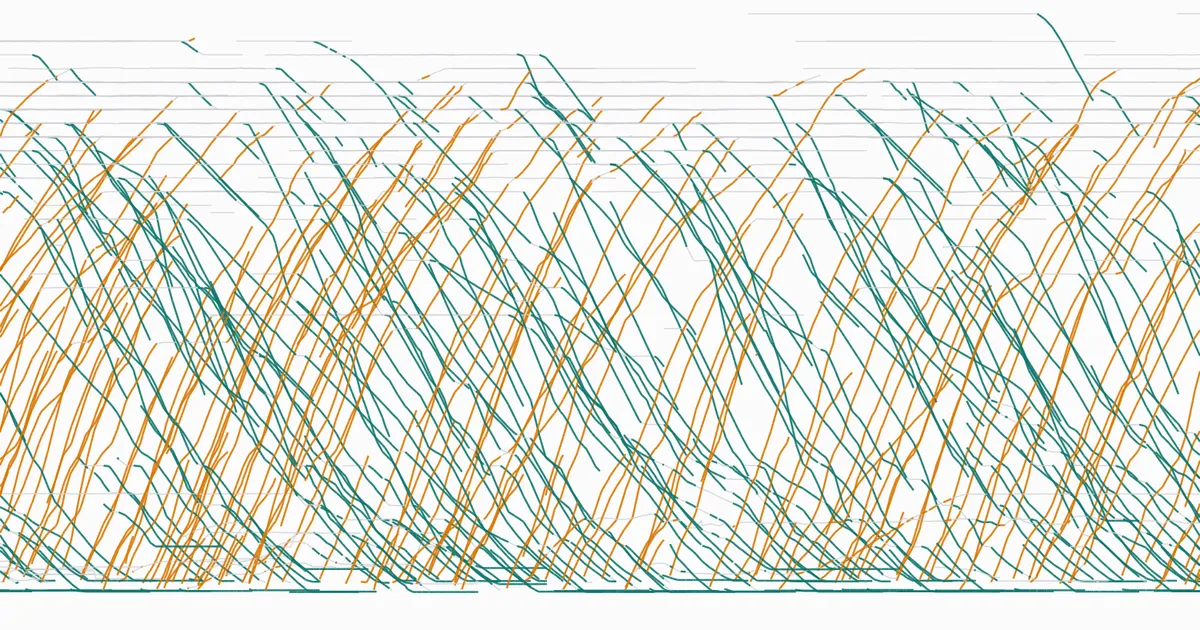
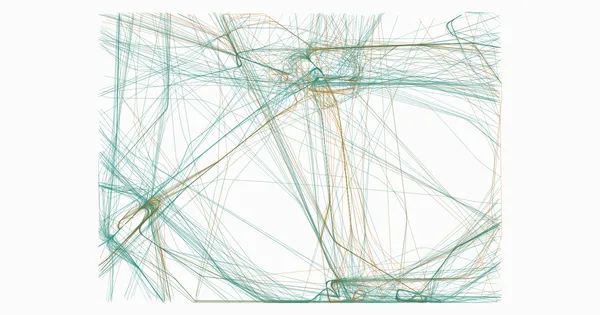
What the rest looks like: 81.8 % of the positions have an airline code, and the phases split into 108,336 cruise, 63,625 on ground, 57,814 descending and 37,057 climbing. The cover image of this post shows the phases from the side: the altitude of every aircraft over Switzerland between 18:30 and 20:00 on 20 October, one line per aircraft – climbs in orange, descents in green, cruise in grey.
What the lookups find – less than I hoped
The joins add no rows – silver has 266,832 positions with and without them, which is the check that the one-row-per-code rule works. But they don’t find everything:
- Airline names: 64.5 % of all positions get one. Of the positions that have an airline code, that’s 78.8 %. The most frequent codes OpenFlights doesn’t know are
EJUandEZS(11,466 and 7,027 positions), followed byWMT,ITY,NJEandBEL. OpenFlights has easyJet only asEZY, and Brussels Airlines asDAT. The data is free and good enough to learn with, but it isn’t current, and a name column that is empty for a third of the traffic needs a better source before it carries a real analysis. - Aircraft categories: 96 % of the positions – 256,510 – have category 0, “No information at all”. The lookup works; the field is simply empty for most aircraft in my data. Large and heavy aircraft show up in 1,480 and 983 positions, helicopters in 385.
Both are worth knowing before anyone builds a chart “traffic by airline” or “traffic by aircraft size” on top of silver.
Incremental: the obvious idea
Silver shouldn’t be rebuilt from all of bronze every 35 seconds. Only new rows. The obvious way to do that: remember the newest snapshot_time in silver – the watermark – and only insert bronze rows that are newer.
INSERT INTO silver.flights
SELECT …                                -- the query from above
FROM bronze.states s
WHERE …
  AND make_timestamp(s.time * 1000000) > (SELECT MAX(snapshot_time) FROM silver.flights)
That’s the pattern you’ll find in countless pipelines, and as long as data arrives in order, it works.
The trap
Now play the actual sequence of events from this series:
- The laptop collector runs. After every snapshot, silver is updated. Silver is up to date, and its watermark is the newest snapshot: 21 October, 09:02:40 UTC.
- Then the backfill from part 4 runs and brings 2,248 snapshots from the bucket – most of them from the night and the evening before. They’re new to bronze. But they’re older than the watermark.
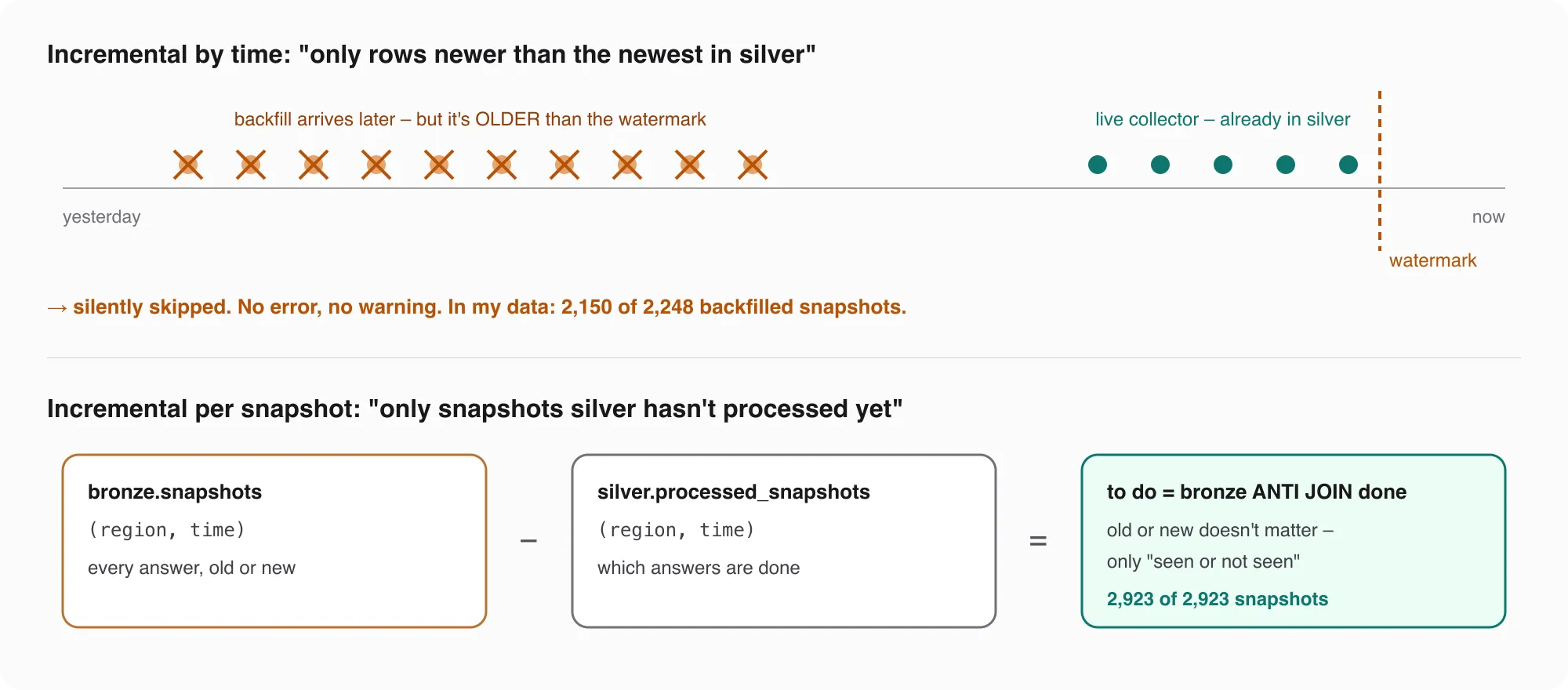
The watermark query looks at them, sees that they’re older than the newest row in silver, and skips them. No error, no warning, no failed job. I ran exactly this on the data from part 4: 2,150 of the 2,248 backfilled snapshots never reach silver. Only the 98 snapshots from after 09:02:40 get through.
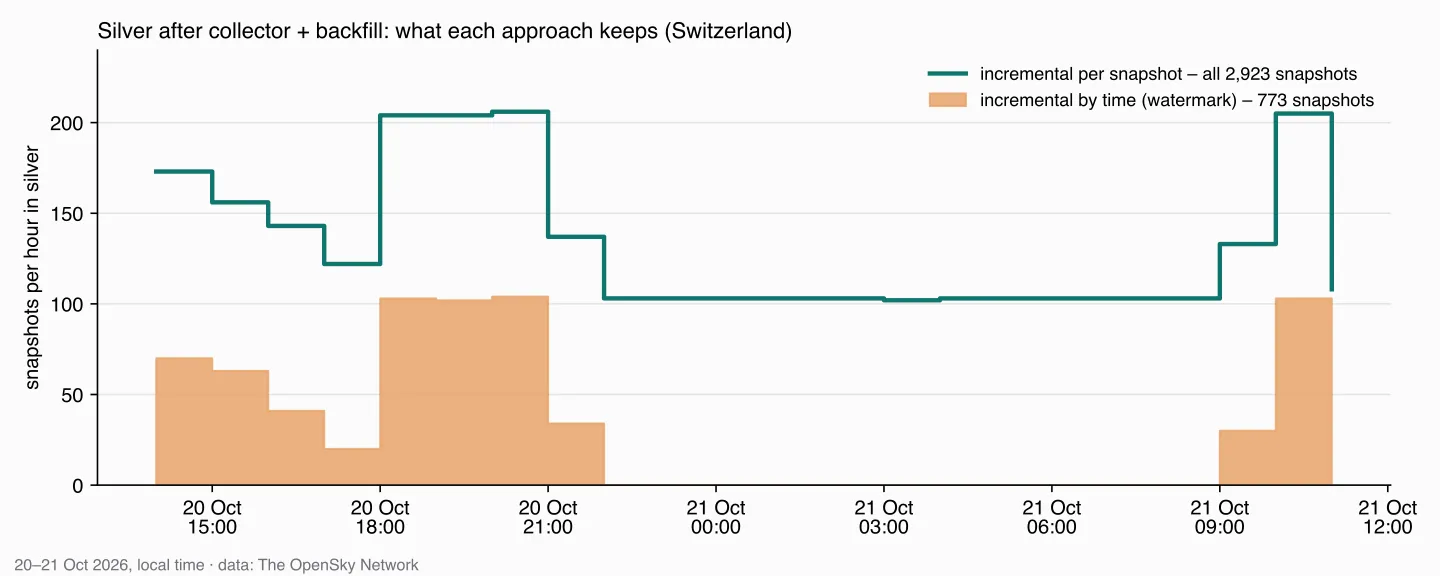
The dangerous part is what it looks like afterwards. Silver isn’t empty. It has the laptop’s data, the job ran successfully, and the newest data is there. You’d only notice if you happened to look at the night – which is exactly the part you ran the backfill for.
This isn’t specific to flight data. Any source that can deliver late does it: a phone that was offline, a corrected invoice, a partner who resends yesterday’s file. A time watermark assumes the world arrives in order. It doesn’t.
The fix: remember which, not until when
Instead of remembering up to which time silver is complete, silver remembers which snapshots it has processed – a small table with the same key as bronze:
CREATE TABLE IF NOT EXISTS silver.processed_snapshots (
    region VARCHAR, time BIGINT, PRIMARY KEY (region, time));
Each run then asks: which bronze snapshots aren’t in that table yet? That’s an anti join – DuckDB even has it as a keyword:
-- the snapshots still to do
CREATE TEMP TABLE todo AS
SELECT b.region, b.time
FROM bronze.snapshots b
ANTI JOIN silver.processed_snapshots p USING (region, time);

-- their positions into silver
INSERT INTO silver.flights
SELECT …                                -- the query from above
FROM bronze.states s
SEMI JOIN todo USING (region, time)
WHERE …
ON CONFLICT DO NOTHING;

-- and remember them
INSERT INTO silver.processed_snapshots SELECT * FROM todo;
Old or new doesn’t matter anymore – only seen or not seen. On the same data: all 2,923 snapshots in silver, 266,832 positions, in 1.3 seconds including the lookups. A second run finds nothing to do and takes under two milliseconds.
The ON CONFLICT DO NOTHING has a job of its own. Silver’s key is (icao24, snapshot_time) – one row per aircraft and moment. An aircraft over Zurich is in the Switzerland box and in the world snapshot; if both answers carry the same snapshot time, the same position arrives twice. In my full copy, that happened 1,435 times. The key keeps one of them.
The open question from part 4: twice as dense
Part 4 ended with a problem I promised to come back to: in the evening, two collectors were running, and bronze has about 205 snapshots per hour instead of 103. Silver inherits that, because it keeps every position. Here is what it does to the numbers, for the evening (18:00–21:00, both sources) and the night (00:00–03:00, bucket only):
| Snapshots per hour | Positions per aircraft and hour | Minutes with a position per aircraft and hour | |
|---|---|---|---|
| Evening, laptop + bucket | 205 | 51.8 | 15.8 |
| Night, bucket only | 103 | 21.5 | 12.9 |
The middle column is the trap: an aircraft in the evening seems to produce two and a half times as many positions as one at night. Part of that is real – evening traffic is different from night traffic – but most of it is just the second collector.
The right column counts something else: in how many minutes of an hour did we see the aircraft at all? That’s barely affected by how often we asked, because with one source every 35 seconds you already see an aircraft in almost every minute. 15.8 against 12.9 is a difference in traffic, not in collectors.
So I’m not changing silver. Silver keeps every position – it’s still the most complete picture, and throwing data away at this layer is hard to undo. Instead, analyses that count positions should count them per time slot, for example one position per aircraft and minute:
SELECT icao24, time_bucket(INTERVAL 1 MINUTE, snapshot_time) AS minute,
       arg_max(latitude, snapshot_time)  AS latitude,
       arg_max(longitude, snapshot_time) AS longitude
FROM silver.flights
GROUP BY ALL
The newest position per aircraft and minute – and the evening and the night become comparable.
What’s next
Silver now has clean positions with names, incrementally, without losing late data. What it doesn’t answer yet are questions: which airport an aircraft is approaching, what the current picture over Switzerland looks like. That’s gold – and the live map, in the next part.
Data source
Flight data: The OpenSky Network – Matthias Schäfer, Martin Strohmeier, Vincent Lenders, Ivan Martinovic and Matthias Wilhelm. “Bringing Up OpenSky: A Large-scale ADS-B Sensor Network for Research”. In Proceedings of the 13th IEEE/ACM International Symposium on Information Processing in Sensor Networks (IPSN), pages 83–94, April 2014. doi:10.1109/IPSN.2014.6846743
Useful Links
DuckDB
- SEMI and ANTI JOIN – “which snapshots aren’t processed yet”
- INSERT … ON CONFLICT – one row per aircraft and moment
- Timestamp functions –
make_timestamp - time_bucket and date functions – positions per minute
- arg_max – the newest position per group
Aviation
- ICAO three-letter designators – why airline callsigns start with three letters
- OpenSky REST API – state vector fields and the aircraft category codes
- OpenFlights data – airlines, ICAO code to name
Architecture
- Medallion architecture (Databricks) – what belongs in bronze, silver and gold
Related posts
- Part 2 – the bronze layer – the primary key and the messy data silver starts from
- Part 4 – the backfill – where the late data comes from
Related Articles

Live Flight Data Step by Step - Part 6 - Gold, and the airport that steals Zurich's arrivals
Gold answers questions: where is every aircraft right now, who is landing where, how busy is each hour? Three SQL views on silver – and why 'the nearest airport' sent 129 Zurich arrivals to an air base.
Live Flight Data Step by Step - Part 2 - Storing raw answers in a DuckDB bronze layer
Every OpenSky answer goes into DuckDB exactly as it arrived – once, no matter how often you store it. Two tables, one primary key, and what a full day of raw data looks like.
Live Flight Data Step by Step - Part 7 - Routes, and why almost a quarter are wrong
ADS-B doesn't say where a flight is going. A free route database does – and my own positions contradict almost a quarter of its answers. How I checked 3,664 routes, and how far flights over Switzerland really deviate from the great circle.
Comments
Comments are powered by giscus. You need a GitHub account to comment.